Unlock a world of possibilities! Login now and discover the exclusive benefits awaiting you.

- Qlik Community
- :
- All Forums
- :
- QlikView
- :
- show -50 as (50)
- Subscribe to RSS Feed
- Mark Topic as New
- Mark Topic as Read
- Float this Topic for Current User
- Bookmark
- Subscribe
- Mute
- Printer Friendly Page

 bhavvibudagam
- Mark as New
- Bookmark
- Subscribe
- Mute
- Subscribe to RSS Feed
- Permalink
- Report Inappropriate Content
show -50 as (50)
Can any one please help me.
I have created one straight table their in expressions tab i wrote one expression like this
Sum({<year={2018}>}Sales) - Sum({<Year=(2017)}Sales) in Sales field their i got one negative value like -50.
Now i want to show this -50 as (50). Please help me to do this.

 sunny_talwar
- Mark as New
- Bookmark
- Subscribe
- Mute
- Subscribe to RSS Feed
- Permalink
- Report Inappropriate Content
May be this:
Num(Sum({<year={2018}>}Sales) - Sum({<Year={2017}>}Sales), '#,##0;(#,##0)')

 andrespa
- Mark as New
- Bookmark
- Subscribe
- Mute
- Subscribe to RSS Feed
- Permalink
- Report Inappropriate Content
Hi, maybe you can use this one:
Fabs(Sum({<year={2018}>}Sales) - Sum({<Year=(2017)}Sales))
 engishfaque
- Mark as New
- Bookmark
- Subscribe
- Mute
- Subscribe to RSS Feed
- Permalink
- Report Inappropriate Content
Dear Bhavvi,
Enclose your expression with Fabs() function, here is the way
=Fabs(Sum({<year={2018}>}Sales) - Sum({<Year=(2017)}Sales))
Kind regards,
Ishfaque Ahmed

 HirisH_V7
- Mark as New
- Bookmark
- Subscribe
- Mute
- Subscribe to RSS Feed
- Permalink
- Report Inappropriate Content
Hi,
Check this,
From this,
LOAD * INLINE [
    Sales, Customer
    50, A
    -50, B
];
In the table expression,
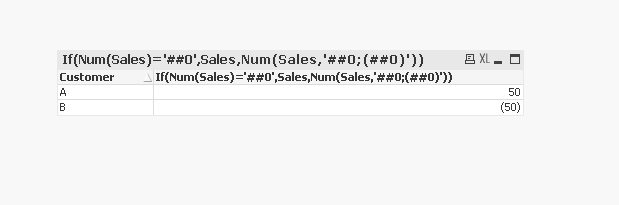
If(Num(Sales)='##0',Sales,Num(Sales,'##0;(##0)'))
HTH,
Hirish

 jonathandienst
- Mark as New
- Bookmark
- Subscribe
- Mute
- Subscribe to RSS Feed
- Permalink
- Report Inappropriate Content
SunnyT's answer is correct, but you can also achieve that format in the chart properties Number tab. Select "Fixed" Enter the same format string #,##0;(#,##0) (match to your preferred thousands format and check it in the preview box.
 avinashelite
- Mark as New
- Bookmark
- Subscribe
- Mute
- Subscribe to RSS Feed
- Permalink
- Report Inappropriate Content
you can also try like this
'('&fabs(Sum({<year={2018}>}Sales) - Sum({<Year=(2017)}Sales) )&')'
 Chanty4u
- Mark as New
- Bookmark
- Subscribe
- Mute
- Subscribe to RSS Feed
- Permalink
- Report Inappropriate Content
