Unlock a world of possibilities! Login now and discover the exclusive benefits awaiting you.

- Qlik Community
- :
- All Forums
- :
- QlikView
- :
- stacked bar chart 1 expression
- Subscribe to RSS Feed
- Mark Topic as New
- Mark Topic as Read
- Float this Topic for Current User
- Bookmark
- Subscribe
- Mute
- Printer Friendly Page

- Mark as New
- Bookmark
- Subscribe
- Mute
- Subscribe to RSS Feed
- Permalink
- Report Inappropriate Content
stacked bar chart 1 expression
Hi,
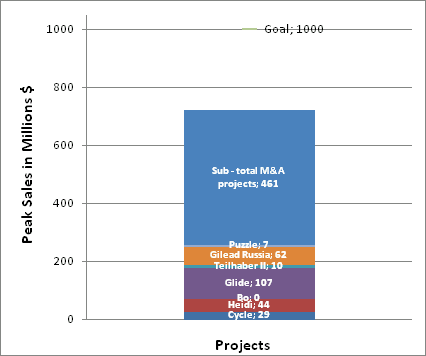
Does anyone have an idea how create the following chart in QlikView?
Accepted Solutions

 vijay_iitkgp
- Mark as New
- Bookmark
- Subscribe
- Mute
- Subscribe to RSS Feed
- Permalink
- Report Inappropriate Content
Hi,
You can create one dummy calulated dimension ='Project' and the checked the stack option in style. 

 SunilChauhan
- Mark as New
- Bookmark
- Subscribe
- Mute
- Subscribe to RSS Feed
- Permalink
- Report Inappropriate Content
take a bar chart
projects in dimensions
and in expression sum(peak sales)
and in style-> select stack radio butto
select vertical for y axis in axes
hope this heelps
vijay_iitkgp
- Mark as New
- Bookmark
- Subscribe
- Mute
- Subscribe to RSS Feed
- Permalink
- Report Inappropriate Content
Hi,
You can create one dummy calulated dimension ='Project' and the checked the stack option in style.
- Mark as New
- Bookmark
- Subscribe
- Mute
- Subscribe to RSS Feed
- Permalink
- Report Inappropriate Content
@Sunil If you have only 1 expression and 1 dimension you can't select the stacked radio button.
The creation of the dummy dimension also doesn't work. Or I do something wrong...
SunilChauhan
- Mark as New
- Bookmark
- Subscribe
- Mute
- Subscribe to RSS Feed
- Permalink
- Report Inappropriate Content
then create seprate exp for each project
vijay_iitkgp
- Mark as New
- Bookmark
- Subscribe
- Mute
- Subscribe to RSS Feed
- Permalink
- Report Inappropriate Content
It is working. Create calculated Dimension ='Project' , and then add your project as 2nd dimension and check stack option. it will work.