Unlock a world of possibilities! Login now and discover the exclusive benefits awaiting you.

- Qlik Community
- :
- All Forums
- :
- QlikView
- :
- stock
- Subscribe to RSS Feed
- Mark Topic as New
- Mark Topic as Read
- Float this Topic for Current User
- Bookmark
- Subscribe
- Mute
- Printer Friendly Page

 raadwiptec
- Mark as New
- Bookmark
- Subscribe
- Mute
- Subscribe to RSS Feed
- Permalink
- Report Inappropriate Content
stock
hi All,
This is my scenario. Please suggest. I don't have any specific data so far.it is only initial stage and few trial and error checks are going on . I require this on the script not as an expression.
my data to some extent looks like the below.
basicall I need to calculate the average value. I have used an excel to calculate the average
so the calculation should be something like the below
12 price value remains as same
11 is average(12 and 11)
10 is average (12,11, and 10)
09 is average (12,11,10 and 09)
so on
secondlt the calculation should be for 2014 ,20103 until back. .so when I click on the calendar an year and month it should reflect the average also.
| year of stock | month of stock | price value | average price value |
| 2015 | 1 | 3,20000 | 3,93333 |
| 2015 | 2 | 2,10000 | 4,00000 |
| 2015 | 3 | 4,20000 | 4,19000 |
| 2015 | 4 | 2,50000 | 4,18889 |
| 2015 | 5 | 4,40000 | 4,40000 |
| 2015 | 6 | 2,70000 | 4,40000 |
| 2015 | 7 | 4,20000 | 4,68333 |
| 2015 | 8 | 7,50000 | 4,78000 |
| 2015 | 9 | 7,40000 | 4,10000 |
| 2015 | 10 | 4,30000 | 3,00000 |
| 2015 | 11 | 2,20000 | 2,35000 |
| 2015 | 12 | 2,50000 | 2,50000 |
- Tags:
- new_to_qlikview
raadwiptec
- Mark as New
- Bookmark
- Subscribe
- Mute
- Subscribe to RSS Feed
- Permalink
- Report Inappropriate Content
hi sunny,
this is an financial arrangement ..some companies can have until 18th month.. for many adjustments

 sunny_talwar
- Mark as New
- Bookmark
- Subscribe
- Mute
- Subscribe to RSS Feed
- Permalink
- Report Inappropriate Content
For 18 months (year being still the same) you can try this code:
Table:
LOAD [year of stock],
[month of stock],
[price value],
[average price value]
FROM
Community_190287.xlsx
(ooxml, embedded labels, table is Sheet1);
NewTable:
NoConcatenate
LOAD [year of stock] as [Year of Stock],
[month of stock] as [Month of Stock],
[price value] as [Price Value],
[average price value] as [Average Price Value],
If(Peek('Year of Stock', -17) = [year of stock],
RangeAvg([price value], Peek('Price Value', -1), Peek('Price Value', -2), Peek('Price Value', -3), Peek('Price Value', -4),
Peek('Price Value', -5), Peek('Price Value', -6), Peek('Price Value', -7), Peek('Price Value', -8),
Peek('Price Value', -9), Peek('Price Value', -10), Peek('Price Value', -11), Peek('Price Value', -12),
Peek('Price Value', -13), Peek('Price Value', -14), Peek('Price Value', -15), Peek('Price Value', -16),
Peek('Price Value', -17)),
If(Peek('Year of Stock', -16) = [year of stock],
RangeAvg([price value], Peek('Price Value', -1), Peek('Price Value', -2), Peek('Price Value', -3), Peek('Price Value', -4),
Peek('Price Value', -5), Peek('Price Value', -6), Peek('Price Value', -7), Peek('Price Value', -8),
Peek('Price Value', -9), Peek('Price Value', -10), Peek('Price Value', -11), Peek('Price Value', -12),
Peek('Price Value', -13), Peek('Price Value', -14), Peek('Price Value', -15), Peek('Price Value', -16)),
If(Peek('Year of Stock', -15) = [year of stock],
RangeAvg([price value], Peek('Price Value', -1), Peek('Price Value', -2), Peek('Price Value', -3), Peek('Price Value', -4),
Peek('Price Value', -5), Peek('Price Value', -6), Peek('Price Value', -7), Peek('Price Value', -8),
Peek('Price Value', -9), Peek('Price Value', -10), Peek('Price Value', -11), Peek('Price Value', -12),
Peek('Price Value', -13), Peek('Price Value', -14), Peek('Price Value', -15)),
If(Peek('Year of Stock', -14) = [year of stock],
RangeAvg([price value], Peek('Price Value', -1), Peek('Price Value', -2), Peek('Price Value', -3), Peek('Price Value', -4),
Peek('Price Value', -5), Peek('Price Value', -6), Peek('Price Value', -7), Peek('Price Value', -8),
Peek('Price Value', -9), Peek('Price Value', -10), Peek('Price Value', -11), Peek('Price Value', -12),
Peek('Price Value', -13), Peek('Price Value', -14)),
If(Peek('Year of Stock', -13) = [year of stock],
RangeAvg([price value], Peek('Price Value', -1), Peek('Price Value', -2), Peek('Price Value', -3), Peek('Price Value', -4),
Peek('Price Value', -5), Peek('Price Value', -6), Peek('Price Value', -7), Peek('Price Value', -8),
Peek('Price Value', -9), Peek('Price Value', -10), Peek('Price Value', -11), Peek('Price Value', -12),
Peek('Price Value', -13)),
If(Peek('Year of Stock', -12) = [year of stock],
RangeAvg([price value], Peek('Price Value', -1), Peek('Price Value', -2), Peek('Price Value', -3), Peek('Price Value', -4),
Peek('Price Value', -5), Peek('Price Value', -6), Peek('Price Value', -7), Peek('Price Value', -8),
Peek('Price Value', -9), Peek('Price Value', -10), Peek('Price Value', -11), Peek('Price Value', -12)),
If(Peek('Year of Stock', -11) = [year of stock],
RangeAvg([price value], Peek('Price Value', -1), Peek('Price Value', -2), Peek('Price Value', -3), Peek('Price Value', -4),
Peek('Price Value', -5), Peek('Price Value', -6), Peek('Price Value', -7), Peek('Price Value', -8),
Peek('Price Value', -9), Peek('Price Value', -10), Peek('Price Value', -11)),
If(Peek('Year of Stock', -10) = [year of stock],
RangeAvg([price value], Peek('Price Value', -1), Peek('Price Value', -2), Peek('Price Value', -3), Peek('Price Value', -4),
Peek('Price Value', -5), Peek('Price Value', -6), Peek('Price Value', -7), Peek('Price Value', -8),
Peek('Price Value', -9), Peek('Price Value', -10)),
If(Peek('Year of Stock', -9) = [year of stock],
RangeAvg([price value], Peek('Price Value', -1), Peek('Price Value', -2), Peek('Price Value', -3), Peek('Price Value', -4),
Peek('Price Value', -5), Peek('Price Value', -6), Peek('Price Value', -7), Peek('Price Value', -8),
Peek('Price Value', -9)),
If(Peek('Year of Stock', -8) = [year of stock],
RangeAvg([price value], Peek('Price Value', -1), Peek('Price Value', -2), Peek('Price Value', -3), Peek('Price Value', -4),
Peek('Price Value', -5), Peek('Price Value', -6), Peek('Price Value', -7), Peek('Price Value', -8)),
If(Peek('Year of Stock', -7) = [year of stock],
RangeAvg([price value], Peek('Price Value', -1), Peek('Price Value', -2), Peek('Price Value', -3), Peek('Price Value', -4),
Peek('Price Value', -5), Peek('Price Value', -6), Peek('Price Value', -7)),
If(Peek('Year of Stock', -6) = [year of stock],
RangeAvg([price value], Peek('Price Value', -1), Peek('Price Value', -2), Peek('Price Value', -3), Peek('Price Value', -4),
Peek('Price Value', -5), Peek('Price Value', -6)),
If(Peek('Year of Stock', -5) = [year of stock],
RangeAvg([price value], Peek('Price Value', -1), Peek('Price Value', -2), Peek('Price Value', -3), Peek('Price Value', -4),
Peek('Price Value', -5)),
If(Peek('Year of Stock', -4) = [year of stock],
RangeAvg([price value], Peek('Price Value', -1), Peek('Price Value', -2), Peek('Price Value', -3), Peek('Price Value', -4)),
If(Peek('Year of Stock', -3) = [year of stock],
RangeAvg([price value], Peek('Price Value', -1), Peek('Price Value', -2), Peek('Price Value', -3)),
If(Peek('Year of Stock', -2) = [year of stock],
RangeAvg([price value], Peek('Price Value', -1), Peek('Price Value', -2)),
If(Peek('Year of Stock', -1) = [year of stock],
RangeAvg([price value], Peek('Price Value', -1)), [price value]))))))))))))))))) as [Average Price Value1]
Resident Table
Order By [year of stock], [month of stock] desc;
DROP Table Table;
If year can change, please provide a representative sample of how your data might look.
Best,
Sunny
raadwiptec
- Mark as New
- Bookmark
- Subscribe
- Mute
- Subscribe to RSS Feed
- Permalink
- Report Inappropriate Content
Hi Sunny,
It looks good now. I need a small change here. the calculation should be reversed..
that means
1st month - the same value
2nd month - avg of 1 and 2
3rd - avg of 1,2,3
4th ...
but certain calculations I feel its not taking average. or I am wrong?
sunny_talwar
- Mark as New
- Bookmark
- Subscribe
- Mute
- Subscribe to RSS Feed
- Permalink
- Report Inappropriate Content
Do you see any place where they are wrong?
For reversing the order of Avg, you can remove the desc from the Order By Statement:
If(Peek('Year of Stock', -2) = [year of stock],
RangeAvg([price value], Peek('Price Value', -1), Peek('Price Value', -2)),
If(Peek('Year of Stock', -1) = [year of stock],
RangeAvg([price value], Peek('Price Value', -1)), [price value]))))))))))))))))) as [Average Price Value1]
Resident Table
Order By [year of stock], [month of stock] desc;
DROP Table Table;
raadwiptec
- Mark as New
- Bookmark
- Subscribe
- Mute
- Subscribe to RSS Feed
- Permalink
- Report Inappropriate Content
hi sunny,
Iam trying ..
is their another way to write this script witout using order by clause as iam trying to insert these lines between one long existing code ..just for the sake to get this additional column ...
raadwiptec
- Mark as New
- Bookmark
- Subscribe
- Mute
- Subscribe to RSS Feed
- Permalink
- Report Inappropriate Content
hi sunny,
can u provide me the script similar for reverse..?
sunny_talwar
- Mark as New
- Bookmark
- Subscribe
- Mute
- Subscribe to RSS Feed
- Permalink
- Report Inappropriate Content
I did in my previous post. Did you look at the attachment?
sunny_talwar
- Mark as New
- Bookmark
- Subscribe
- Mute
- Subscribe to RSS Feed
- Permalink
- Report Inappropriate Content
If you don't want to touch the script, why don't you do it on the front end of the application? You can get a much more simpler expression if you do this on the front end of the application.
raadwiptec
- Mark as New
- Bookmark
- Subscribe
- Mute
- Subscribe to RSS Feed
- Permalink
- Report Inappropriate Content
hi sunny,
Basically iam facing 2 issues ..your script results is good from calculating from the desc..without using order by clause
if I use order by clause iam getting undesired results.
so I was asking you the script similar one to calculate ascending without using the order by options only for 12 months.. 18 months is no more required..
Can you let me know from the front end also? I prefer this is as last option ..
sunny_talwar
- Mark as New
- Bookmark
- Subscribe
- Mute
- Subscribe to RSS Feed
- Permalink
- Report Inappropriate Content
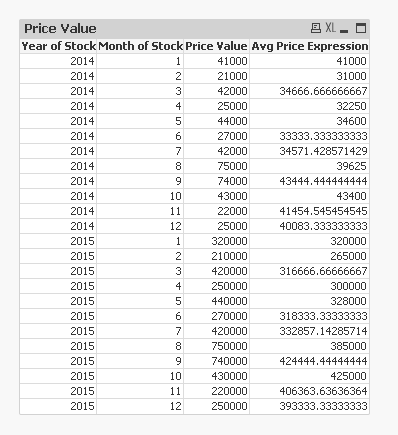
Unfortunately, it won't work without the order by. At least as per my knowledge, and I would love to be proven wrong. Front end expression would be:
=If(Sum([Price Value]) > 0, RangeAvg(Above(Sum({<[Month of Stock] = >}[Price Value]), 0, RowNo())))