Unlock a world of possibilities! Login now and discover the exclusive benefits awaiting you.

- Qlik Community
- :
- All Forums
- :
- QlikView
- :
- sub Sum
- Subscribe to RSS Feed
- Mark Topic as New
- Mark Topic as Read
- Float this Topic for Current User
- Bookmark
- Subscribe
- Mute
- Printer Friendly Page

 master_student
- Mark as New
- Bookmark
- Subscribe
- Mute
- Subscribe to RSS Feed
- Permalink
- Report Inappropriate Content
sub Sum
Hello Guys,
I hope everything is okay 
I have a table that contains a few dimensions and an expression :
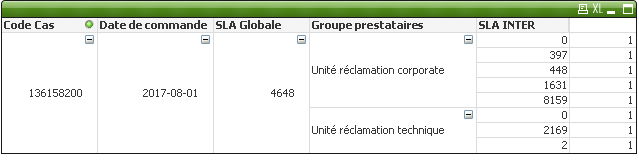
I need to get the Total of SLA inter BY groupe prestataire knowing that the SLA INTER IS a calculated dimension =Interval(Interval#(SLA_INTERM, 's'), 'm')
Accepted Solutions

 sunny_talwar
- Mark as New
- Bookmark
- Subscribe
- Mute
- Subscribe to RSS Feed
- Permalink
- Report Inappropriate Content
Are you saying that for these rows
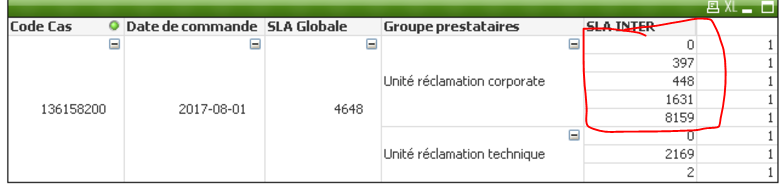
you would want to see 10635 on each of the rows?
May be this
=Interval(Sum(TOTAL <[Code Cas], [Date de commande], [SLA Globale], [Groupe prestataires]> Interval#(SLA_INTERM, 's')), 'm')
 Kushal_Chawda
- Mark as New
- Bookmark
- Subscribe
- Mute
- Subscribe to RSS Feed
- Permalink
- Report Inappropriate Content
Instead calculated dimension for SLA INTER create expression
=sum(aggr(Interval(Interval#(SLA_INTERM, 's'), 'm'),[Code Cas],[Date de commande],[SLA globale],[groupe prestataire]))
or
=sum(Interval(Interval#(SLA_INTERM, 's'), 'm'))
sunny_talwar
- Mark as New
- Bookmark
- Subscribe
- Mute
- Subscribe to RSS Feed
- Permalink
- Report Inappropriate Content
Are you saying that for these rows
you would want to see 10635 on each of the rows?
May be this
=Interval(Sum(TOTAL <[Code Cas], [Date de commande], [SLA Globale], [Groupe prestataires]> Interval#(SLA_INTERM, 's')), 'm')

 its_anandrjs
- Mark as New
- Bookmark
- Subscribe
- Mute
- Subscribe to RSS Feed
- Permalink
- Report Inappropriate Content
What is the expected output you need also which fields are calculated dim.
