Unlock a world of possibilities! Login now and discover the exclusive benefits awaiting you.

- Qlik Community
- :
- All Forums
- :
- QlikView
- :
- tax calculation
- Subscribe to RSS Feed
- Mark Topic as New
- Mark Topic as Read
- Float this Topic for Current User
- Bookmark
- Subscribe
- Mute
- Printer Friendly Page

- Mark as New
- Bookmark
- Subscribe
- Mute
- Subscribe to RSS Feed
- Permalink
- Report Inappropriate Content
tax calculation
Hi All,
Please let me to know how to calculate Inclusive and exclusive tax in dimension filters
example
Filters should be Y or N
If user clicks Y then it has to calculate A+B
if User Clicks N then it has to calculate A+ c
we have value for A+B and A+C
Thanks in advance
- Tags:
- data

 its_anandrjs
- Mark as New
- Bookmark
- Subscribe
- Mute
- Subscribe to RSS Feed
- Permalink
- Report Inappropriate Content
Hi,
In the expression write this expression
=IF( GetFieldSelections(Filters) = 'Y', Sum(A)+Sum(B),Sum(A)+Sum(C))
Filters is a field here with values Y and N
Regards,
Anand
- Mark as New
- Bookmark
- Subscribe
- Mute
- Subscribe to RSS Feed
- Permalink
- Report Inappropriate Content
Hi,
Try:
=sum(if(FieldName = 'Y' ,A+B,A+C))
or
=sum(if(GetFieldSelections(FieldName) = 'Y' ,A+B,A+C))
Regards
Neetha
- Mark as New
- Bookmark
- Subscribe
- Mute
- Subscribe to RSS Feed
- Permalink
- Report Inappropriate Content
Hi,
thks for the reply..
I need to show in list box...
y ---- A+B
N ---- A+c
Thks in advance
its_anandrjs
- Mark as New
- Bookmark
- Subscribe
- Mute
- Subscribe to RSS Feed
- Permalink
- Report Inappropriate Content
Hi,
Try this way then
T1:
LOAD * Inline [
Filters,A,B,C
Y,34,56,23
N,45,45,45
Y,7,56,24
N,65,34,53
Y,54,45,45
Y,45,67,43
];
tmp:
LOAD
Filters,
'Y' as Flag,
IF(Filters = 'Y', Sum(A)+Sum(B)) as CommonSum
Resident T1
Group By
Filters;
LOAD
Filters,
'N' as Flag,
IF(Filters = 'N', Sum(A)+Sum(C)) as CommonSum
Resident T1
Group By
Filters;
Final:
LOAD
Filters,Flag,
Flag&'----'&CommonSum as XY_Common
Resident tmp
Where not IsNull(CommonSum);
DROP Table tmp;
And you get list box as
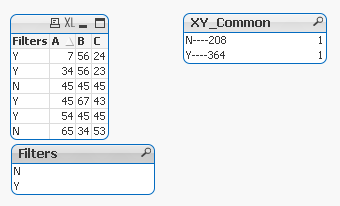
Regards
Anand