Unlock a world of possibilities! Login now and discover the exclusive benefits awaiting you.

- Qlik Community
- :
- All Forums
- :
- QlikView
- :
- textbox and listbox calculation
- Subscribe to RSS Feed
- Mark Topic as New
- Mark Topic as Read
- Float this Topic for Current User
- Bookmark
- Subscribe
- Mute
- Printer Friendly Page

- Mark as New
- Bookmark
- Subscribe
- Mute
- Subscribe to RSS Feed
- Permalink
- Report Inappropriate Content
textbox and listbox calculation
Hello everybody...
If i have two listboxes
One who shows last weeks count on companies and a listbox showing todays companies
How do i then calculate the difference in companies in my listbox?
Let me specific:
I have 100 customers in DimCustomers
In my textbox A i have the 2013-04-22 a count of 25 customers
In my textbox B i have the 2013-04-28 a count of 25 customers
in My textbox C i have the 2013-04-28 a count of 30 customers
The difference is that textbos B contains new customers
How can i calculate how many who has been "deleted" and how many is "new"
so i want to calculate how many went from ex textbox C to B and from B to C?
- Mark as New
- Bookmark
- Subscribe
- Mute
- Subscribe to RSS Feed
- Permalink
- Report Inappropriate Content
Hi,
Can you post some sample data.
Regards,
Snehal Nabar
- Mark as New
- Bookmark
- Subscribe
- Mute
- Subscribe to RSS Feed
- Permalink
- Report Inappropriate Content
Let me be even more specific..
I have this listbox:
A
B
C
D
E
F
G
My count on companies on the 2013-04-22 is therefor 7 customers.
Next in my Listbox i have
A
B
C
D
E
L
H
My count on comanies on the 2013-04-28 is therefor 7 customers.
What i would like to know in a listbox is - How many has left listbox, and how many is new.
In this example 2 companies has left, and 2 new has arrived. Therfore i should have two or one textbos which shows me a count of +2 on new companies and -2 of left companies.
Thanks!!
- Mark as New
- Bookmark
- Subscribe
- Mute
- Subscribe to RSS Feed
- Permalink
- Report Inappropriate Content
Well no, not really..
But i have given a better description further down.
Imagine i have one listbox which changes data, and i want the count of the new values in the listbox.
Eg.
So imagine i have listbox A with values
A, B, C,D,E, F,G
Now its the next day nad now my listbox A has these values:
A,B,C,D,E,K,L
So i want to count that my listbox has 2 new values incoming, and actually also 2 values outgoing
- Mark as New
- Bookmark
- Subscribe
- Mute
- Subscribe to RSS Feed
- Permalink
- Report Inappropriate Content
Hello,
You can try using OUTER JOIN between two Listboxes, ForExmp :
L1:
LOAD * INLINE [
S1,List1
1,A
2,B
3,C
4,D
5,E
6,F
];
outer join (L1)
LOAD * INLINE [
S1,List2
1,A
2,B
3,C
4,D
7,G
8,H
];
Would give result as :
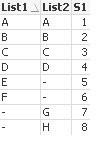
Then you can count where List1 is null and similarly where List2 is null.
Thanks,
Angad
- Mark as New
- Bookmark
- Subscribe
- Mute
- Subscribe to RSS Feed
- Permalink
- Report Inappropriate Content
Sorry, i dont think that would help, because it should be dynamic, so i can be changed by dates and different selections.
(I dont know how my listbox would look like tomorrow, therefor i cannot join it, cause i never know which customers or how many it will contain.)
Anyone who knows about loops? I think it could be handled by a loop ?
- Mark as New
- Bookmark
- Subscribe
- Mute
- Subscribe to RSS Feed
- Permalink
- Report Inappropriate Content
No one with any hints??