Unlock a world of possibilities! Login now and discover the exclusive benefits awaiting you.

- Qlik Community
- :
- All Forums
- :
- QlikView
- :
- time after midnight
- Subscribe to RSS Feed
- Mark Topic as New
- Mark Topic as Read
- Float this Topic for Current User
- Bookmark
- Subscribe
- Mute
- Printer Friendly Page

- Mark as New
- Bookmark
- Subscribe
- Mute
- Subscribe to RSS Feed
- Permalink
- Report Inappropriate Content
time after midnight
Dear All,
How best can i deal with a situation where end time is after midnight and i want to get the duration of a event in mins, that is end time - start time. my solution had eluded date and i have already loaded lots of data to it, which is why i am looking for a workaround.
he is my script
If (interval(time(end_time) - Time(start_time) ) < 0, 0, ((time(end_time) - time(start_time))*1440
my start time is 15:01 and end time is 00:37, this is leading to wrong results
Thanks in advance

 marcus_sommer
- Mark as New
- Bookmark
- Subscribe
- Mute
- Subscribe to RSS Feed
- Permalink
- Report Inappropriate Content
I assume that you have also a date-part to this times and could use something like this:
interval((end_date + end_time) - (start_date + start_time), 'hh:mm')
- Marcus
- Mark as New
- Bookmark
- Subscribe
- Mute
- Subscribe to RSS Feed
- Permalink
- Report Inappropriate Content
yes will do that
 MarcoWedel
- Mark as New
- Bookmark
- Subscribe
- Mute
- Subscribe to RSS Feed
- Permalink
- Report Inappropriate Content
Hi,
if there is no date information available and the duration can be 1 day at max then one solution might be:
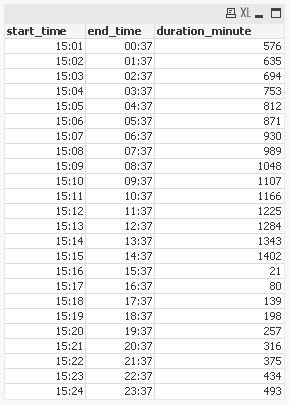
table1:
LOAD *,
    fmod(end_time-start_time+1,1)*1440 as duration_minute
Inline [
start_time, end_time
15:01, 00:37
15:02, 01:37
15:03, 02:37
15:04, 03:37
15:05, 04:37
15:06, 05:37
15:07, 06:37
15:08, 07:37
15:09, 08:37
15:10, 09:37
15:11, 10:37
15:12, 11:37
15:13, 12:37
15:14, 13:37
15:15, 14:37
15:16, 15:37
15:17, 16:37
15:18, 17:37
15:19, 18:37
15:20, 19:37
15:21, 20:37
15:22, 21:37
15:23, 22:37
15:24, 23:37
];
hope this helps
regards
Marco