Unlock a world of possibilities! Login now and discover the exclusive benefits awaiting you.

- Qlik Community
- :
- All Forums
- :
- QlikView
- :
- urgent help need
- Subscribe to RSS Feed
- Mark Topic as New
- Mark Topic as Read
- Float this Topic for Current User
- Bookmark
- Subscribe
- Mute
- Printer Friendly Page

- Mark as New
- Bookmark
- Subscribe
- Mute
- Subscribe to RSS Feed
- Permalink
- Report Inappropriate Content
urgent help need
i m making the site column in my chart like this.
if(Left(location1,2)='V7','DSI',if(Left(location1,2)='V8','SML',if(location1='V956','non foot',if(location1='D12','67WS')))) as site
now i want to get Sum(saleQty) only to site fields. how can i use set analyse to this?
- Tags:
- new_to_qlikview

 srchilukoori
- Mark as New
- Bookmark
- Subscribe
- Mute
- Subscribe to RSS Feed
- Permalink
- Report Inappropriate Content
please post a sample app
- Mark as New
- Bookmark
- Subscribe
- Mute
- Subscribe to RSS Feed
- Permalink
- Report Inappropriate Content
Use below in Dimension of Either straight or pivot table
if(Left(location1,2)='V7','DSI',if(Left(location1,2)='V8','SML',if(location1='V956','non foot',if(location1='D12','67WS')))) as site
and
in Expression just use
sum(SaleQty)
Like...
if(accpg_ordtyp='SL','Sale',if(accpg_ordtyp='CR','Credit')) - For Dimension
sum([Net Sales]) -For Expresion
Vinay
 chiru_thota
- Mark as New
- Bookmark
- Subscribe
- Mute
- Subscribe to RSS Feed
- Permalink
- Report Inappropriate Content
Can't you create Site dimension while loading data itself?
I mean by using your If statement.
It will be good if you can do that.So that you can use Site directly and it will be fast.
Otherwise you can follow as Vinay mentioned.
- Mark as New
- Bookmark
- Subscribe
- Mute
- Subscribe to RSS Feed
- Permalink
- Report Inappropriate Content
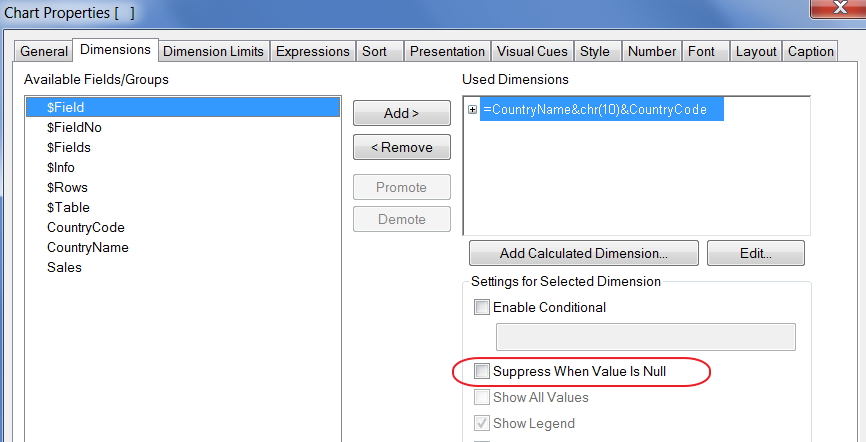
hi all, yes i can get that like vinay has told. but the problem is another extra row loading in my table chart because of sum(saleQty) not related to "site". because there are other saleQty. so i want to avoid it and get only site's Sum(saleQty)
chiru_thota
- Mark as New
- Bookmark
- Subscribe
- Mute
- Subscribe to RSS Feed
- Permalink
- Report Inappropriate Content
Enable following property for your dimension.