Unlock a world of possibilities! Login now and discover the exclusive benefits awaiting you.

- Qlik Community
- :
- All Forums
- :
- QlikView
- :
- with button value for listbox exlude
- Subscribe to RSS Feed
- Mark Topic as New
- Mark Topic as Read
- Float this Topic for Current User
- Bookmark
- Subscribe
- Mute
- Printer Friendly Page

- Mark as New
- Bookmark
- Subscribe
- Mute
- Subscribe to RSS Feed
- Permalink
- Report Inappropriate Content
with button value for listbox exlude
Dear QV-experts,
I have a simple problem:
I have a listbox with a lot of values. I can select multiple values for my report.
Now I want to have a possibility with button to include/exclude from the selected values follow value: 229.
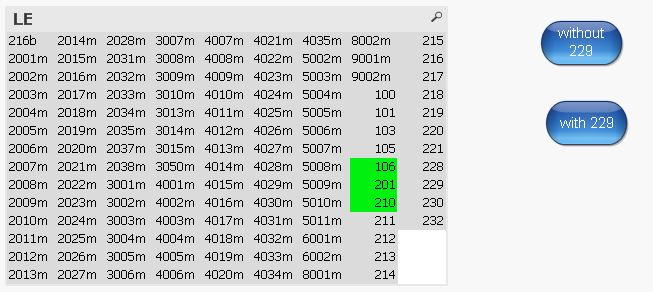
How can I include one value to the selected values?
=GetFieldSelections(LE)& (LE=229) is not working
Kind regards,
André
Accepted Solutions

 Kushal_Chawda
- Mark as New
- Bookmark
- Subscribe
- Mute
- Subscribe to RSS Feed
- Permalink
- Report Inappropriate Content
try this
='(' & Concat(DISTINCT{<LE-={'229'}>} chr(34) & LE & chr(34),'|') &')'
Kushal_Chawda
- Mark as New
- Bookmark
- Subscribe
- Mute
- Subscribe to RSS Feed
- Permalink
- Report Inappropriate Content
try this
='(' & Concat(DISTINCT{<LE-={'229'}>} chr(34) & LE & chr(34),'|') &')'
 sunny_talwar
- Mark as New
- Bookmark
- Subscribe
- Mute
- Subscribe to RSS Feed
- Permalink
- Report Inappropriate Content
May be this needs to only work when something is already selected in LE:
If(GetSelectedCount(LE) > 0, '(' & Concat(DISTINCT{<LE-={'229'}>} chr(34) & LE & chr(34),'|') &')')

 erikzions
- Mark as New
- Bookmark
- Subscribe
- Mute
- Subscribe to RSS Feed
- Permalink
- Report Inappropriate Content
use the action "Toggle Select" and just put the value 229. This will toggle it on or off. Use only one button or text box and change the label for the current function of the button.
- Mark as New
- Bookmark
- Subscribe
- Mute
- Subscribe to RSS Feed
- Permalink
- Report Inappropriate Content
thank you for your reply! It works
I have now two buttons: with/without "LE+/-={'229'}"
in one_button_solution 
=if(Concat(DISTINCT(LE='229')),
'(' & Concat(DISTINCT{<LE-={'229'}>} chr(34) & LE & chr(34),'|') &')',
'(' & Concat(DISTINCT{<LE+={'229'}>} chr(34) & LE & chr(34),'|') &')'
)