Unlock a world of possibilities! Login now and discover the exclusive benefits awaiting you.

- Qlik Community
- :
- Events
- :
- Attend an Event
- :
- Techspert Talks
- :
- STT - Exploring Qlik Sense Enterprise on Kubernete...
- Subscribe to RSS Feed
- Mark Topic as New
- Mark Topic as Read
- Float this Topic for Current User
- Bookmark
- Subscribe
- Mute
- Printer Friendly Page

 Troy_Raney
- Mark as New
- Bookmark
- Subscribe
- Mute
- Subscribe to RSS Feed
- Permalink
- Report Inappropriate Content
STT - Exploring Qlik Sense Enterprise on Kubernetes
This session will address the following:
- Look at new features
- What to do first
- Live demonstration
- Gotchas to avoid
For more information:
https://support.qlik.com/articles/000085749
Resource links:
App Administration - Administer Qlik Sense Enterprise on Kubernetes
Kubectl - Kubectl Cheat Sheet
Helm - Helm Chart Best Practices Guide
Logging - Qlik Sense Enterrpise on Kubernetes Monitor Metrics
Git Ops - Highly Effective Kubernetes Deployments with GitOps
Scaling –Assigning Pods- Assign Pod Node
Template Values Yaml - QSEoK Support Templates
Minimum Prereqs - Minimum Qlik Sense Enterprise Pre-Requisites
MongoDB – Stateful Sets - Running MongoDB on Kubernetes with Stateful Sets
Setup instructions of demo environment
Video demonstrating setup of Qlik Sense Enterprise on Azure AKS
- Tags:
- azure
- best practices
- cloud
- container
- containers
- deployment
- docker
- error
- fix
- kubernetes
- linux
- Multi Cloud
- multi-cloud
- multicloud
- qlik
- qlik cloud
- qlik sense
- qlik support
- Qlik Webinar
- recommendation
- Scalable
- stt
- support
- Support Expert
- support techspert thursdays
- thursday
- troubleshooting
- video
- webinar
- Subscribe by Topic:
-
Cloud
-
Kubernetes
-
Qlik Sense Enterprise
-
Qlik Support
-
Support Techspert Thursdays

 Carl_Hunter
- Mark as New
- Bookmark
- Subscribe
- Mute
- Subscribe to RSS Feed
- Permalink
- Report Inappropriate Content
Hi, is anyone running into issues with trying to setup kubernetes on Minikube?
I've tried doing configuring QSE on Minikube via the Qlik Help file, which was unsuccessful, and now after watching the youtube video and using some scripts from GitHub (https://github.com/tonikautto/qse-kubernetes-minikube), I am getting the same problem:
It seems that when Helm is started, Tiller isn't being initialised correctly, so when you run <helm install>, you get an error re "Could not find Tiller"
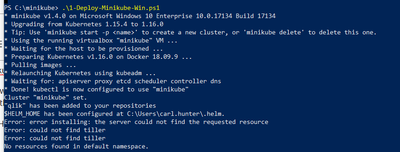
$HELM_HOME has been configured at C:\Users\<name>\.helm.
Error: error installing: the server could not find the requested resource
Error: could not find tiller
Error: could not find tiller
No resources found in default namespace.
There are posts online re this issue, and I've tried a few of them, i.e. rolling back my version of Kubernetes, but, this doesn't resolve. I am not really sure where to go next, as my knowledge of this world is quite slim, hence why wondering if anyone else in the Qlik world is having this issue?

 Bjorn_Wedbratt
- Mark as New
- Bookmark
- Subscribe
- Mute
- Subscribe to RSS Feed
- Permalink
- Report Inappropriate Content
Hi @Carl_Hunter ,
I haven't used that PS script myself to deploy, but what you need to check first is that kubectl is set up to work against minikube.
If you run kubectl config get-contexts you should get something similar to:
CURRENT NAME CLUSTER AUTHINFO NAMESPACE
k8s-3tier k8s-3tier k8s-3tier-admin
microk8s-cluster microk8s-cluster microk8s-admin
* minikube minikube minikube
minishift 192-168-99-100:8443 developer/192-168-99-100:8443
Make sure kubectl is configured to work against minikube (the * at the beginning).
If not, run the following:
kubectl config use-context minikube
Check communication is working using:
kubectl cluster-info
This should give you the following:
Kubernetes master is running at https://192.168.99.102:8443
KubeDNS is running at https://192.168.99.102:8443/api/v1/namespaces/kube-system/services/kube-dns:dns/proxy
As Helm is using kubectl it's essential that kubectl is configured and working properly before trying to initialize Helm and deploy the tiller pod.
Since v0.26 of minikube RBAC is enabled by default. You can check this by running:
kubectl api-versions
If you have the following line, authorization.k8s.io/v1, you need to add a service account for tiller before deploying it, as described here:
https://helm.sh/docs/using_helm/#role-based-access-control
I hope the above solves your issues.
Best,
Bjorn
Carl_Hunter
- Mark as New
- Bookmark
- Subscribe
- Mute
- Subscribe to RSS Feed
- Permalink
- Report Inappropriate Content
Hi @Bjorn_Wedbratt @Troy_Raney
Sorry, this still isnt working after I've applied the service account to teller. I keep getting an error when running helm init:
Error: error installing: the server could not find the requested resource
The Qlik Help file doesn't really go into that much detail re Minikube, which is disappointing (https://help.qlik.com/en-US/sense-admin/September2019/Subsystems/DeployAdministerQSE/Content/Sense_D...)
Bjorn_Wedbratt
- Mark as New
- Bookmark
- Subscribe
- Mute
- Subscribe to RSS Feed
- Permalink
- Report Inappropriate Content
Hi @Carl_Hunter
I investigated this a bit further and there seems to be an issue with Helm and Kubernetes 1.16 when running minikube as discussed here: https://github.com/helm/helm/issues/6374
I tried to downgrade kubernetes to 1.15 and that seems to be the easiest workaround for now.
What you need to do is:
delete the existing deployment of minikube
minikube delete
Then if you look into the 1-Deploy-Minikube-Win.ps1, edit the line where minikube is started and specify the version
minikube start --memory $VmMemory --cpus=$VmCpu --kubernetes-version=1.15.4
Now everything should be working fine.
Best
Bjorn
