Unlock a world of possibilities! Login now and discover the exclusive benefits awaiting you.

- Qlik Community
- :
- Forums
- :
- Analytics & AI
- :
- Products & Topics
- :
- Visualization and Usability
- :
- Re: Comparison to PY on a chart
- Subscribe to RSS Feed
- Mark Topic as New
- Mark Topic as Read
- Float this Topic for Current User
- Bookmark
- Subscribe
- Mute
- Printer Friendly Page

 laura_1
- Mark as New
- Bookmark
- Subscribe
- Mute
- Subscribe to RSS Feed
- Permalink
- Report Inappropriate Content
Comparison to PY on a chart
Hi All,
Is there a way to compare PY to current year on a time trend chart with month-year (e.g. 2018 Aug) rather than month on the X axis?
Dimension: year_month
Measure (current): sum({<year={$(vMaxYear)}>}[kpi_value])
Measure (PY): sum({<year={$(vPreviousYear)}>}[kpi_value])
This produced the following chart:
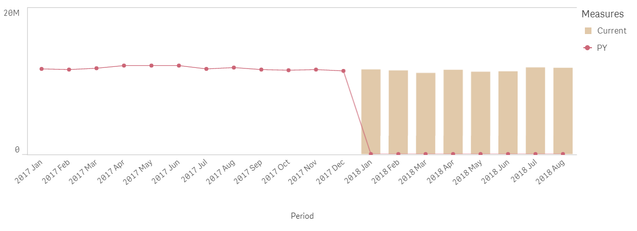
Is there a way to have make the chart look like this instead (but with year-month, not month on X axis):
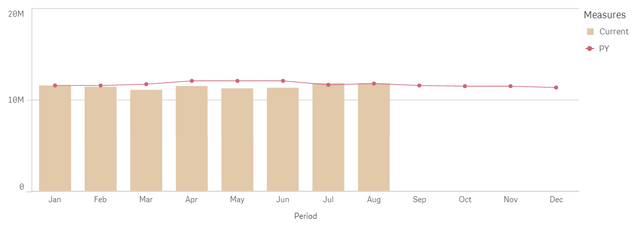
- « Previous Replies
-
- 1
- 2
- Next Replies »

 sunny_talwar
- Mark as New
- Bookmark
- Subscribe
- Mute
- Subscribe to RSS Feed
- Permalink
- Report Inappropriate Content
I think it might be easy to help you out if you are able to share a sample 🙂
laura_1
- Mark as New
- Bookmark
- Subscribe
- Mute
- Subscribe to RSS Feed
- Permalink
- Report Inappropriate Content
Example attached 🙂
sunny_talwar
- Mark as New
- Bookmark
- Subscribe
- Mute
- Subscribe to RSS Feed
- Permalink
- Report Inappropriate Content
Try this
Above(Sum({<year={$(vPreviousYear)}, month>} [kpi_value]), 12)
laura_1
- Mark as New
- Bookmark
- Subscribe
- Mute
- Subscribe to RSS Feed
- Permalink
- Report Inappropriate Content
Thanks Sunny, PY trendline appears now, but if any month from 2018 is selected in filter, it shows the same value for PY, e.g. if May 2018, Aug 2018 or Sep 2018 is selected, PY for all these months is the same, which doesn't reflect the data; and if a month from 2017 selected, no trendline appears even when there is a data for PY, e.g. 2017 Dec?
sunny_talwar
- Mark as New
- Bookmark
- Subscribe
- Mute
- Subscribe to RSS Feed
- Permalink
- Report Inappropriate Content
Try out this alternative approach where I use The As Of Table to do this by creating this at the end of the script
AsOfTable:
LOAD DISTINCT month as AsOfMonth,
	 year as AsOfYear,
     month,
     'CY' as Flag
Resident Table;

Concatenate(AsOfTable)
LOAD DISTINCT month as AsOfMonth,
	 year as AsOfYear,
     Date(MonthStart(month, -12), 'YYYYMM') as month,
     'PY' as Flag
Resident Table;
and then use these
Dimension
AsOfMonth
Expressions
If(GetSelectedCount(AsOfMonth) > 0,
Sum({<Flag = {'CY'}>}[kpi_value]),
Sum({<year={$(vMaxYear)}, Flag = {'CY'}>}[kpi_value]))

If(GetSelectedCount(AsOfMonth) > 0,
Sum({<Flag = {'PY'}>}[kpi_value]),
Sum({<Flag = {'PY'}, AsOfYear={$(vMaxYear)}>} [kpi_value]))
laura_1
- Mark as New
- Bookmark
- Subscribe
- Mute
- Subscribe to RSS Feed
- Permalink
- Report Inappropriate Content
That worked, thanks very much Sunny!

- « Previous Replies
-
- 1
- 2
- Next Replies »