Unlock a world of possibilities! Login now and discover the exclusive benefits awaiting you.

- Qlik Community
- :
- Forums
- :
- Analytics & AI
- :
- Products & Topics
- :
- Visualization and Usability
- :
- Cross Table Help
- Subscribe to RSS Feed
- Mark Topic as New
- Mark Topic as Read
- Float this Topic for Current User
- Bookmark
- Subscribe
- Mute
- Printer Friendly Page

 mahitham
- Mark as New
- Bookmark
- Subscribe
- Mute
- Subscribe to RSS Feed
- Permalink
- Report Inappropriate Content
Cross Table Help
Hi Experts,
Can any one please help me on below requirement.
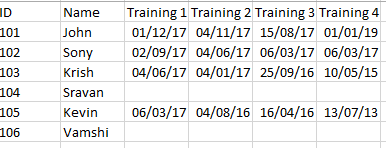
I have the source like below.
I have to store Training 1, Training 2... in Training Column and all dates in [Completion Date] Column
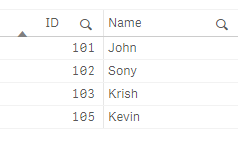
So I have tried the below code. But getting only 4 IDs in the result and missing 104 and 106 IDs because all Trainings are blank.
[Training Details]:
CrossTable(Training,CompletionDate,2)
LOAD
*
FROM [lib://Source/Training Sample.xlsx]
(ooxml, embedded labels, table is Sheet1);
Result:
 Then I have tried the below code to get the blank ids as well.
[Training Details]:
CrossTable(Training,CompletionDate,2)
LOAD
ID,
Name,
if(len(Trim("Training 1"))>0,"Training 1",'Null') as "Training 1",
if(len(Trim("Training 2"))>0,"Training 2",'Null') as "Training 2",
if(len(Trim("Training 3"))>0,"Training 3",'Null') as "Training 3",
if(len(Trim( "Training 4"))>0, "Training 4",'Null') as "Training 4",
if(len(Trim( "Training 5"))>0, "Training 5",'Null') as "Training 5"
FROM [lib://Source/Training Sample.xlsx]
(ooxml, embedded labels, table is Sheet1);
Result:
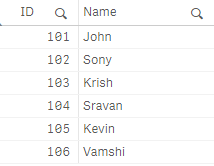
ISSUE:
Here the issue is daily one new training will be added in the source file it has to be update dynamically in Qlik. When I have removed * its not updating dynamically and if I put * not able to apply the blank if logic.
Please help me to get any newly added Training 6 column into source file it has to be updated dynamically and need to get all the IDs in UI.
Thanks in advance.
Accepted Solutions

 vamsee
- Mark as New
- Bookmark
- Subscribe
- Mute
- Subscribe to RSS Feed
- Permalink
- Report Inappropriate Content
vamsee
- Mark as New
- Bookmark
- Subscribe
- Mute
- Subscribe to RSS Feed
- Permalink
- Report Inappropriate Content
Hi Mahitha,
I can't open your QVF though but from what I understood, instead of using IF statements you can handle null values using
or
NullAsValue https://help.qlik.com/en-US/qlikview/November2017/Subsystems/Client/Content/Scripting/ScriptRegularS...
---
In your case try
NullAsValue *;
SET NullValue ='***ValueNotFound**';
[Training Details]:
CrossTable(Training,CompletionDate,2)
LOAD
*
FROM [lib://Source/Training Sample.xlsx]
(ooxml, embedded labels, table is Sheet1);
Temp:
CrossTable (Training, CompletionDate,2)
LOAD
*
Resident [Training Details];
DROP Table [Training Details];
Final:
NoConcatenate
LOAD
ID,
Name,
Training,
ALT(Date(Date#(CompletionDate, 'DD/MM/YYYY')), Date(Date#(CompletionDate, 'MM/DD/YYYY')), 'Value Not Found') as CompletionDate
Resident Temp;
DROP Table Temp;
mahitham
- Mark as New
- Bookmark
- Subscribe
- Mute
- Subscribe to RSS Feed
- Permalink
- Report Inappropriate Content
Hi Vamshi,
Thanks for your reply.
I have tried the code you have provided. But its not working.
Still I am not able to see the IDs 104 and 106 whose trainings are blank .
Could you please attach the application.

 nsetty
- Mark as New
- Bookmark
- Subscribe
- Mute
- Subscribe to RSS Feed
- Permalink
- Report Inappropriate Content
Is it on purpose that you are loading data in Section and Section2? Both load to the same table - [Training Details]?
vamsee
- Mark as New
- Bookmark
- Subscribe
- Mute
- Subscribe to RSS Feed
- Permalink
- Report Inappropriate Content
My bad I wrote crosstable command twice.
Try
NullAsValue *;
SET NullValue ='***ValueNotFound**';
[Training Details]:
LOAD
*
FROM [lib://Source/Training Sample.xlsx]
(ooxml, embedded labels, table is Sheet1);
Temp:
CrossTable (Training, CompletionDate,2)
LOAD
*
Resident [Training Details];
DROP Table [Training Details];
Final:
NoConcatenate
LOAD
ID,
Name,
Training,
ALT(Date(Date#(CompletionDate, 'DD/MM/YYYY')), Date(Date#(CompletionDate, 'MM/DD/YYYY')), 'Value Not Found') as CompletionDate
Resident Temp;
DROP Table Temp;
vamsee
- Mark as New
- Bookmark
- Subscribe
- Mute
- Subscribe to RSS Feed
- Permalink
- Report Inappropriate Content
PFA
mahitham
- Mark as New
- Bookmark
- Subscribe
- Mute
- Subscribe to RSS Feed
- Permalink
- Report Inappropriate Content
Thank a lot for your help 
