Unlock a world of possibilities! Login now and discover the exclusive benefits awaiting you.

- Qlik Community
- :
- Forums
- :
- Analytics & AI
- :
- Products & Topics
- :
- Visualization and Usability
- :
- If statement with multiple languages
- Subscribe to RSS Feed
- Mark Topic as New
- Mark Topic as Read
- Float this Topic for Current User
- Bookmark
- Subscribe
- Mute
- Printer Friendly Page

 etrotter
- Mark as New
- Bookmark
- Subscribe
- Mute
- Subscribe to RSS Feed
- Permalink
- Report Inappropriate Content
If statement with multiple languages
I am creating an app that has three languages in it. the languages were created by having a table with three versions of the data in each language and there being filters you can set to pick the language. That being said I want to have a table conditionally colored but I am having issues integrating the languages.
this is the origional if statement without the addition of the other languages:
if(Source='Forestry' and (Geography<>'Brazil' xor ForestryScenario='Globiom FC'),green(), red())
here is the addition of the new languages but it is not working
if((Source='Forestry' OR '森林业' OR 'Silvicultura') and ((Geography<>'Brazil' OR 'Brasil' OR '巴西') xor ForestryScenario='Globiom FC'),green(), red())
the goal is that forestry is green unless it is Brazil. I do want it to be green for Brazil if Globiom is selected though! Globiom FC is the same in every language.
Thanks in advance!
Accepted Solutions
etrotter
- Mark as New
- Bookmark
- Subscribe
- Mute
- Subscribe to RSS Feed
- Permalink
- Report Inappropriate Content
I used a match function so Match(Source, 'Forestry', 'Silvacultura', '森林业') and it worked!

 ogster1974
- Mark as New
- Bookmark
- Subscribe
- Mute
- Subscribe to RSS Feed
- Permalink
- Report Inappropriate Content
I think if you identify the language first then put your language based conditions in you will have better luck.
When making reference data local you usually have a key value to Id it regardless of the language. perhaps you can base the condition on the key value rather than the local values as you will struggle supporting it if you need to add more languages later.
etrotter
- Mark as New
- Bookmark
- Subscribe
- Mute
- Subscribe to RSS Feed
- Permalink
- Report Inappropriate Content
So something like this?
If((Lang='en'),if(Source='Forestry' and (Geography<>'Brazil' xor ForestryScenario='Globiom FC'),green(), red()),
if(Lang='ch',IF(Source='森林业' and (Geography<>'巴西' xor ForestryScenario='Globiom FC'),green(), red())),
IF(Source='Silvicultura' and (Geography<>'Brasil' xor ForestryScenario='Globiom FC'),green(), red()))
 petter
- Mark as New
- Bookmark
- Subscribe
- Mute
- Subscribe to RSS Feed
- Permalink
- Report Inappropriate Content
Since Forestry, 森林业 and Silvicultura means the same and are related by being in the same table on the same row you can just check on either of them - not all of them:
If( Source='Forestry' AND Geography<>'Brazil' OR ForestryScenario='Globiom FC') , green() , red() )

 JustinDallas
- Mark as New
- Bookmark
- Subscribe
- Mute
- Subscribe to RSS Feed
- Permalink
- Report Inappropriate Content
Do you mind telling us the source of this data? If it;s coming from an ERP/CRM of some sort, then there should be a catalog/dictionary available to you that you can pull down. If you are making this yallselves, then I might suggest putting the data in a Dictionary type table, and then going from there.
Using a dictionary, it would allow you to pick a Base Language, and you could write your scripts according to that. Better yet, you could create Codes for all your dictionary entries and then use that, for instance
if((Source='Forestry' OR '森林业' OR 'Silvicultura') and ((Geography<>'Brazil' OR 'Brasil' OR '巴西') xor ForestryScenario='Globiom FC'),green(), red())
Would become
if(( SourceBaseId='FORESTRY_CODE' ) and ((Geography<>'BRAZIL_CODE' ) xor ForestryScenario='Globiom FC'),green(), red())
Your dictionary table would look something like this
Dict:
DictCode, => FORESTRY_CODE, BRAZIL_CODE
BaseLanguageText, => Brazil
ChineseText, => 巴西
EnglishText, => Brazil
PortugueseText => Brasil
And then you would left join all the fields where you needed the translation. The drawback is that you would have to rename your Dict fields to avoid inadvertent keys. Also, this could require a lot of work, and might be unworkable as I've seen one Catalog out of hundreds have over 5000 values spread over 17 languages.
petter
- Mark as New
- Bookmark
- Subscribe
- Mute
- Subscribe to RSS Feed
- Permalink
- Report Inappropriate Content
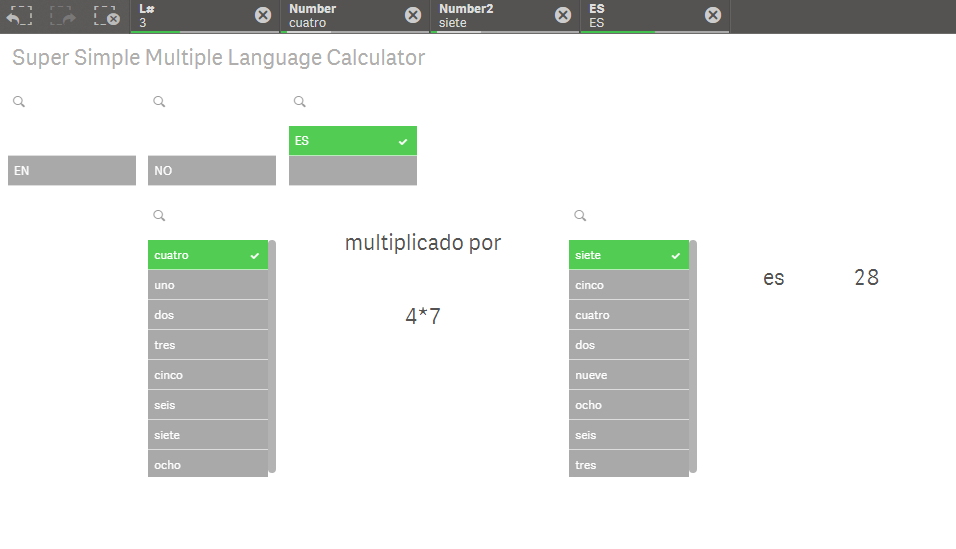
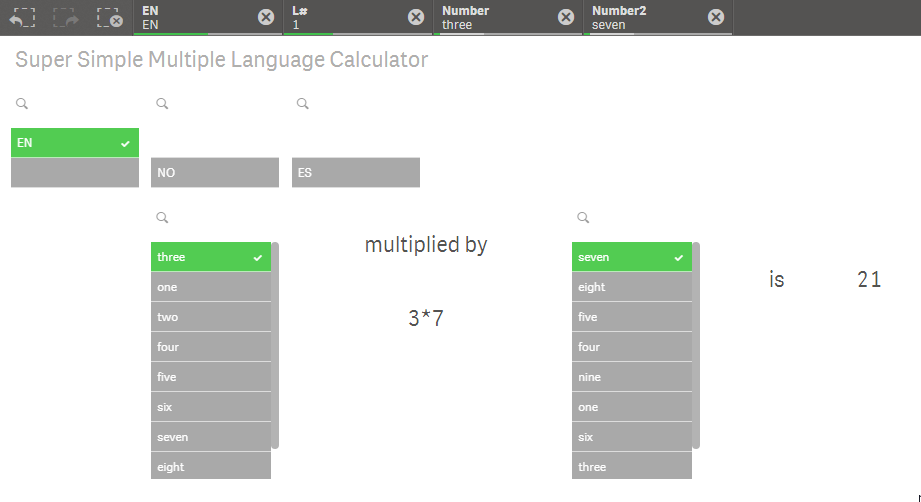
This is an example showing how you can let Qlik's Associative Model work for you dynamically and pick the right language:
(I have attached the Qlik Sense App)
petter
- Mark as New
- Bookmark
- Subscribe
- Mute
- Subscribe to RSS Feed
- Permalink
- Report Inappropriate Content
Actually this is a better approach that is still using the associative model but simpler to understand. Have attached a revised app.
etrotter
- Mark as New
- Bookmark
- Subscribe
- Mute
- Subscribe to RSS Feed
- Permalink
- Report Inappropriate Content
I used a match function so Match(Source, 'Forestry', 'Silvacultura', '森林业') and it worked!
