Unlock a world of possibilities! Login now and discover the exclusive benefits awaiting you.

- Qlik Community
- :
- Forums
- :
- Analytics & AI
- :
- Products & Topics
- :
- Visualization and Usability
- :
- Re: Need help with counts in straight table
- Subscribe to RSS Feed
- Mark Topic as New
- Mark Topic as Read
- Float this Topic for Current User
- Bookmark
- Subscribe
- Mute
- Printer Friendly Page

 rvijayanth
- Mark as New
- Bookmark
- Subscribe
- Mute
- Subscribe to RSS Feed
- Permalink
- Report Inappropriate Content
Need help with counts in straight table
Sample data:
| Patient ID | City | State |
| 101 | ABC | State 1 |
| 101 | XYZ | State 2 |
| 103 | XYZ | State 2 |
| 103 | BCD | State 1 |
| 104 | BCD | State 1 |
| 105 | BCD | State 1 |
| 106 | ABC | State 1 |
| 107 | XYZ | State 2 |
| 108 | ABC | State 1 |
| 109 | ABC | State 1 |
| 110 | ABC | State 1 |
| 108 | ABC | State 1 |
| 106 | ABC | State 1 |
| 105 | XYZ | State 2 |
| 103 | XYZ | State 2 |
| 101 | ABC | State 1 |
| 109 | ABC | State 1 |
| 106 | XYZ | State 2 |
| 102 | ABC | State 1 |
| 105 | BCD | State 1 |
Above shown data is patient ID for three cities:
Cities ABC and BCD belonging to State 1 and city XYZ belonging to State 2.
ABC city has 10, BCD has 4 and XYZ has 6 patients.
So State 1 has a total of 14 patients and State 2 has total of 6 patients.
I want ONE straight table like shown below for comparison:
| City | Total Patients in City | State | Total patients in State corresponding to city | Total patients in other cities of State |
| ABC | 10 | State 1 | 14 | 4 |
| BCD | 4 | State 1 | 14 | 10 |
| XYZ | 6 | State 2 | 6 | 0 |
I need help with "Total patients in State corresponding to each city" and "Total patients in other cities of State"
- « Previous Replies
-
- 1
- 2
- Next Replies »
Accepted Solutions

 OmarBenSalem
- Mark as New
- Bookmark
- Subscribe
- Mute
- Subscribe to RSS Feed
- Permalink
- Report Inappropriate Content
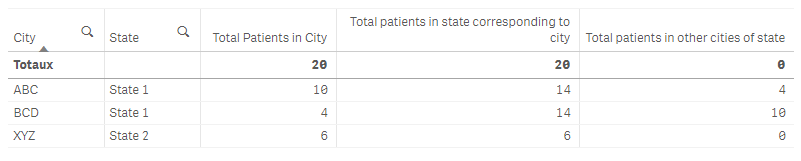
1) Total Patients in City: Count([Patient ID])
2) Total patients in state corresponding to city : count (total < State> [Patient ID])
3) Total patients in other cities of state : count(total <State> [Patient ID])- Count([Patient ID])
Result:
 tan_chungkam
- Mark as New
- Bookmark
- Subscribe
- Mute
- Subscribe to RSS Feed
- Permalink
- Report Inappropriate Content
For column - Total Patients in City, you can try use this set analysis:
IF(City='ABC', count({<City={'ABC'}>}[Patient ID]),
IF(City='BCD', count({<City={'BCD'}>}[Patient ID]),
IF(City='XYZ', count({<City={'XYZ'}>}[Patient ID]))))


- Mark as New
- Bookmark
- Subscribe
- Mute
- Subscribe to RSS Feed
- Permalink
- Report Inappropriate Content
Check this?
 OmarBenSalem
- Mark as New
- Bookmark
- Subscribe
- Mute
- Subscribe to RSS Feed
- Permalink
- Report Inappropriate Content
1) Total Patients in City: Count([Patient ID])
2) Total patients in state corresponding to city : count (total < State> [Patient ID])
3) Total patients in other cities of state : count(total <State> [Patient ID])- Count([Patient ID])
Result:
rvijayanth
- Mark as New
- Bookmark
- Subscribe
- Mute
- Subscribe to RSS Feed
- Permalink
- Report Inappropriate Content
Thanks for the reply. I got a solution.
rvijayanth
- Mark as New
- Bookmark
- Subscribe
- Mute
- Subscribe to RSS Feed
- Permalink
- Report Inappropriate Content
Thanks for the reply. This is exactly what I wanted. Cant believe how simple it is.
Can you also help me to perform the same in the load script?
My data is too big and I am getting timeout error so I want to calculate all these during load.
- Mark as New
- Bookmark
- Subscribe
- Mute
- Subscribe to RSS Feed
- Permalink
- Report Inappropriate Content
Not sure, why my answer is not helped for you? I am bit worried about that? You don't have license to open the document? That's fine you found the logic.
rvijayanth
- Mark as New
- Bookmark
- Subscribe
- Mute
- Subscribe to RSS Feed
- Permalink
- Report Inappropriate Content
Thanks for the reply. Can you help me achieve the same in the load script please?
- Mark as New
- Bookmark
- Subscribe
- Mute
- Subscribe to RSS Feed
- Permalink
- Report Inappropriate Content
I still not happy of your reply, FYI - Qlikview and Qliksense are similar for concepts like set analysis, Data model etc. because QIX is same for both. BTW, Try this for script?
Sample:
LOAD [Patient ID],
City,
State
FROM
[https://community.qlik.com/t5/New-to-Qlik-Sense/Need-help-with-counts-in-straight-table/m-p/1524247#...]
(html, utf8, embedded labels, table is @1);
Join
LOAD City, Count([Patient ID]) as [Total Patients in City] Resident Sample Group By City;
Join
LOAD State, Count([Patient ID]) as [Total patients in State corresponding to city] Resident Sample Group By State;
Final:
NoConcatenate
LOAD *, [Total patients in State corresponding to city]-[Total Patients in City] as [Total patients in other cities of State] Resident Sample;
DROP Table Sample;
OmarBenSalem
- Mark as New
- Bookmark
- Subscribe
- Mute
- Subscribe to RSS Feed
- Permalink
- Report Inappropriate Content

- « Previous Replies
-
- 1
- 2
- Next Replies »