Unlock a world of possibilities! Login now and discover the exclusive benefits awaiting you.

- Qlik Community
- :
- Forums
- :
- Analytics & AI
- :
- Products & Topics
- :
- Visualization and Usability
- :
- Qliksense - Vertical Text (90 rotate text) in Text...
- Subscribe to RSS Feed
- Mark Topic as New
- Mark Topic as Read
- Float this Topic for Current User
- Bookmark
- Subscribe
- Mute
- Printer Friendly Page

 manojkulkarni
- Mark as New
- Bookmark
- Subscribe
- Mute
- Subscribe to RSS Feed
- Permalink
- Report Inappropriate Content
Qliksense - Vertical Text (90 rotate text) in Text Object
Hi All,
can we rotate text to 90 degree in text object of Qlik sense ? It use to present in Qlik presentation tab but not sure about in Qlik sense. looking for some assistance from experts.
Accepted Solutions
manojkulkarni
- Mark as New
- Bookmark
- Subscribe
- Mute
- Subscribe to RSS Feed
- Permalink
- Report Inappropriate Content
Thanks @saso70 , got it.
manojkulkarni
- Mark as New
- Bookmark
- Subscribe
- Mute
- Subscribe to RSS Feed
- Permalink
- Report Inappropriate Content

 Mark_Little
- Mark as New
- Bookmark
- Subscribe
- Mute
- Subscribe to RSS Feed
- Permalink
- Report Inappropriate Content
Sot something that i have been able to do, i have always had to add it to a image and use the image in a text box.
 saso70
- Mark as New
- Bookmark
- Subscribe
- Mute
- Subscribe to RSS Feed
- Permalink
- Report Inappropriate Content
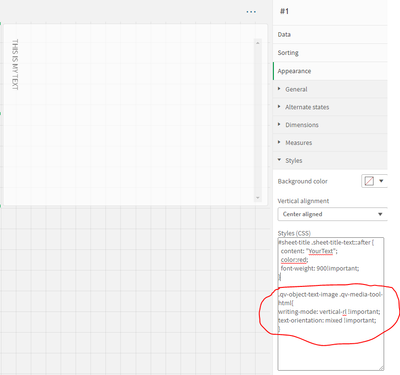
Hi maybe you can try to add CSS using the multi KPI object and create desire result . try this :
.qv-object-text-image .qv-media-tool-html{
writing-mode: vertical-rl !important;
text-orientation: mixed !important;
}
more about text orientation you can find on this site https://developer.mozilla.org/en-US/docs/Web/CSS/text-orientation
How to use multi KPI:
1. add multi KPI on sheet
2. add measure =' '
3.Appearance tab select Styles and add the CSS code
manojkulkarni
- Mark as New
- Bookmark
- Subscribe
- Mute
- Subscribe to RSS Feed
- Permalink
- Report Inappropriate Content
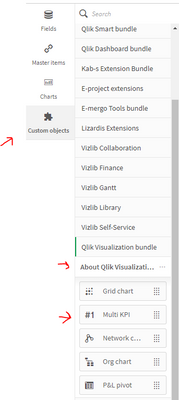
Hi @saso70 , thanks for your suggestion. Is multi KPI an extension or in-built object in QS.
saso70
- Mark as New
- Bookmark
- Subscribe
- Mute
- Subscribe to RSS Feed
- Permalink
- Report Inappropriate Content
Built object in qlik sense
manojkulkarni
- Mark as New
- Bookmark
- Subscribe
- Mute
- Subscribe to RSS Feed
- Permalink
- Report Inappropriate Content
Thanks @saso70 , got it.
manojkulkarni
- Mark as New
- Bookmark
- Subscribe
- Mute
- Subscribe to RSS Feed
- Permalink
- Report Inappropriate Content

 Vasunthra_R
- Mark as New
- Bookmark
- Subscribe
- Mute
- Subscribe to RSS Feed
- Permalink
- Report Inappropriate Content
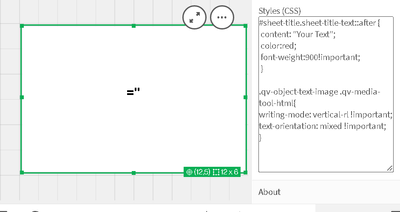
Hi @saso70 I have tried the same you suggested but that's not working. Could you please help.
below image is what i tried.
saso70
- Mark as New
- Bookmark
- Subscribe
- Mute
- Subscribe to RSS Feed
- Permalink
- Report Inappropriate Content
Hi, i just try the code and is work , you need to add your text in Text & image object and use the multi KPI object with css:
writing-mode: vertical-rl !important;