Unlock a world of possibilities! Login now and discover the exclusive benefits awaiting you.

- Qlik Community
- :
- Forums
- :
- Analytics & AI
- :
- Products & Topics
- :
- Visualization and Usability
- :
- Re: Replace blank/empty to N/A
- Subscribe to RSS Feed
- Mark Topic as New
- Mark Topic as Read
- Float this Topic for Current User
- Bookmark
- Subscribe
- Mute
- Printer Friendly Page

 Anna90
- Mark as New
- Bookmark
- Subscribe
- Mute
- Subscribe to RSS Feed
- Permalink
- Report Inappropriate Content
Replace blank/empty to N/A
Hi All,
Below script is simply for an example:
table1:
Load*Inline
[ID];
table2:
Load
if(isnull(ID) or len(trim(ID))=0,'N/A',ID) AS IDs
Resident table1;
In this case I need IDs show as 'N/A', but still just show as empty.
I really confused in where is wrong. Please help here! Thank you.
Accepted Solutions

 ArnadoSandoval
- Mark as New
- Bookmark
- Subscribe
- Mute
- Subscribe to RSS Feed
- Permalink
- Report Inappropriate Content
Hi @Anna90
You should take a look at the following script variables and statements:
You script will looks like this:
set NullInterpret =''; // '' are interpreted as NULL
Set NullValue='n/a';   // Null values will be replaced with the text 'n/a'
NullAsValue ID, Name;  // the fields to apply the NullInterpret and NullValue

table1:
Load * Inline [
ID, Name
, Row 1
 , Row 2
3,
,
5,Row 5
];
These Null values appear as 'n/a' on the User Interface
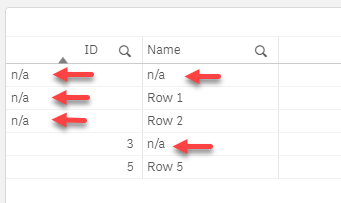
I attached a sample QVF file for you:
A journey of a thousand miles begins with a single step.
Anna90
- Mark as New
- Bookmark
- Subscribe
- Mute
- Subscribe to RSS Feed
- Permalink
- Report Inappropriate Content
HI Arnaldo Sandoval,
Super! The approach is good to fix the issue. And Thank you for the knowledge sharing.😀

 Almen
Almen
- Mark as New
- Bookmark
- Subscribe
- Mute
- Subscribe to RSS Feed
- Permalink
- Report Inappropriate Content
Try this:
Table2:
Load
IF(IsNull(ID)=-1, 'N/A', IF(len(trim(ID))=0, 'N/A', ID)) as IDs
 Chanty4u
- Mark as New
- Bookmark
- Subscribe
- Mute
- Subscribe to RSS Feed
- Permalink
- Report Inappropriate Content
can you try below
if(len(trim(ID))=0,'N/A',ID) as Ids
or
if(ID='', 'N/A', ID) as Ids
or
Alt(ID,'N/A') as IDs
or
if(isnull(ID) or len(trim(ID))=0,'N/A',ID) AS IDs
 RsQK
RsQK
- Mark as New
- Bookmark
- Subscribe
- Mute
- Subscribe to RSS Feed
- Permalink
- Report Inappropriate Content
The problem isn't in the formulas. This should cover the problem:
table1:
LOAD
ROWNO() AS ID,
ROWNO() AS LookupID1
AUTOGENERATE 12;

table2:
NoConcatenate
LOAD
ROWNO() AS ID,
ROWNO() AS LookupID2,
ROWNO() AS IDS
AUTOGENERATE 10;

//Missing records from table2:

tempMissing:
LOAD
ID,
'N/A' as IDS
RESIDENT table1
WHERE NOT EXISTS(LookupID2,LookupID1);

CONCATENATE (table2)
LOAD
ID,
IDS
RESIDENT tempMissing;

DROP TABLE tempMissing;
DROP FIELDS LookupID1,LookupID2;- Mark as New
- Bookmark
- Subscribe
- Mute
- Subscribe to RSS Feed
- Permalink
- Report Inappropriate Content
Thanky you All for the reply. Unfortunately the issue is not fixed, still showing as blank not N/A.
Chanty4u
- Mark as New
- Bookmark
- Subscribe
- Mute
- Subscribe to RSS Feed
- Permalink
- Report Inappropriate Content
can you attach your sample file?
ArnadoSandoval
- Mark as New
- Bookmark
- Subscribe
- Mute
- Subscribe to RSS Feed
- Permalink
- Report Inappropriate Content
Hi @Anna90
You should take a look at the following script variables and statements:
You script will looks like this:
set NullInterpret =''; // '' are interpreted as NULL
Set NullValue='n/a';   // Null values will be replaced with the text 'n/a'
NullAsValue ID, Name;  // the fields to apply the NullInterpret and NullValue

table1:
Load * Inline [
ID, Name
, Row 1
 , Row 2
3,
,
5,Row 5
];
These Null values appear as 'n/a' on the User Interface
I attached a sample QVF file for you:
A journey of a thousand miles begins with a single step.
Anna90
- Mark as New
- Bookmark
- Subscribe
- Mute
- Subscribe to RSS Feed
- Permalink
- Report Inappropriate Content
HI Arnaldo Sandoval,
Super! The approach is good to fix the issue. And Thank you for the knowledge sharing.😀
