Unlock a world of possibilities! Login now and discover the exclusive benefits awaiting you.

- Qlik Community
- :
- Forums
- :
- Analytics & AI
- :
- Products & Topics
- :
- Visualization and Usability
- :
- Rolling 3 Month Sum (Using Relative Month)
- Subscribe to RSS Feed
- Mark Topic as New
- Mark Topic as Read
- Float this Topic for Current User
- Bookmark
- Subscribe
- Mute
- Printer Friendly Page

 AOG123
- Mark as New
- Bookmark
- Subscribe
- Mute
- Subscribe to RSS Feed
- Permalink
- Report Inappropriate Content
Rolling 3 Month Sum (Using Relative Month)
Hi Qlik Community
I am importing aggregated data into QlikSense.
My Objective is to create a Rolling Sum of the previous 3 relative months as per grid below:
Can you kindly point me in the right direction to achieve this.
As the data is already aggregated i only have the below time references available.
RelativeMonth (-1,-2,-3,-4,-5, etc)
Year (2018,2019 etc)
Month (01,02,03,04 etc)
Example of requirement: -
RelativeMonth Sales Rolling 3 Month Sum
-1 1000 3108
-2 1058 4433
-3 1050 4800
-4 2325 6114
-5 1425 5034
-6 2364 5642
-7 1245 5779
-8 2033 7785
-9 2501 8004
-10 3251 6715
-11 2252 3464
-12 1212 1212

 JordyWegman
- Mark as New
- Bookmark
- Subscribe
- Mute
- Subscribe to RSS Feed
- Permalink
- Report Inappropriate Content
Hi Aog,
Does the relative month always have 12 months per year or does this number continue like a sequence number?
If it's the last, do this:
- Get a variable with the current relative month
let vCurrentRelativeMonth = Peek('YourField',0,'YourTable');
- Then use this formula:
Sum({$< [RelativeMonth] = {">=$(vCurrentRelativeMonth)-2","<=$(vCurrentRelativeMonth)"}>}[Rolling 3 Month Sum])
Jordy
Climber

 kaanerisen
- Mark as New
- Bookmark
- Subscribe
- Mute
- Subscribe to RSS Feed
- Permalink
- Report Inappropriate Content
Hi AOG213,
You can get this by using expression below.
Measure : RangeSum(below(sum(Sales),0,3))
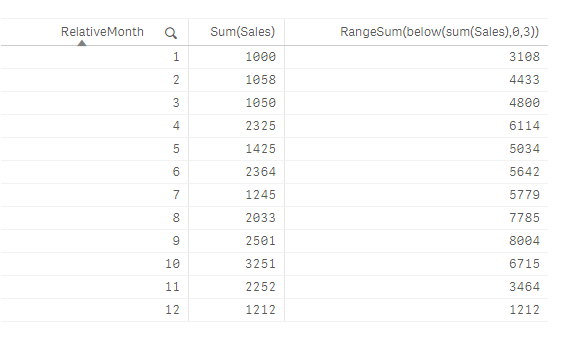
Hope it helps,
AOG123
- Mark as New
- Bookmark
- Subscribe
- Mute
- Subscribe to RSS Feed
- Permalink
- Report Inappropriate Content
Hi Jordy
Regarding your question:
Does the relative month always have 12 months per year or does this number continue like a sequence number?
Its continues as a sequence number.
JordyWegman
- Mark as New
- Bookmark
- Subscribe
- Mute
- Subscribe to RSS Feed
- Permalink
- Report Inappropriate Content
Hi Aog,
Then my solution would work for you, but the solution of @kaanerisen is also a good one!
Jordy
Climber
AOG123
- Mark as New
- Bookmark
- Subscribe
- Mute
- Subscribe to RSS Feed
- Permalink
- Report Inappropriate Content
Thankyou both for your help!
RangeSum(below(sum(sales),0,3))
I tried this before posting here without success. Using this in table view it didn't calculate correctly with other dimensions such as Year and Month included. When I only include RelativeMonth and Sales it works.
Is it possible to add a another dimension to the formulae?
I have 3 categories of sales that need to calculate separately. These can be different columns.
Category. A, B or C
