
- Mark as New
- Bookmark
- Subscribe
- Mute
- Subscribe to RSS Feed
- Permalink
- Report Inappropriate Content
Hi Josh
Is it possible to get the PDF filename the same as the report name? I have a qvw with more than one report that I would like to send it via publisher.
The problem however is that the PDF's have the same file name that it gets from the qvw filename.
Kind Regards

 Josh_Good
- Mark as New
- Bookmark
- Subscribe
- Mute
- Subscribe to RSS Feed
- Permalink
- Report Inappropriate Content
Yes you can change the name of the pdf produced. This is set on the Reduce tab of the task settings. You can either hard code a name or make the name dynamic based on a loop and reduce.

 vikasmahajan
- Mark as New
- Bookmark
- Subscribe
- Mute
- Subscribe to RSS Feed
- Permalink
- Report Inappropriate Content
Hii Josh ,
How to show this Generated PDF files in web portal ?
Vikas
If the issue is solved please mark the answer with Accept as Solution & like it.
If you want to go quickly, go alone. If you want to go far, go together.

.png "Former Employee") Bill_Britt
Bill_Britt
- Mark as New
- Bookmark
- Subscribe
- Mute
- Subscribe to RSS Feed
- Permalink
- Report Inappropriate Content
Hi Vikas,
You can no longer do that with Access Point. You could back in earlier version of Qlik.
Bill
To help users find verified answers, please don't forget to use the "Accept as Solution" button on any posts that helped you resolve your problem or question.
Josh_Good
- Mark as New
- Bookmark
- Subscribe
- Mute
- Subscribe to RSS Feed
- Permalink
- Report Inappropriate Content
Your only option via the web portal in the current product is to manually run the report in the QVW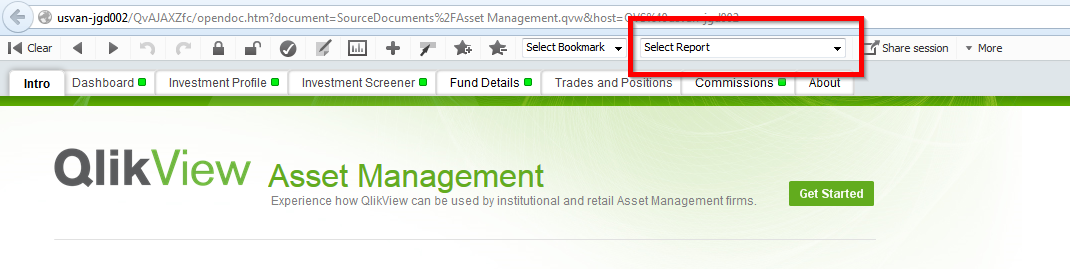
- Mark as New
- Bookmark
- Subscribe
- Mute
- Subscribe to RSS Feed
- Permalink
- Report Inappropriate Content
Is the screenshot from Publisher ? As it has the options Reduce & Distribute ?
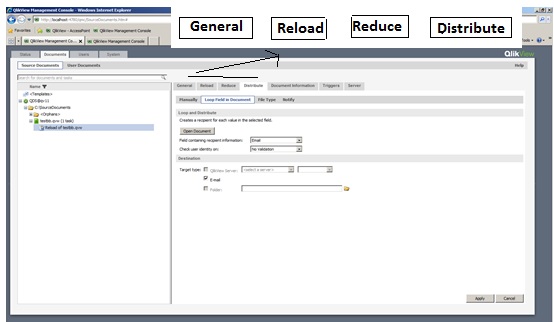
Please let me know if my thinking is wrong..
Josh_Good
- Mark as New
- Bookmark
- Subscribe
- Mute
- Subscribe to RSS Feed
- Permalink
- Report Inappropriate Content
Yes, that image is from an enciornment that has Publisher.
- Mark as New
- Bookmark
- Subscribe
- Mute
- Subscribe to RSS Feed
- Permalink
- Report Inappropriate Content
Hi
we followed same method , but we can't received any mail.
Kindly advice me,How solve this issue.
- Mark as New
- Bookmark
- Subscribe
- Mute
- Subscribe to RSS Feed
- Permalink
- Report Inappropriate Content
Hi josh
we followed same method,but we can't get any mail.
Josh_Good
- Mark as New
- Bookmark
- Subscribe
- Mute
- Subscribe to RSS Feed
- Permalink
- Report Inappropriate Content
Have you connected QlikView to your mail server and confirmed it is connected correctly with a test email?
