Unlock a world of possibilities! Login now and discover the exclusive benefits awaiting you.

- Qlik Community
- :
- All Forums
- :
- QlikView
- :
- MAIL SMTP SETTINGS Personal Edition
- Subscribe to RSS Feed
- Mark Topic as New
- Mark Topic as Read
- Float this Topic for Current User
- Bookmark
- Subscribe
- Mute
- Printer Friendly Page

- Mark as New
- Bookmark
- Subscribe
- Mute
- Subscribe to RSS Feed
- Permalink
- Report Inappropriate Content
MAIL SMTP SETTINGS Personal Edition
Hello All,
I am doing a POC for a client using a personal edition for which I need to create EMAIl ALERTS based on a certain condition. I was trying to configure email alert setting under user preference-> Mail Settings but the settings did not work, I don't have the client network access yet, could this even be done in a personal edition and on home network like using Gmaili SMTP settings, which I tried so many times and TEST always gave an error. Could someone please help me answer this ?

 stabben23
- Mark as New
- Bookmark
- Subscribe
- Mute
- Subscribe to RSS Feed
- Permalink
- Report Inappropriate Content
Can you post a sampled file?
- Mark as New
- Bookmark
- Subscribe
- Mute
- Subscribe to RSS Feed
- Permalink
- Report Inappropriate Content
Hello Staffan,
Say I want to do the mail settings in this file only where an alert would be triggered when id=1, how could I do that?
I have a personal edition of qlikview , I don't know if it is a constraing and I am on my home network.
Thanks and Regards,
Ronak jain

 Joseph_Musekura
- Mark as New
- Bookmark
- Subscribe
- Mute
- Subscribe to RSS Feed
- Permalink
- Report Inappropriate Content
Hi,
Here is an example of settings under user preference-> Mail Settings
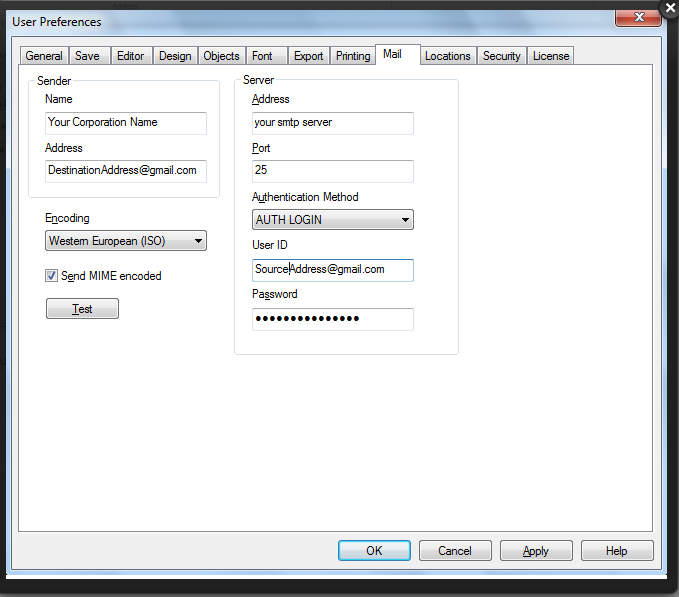
What are you missing here?
- Mark as New
- Bookmark
- Subscribe
- Mute
- Subscribe to RSS Feed
- Permalink
- Report Inappropriate Content
Can I use any other SMTP server besides My Company's. I tried smtp.gmail.com and port #465 but it was giving me a lot of errors
Joseph_Musekura
- Mark as New
- Bookmark
- Subscribe
- Mute
- Subscribe to RSS Feed
- Permalink
- Report Inappropriate Content
Hi,
You can use smpt.gmail.com and port 465 as this require SSL.
see http://support.google.com/mail/bin/answer.py?hl=en&answer=13287
In the previous attached settings under user preference-> Mail Settings, SSL is not listed in Authentication mode.
If you want to use Gmail, a possible solution is macro
Sub SendGMail()

' Object creation
Set objMsg = CreateObject("CDO.Message")
Set msgConf = CreateObject("CDO.Configuration")

' Server Configuration
msgConf.Fields.Item("http://schemas.microsoft.com/cdo/configuration/sendusing") = 2
msgConf.Fields.Item("http://schemas.microsoft.com/cdo/configuration/smtpserver") = "smtp.gmail.com"
msgConf.Fields.Item("http://schemas.microsoft.com/cdo/configuration/smtpserverport") = 465
msgConf.Fields.Item("http://schemas.microsoft.com/cdo/configuration/smtpauthenticate") = 1
msgConf.Fields.Item("http://schemas.microsoft.com/cdo/configuration/sendusername") = "user@gmail.com"
msgConf.Fields.Item("http://schemas.microsoft.com/cdo/configuration/sendpassword") = "password"
msgConf.Fields.Item("http://schemas.microsoft.com/cdo/configuration/smtpusessl") = 1
msgConf.Fields.Update

' Email
objMsg.To = "user@gmail.com"
objMsg.From = "fromuser@domain.com"
objMsg.Subject = "Test send with Gmail account"
objMsg.HTMLBody = "HTML/Plain text message."
objMsg.Sender = "Mr. Name"

Set objMsg.Configuration = msgConf

' Send
objMsg.Send

' Clear
Set objMsg = nothing
Set msgConf = nothing

End Sub
Note : Please check