Unlock a world of possibilities! Login now and discover the exclusive benefits awaiting you.

- Qlik Community
- :
- All Forums
- :
- QlikView
- :
- When am I? (What timezone setting need to be synch...
- Subscribe to RSS Feed
- Mark Topic as New
- Mark Topic as Read
- Float this Topic for Current User
- Bookmark
- Subscribe
- Mute
- Printer Friendly Page

 evan_kurowski
- Mark as New
- Bookmark
- Subscribe
- Mute
- Subscribe to RSS Feed
- Permalink
- Report Inappropriate Content
When am I? (What timezone setting need to be synchronized in order to collect file times?)
Hello Community,
I have a question regarding time zone settings and the relationship between the present, operating system times, and the QlikView settings/functions. While trying to form an application that used file modification times as part of the keying system, I got the following results:
Settings:
My Windows operating system is set to the following time zone (with Daylight savings checked):
- (UTC-05:00) Eastern Time (US & Canada)
Results when scanning a file from a local Drive:
Windows Explorer shows file modification time of 5:00PM
- QlikView FileTime() function reports as 5:00PM
Results from scanning files on a network server:
All file modification times collected from QlikView FileTime() function are increased by +1 hour from those shown in Explorer
- (5:00PM in Explorer, reports as 6:00PM in QlikView FileTime() function)
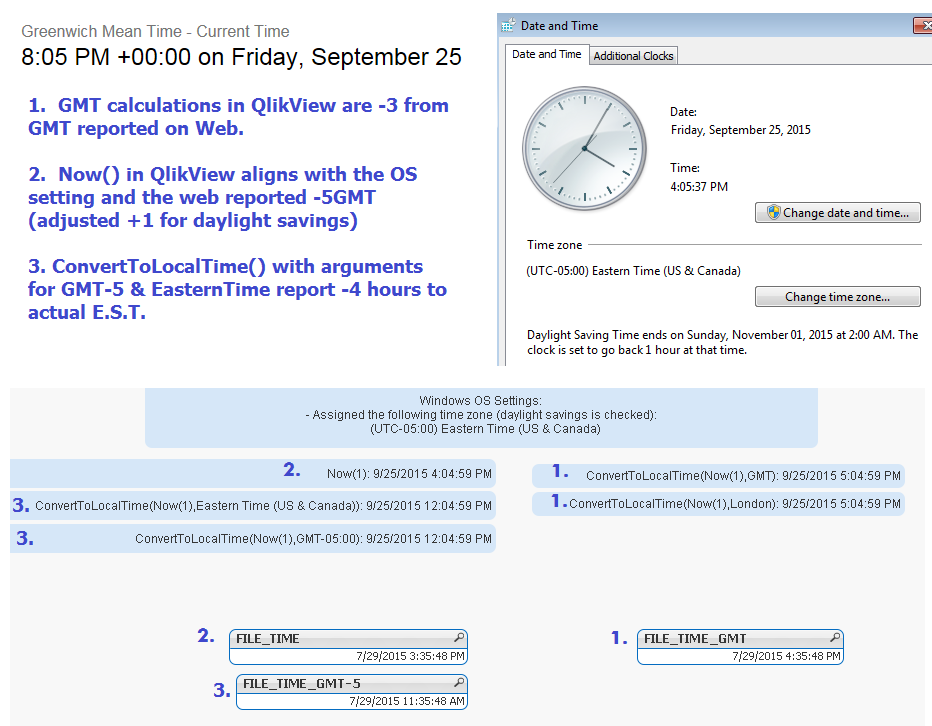
Results of functions used in QV Interface (using the 8:00 GMT as an example reference point):
- website reports GMT of 8:00PM
- Now() = 4:00PM // (matching system clock of -5GMT Easter Standard Time)
- ConvertToLocalTime(Now(),'GMT') = 5:00PM //reports 5:00PM +1 hours - Atlantic Time
- ConvertToLocalTime(Now(),'Eastern Time (US & Canada)') = 12:00PM //reports -4 hours Alaska
So my question is “When am I”? Based on the above, it appears the results are being placed in 3 different time zones at once. What settings can be synchronized in order to consistently collect file times aligned to a single time zone designated the “time point of reference”?
evan_kurowski
- Mark as New
- Bookmark
- Subscribe
- Mute
- Subscribe to RSS Feed
- Permalink
- Report Inappropriate Content
I guess if this is an issue that can't be ironed out, maybe I'll revise the situation.
When collecting flat files from any possibility of sources, is there a way I can form an identifier based on file attributes to check whether the file has been modified from the last time I attempted to read information from it?
The premise here was, if the file name & modification time is unchanged, you don't need to reload this data.
Any ideas?

 marcus_sommer
- Mark as New
- Bookmark
- Subscribe
- Mute
- Subscribe to RSS Feed
- Permalink
- Report Inappropriate Content
I could think to read the timezone settings from the server registry - Time Zone registry key? - per qv-function:
GetRegistryString(pfad, key)
and then to compare this information with the timezone from the qv system and then to add the differences to the timestamp or put them into a new field. A maybe easier workaround could be before reading the timestamps to store a dummy-file on this server and read afterwards the timestamp from server and compare it with the timestamp from storing.
Seems to be rather ugly workarounds but within a sub-routine or an include-variable it shouldn't clutter the code very much.
- Marcus
evan_kurowski
- Mark as New
- Bookmark
- Subscribe
- Mute
- Subscribe to RSS Feed
- Permalink
- Report Inappropriate Content
Hello Marcus,
This is an interesting suggestion. I followed your link to the Microsoft Technet page where the thread describes setting a registry key 'ActiveTimeBias'.
Time Zone registry key?
HKEY_LOCAL_MACHINE\SYSTEM\CurrentControlSet\Control\TimeZoneInformation
I think I'll be creating an attribute for ActiveTimeBias, creating groups using this attribute, and then I can schedule scripts against these groups accordingly.
Before I could contemplate what effect setting ActiveTimeBias has on the QlikView FileTime() function, or what I should set it to, I took a look at the registry values themselves.
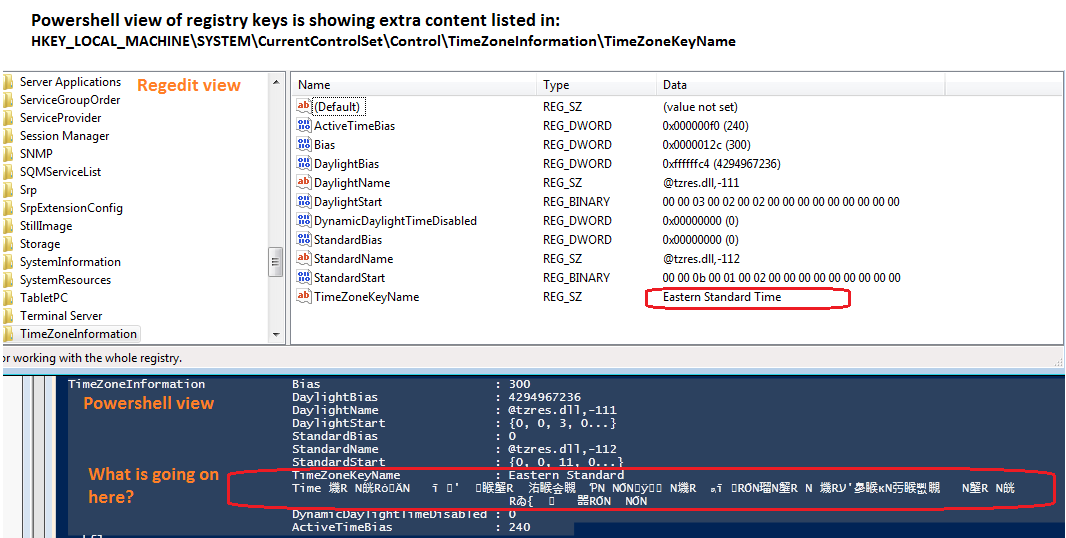
Something strange occurred and now I have another question. When I examined the registry keys in regedit everything looks clean, but when I read the same registry area in Powershell, the key 'TimeZoneKeyName' seems to have a lot of additional content embedded after the string 'Eastern Standard Time'. Any ideas on what is going on with that strange looking registry key?
**Update:
I tried changing the value of 'ActiveTimeBias' from 240 to 0. My QlikView function ConvertToLocalTime(Now(1), 'Eastern Time (US & Canada)') is off by 4 hours (240 minutes), so I was hopeful this would re-align things, however chaning the registry keys in this area hasn't had a noticeable impact on QlikView functions (that I'm aware of).
Tried instructions here for setting the CMOS clock to UTC, in conjunction with creating the registry var RealTimeIsUniversal.
https://technet.microsoft.com/en-us/sqlserver/ff794720(v=winembedded.60) However, after reboots still could not sync the QV functions.
marcus_sommer
- Mark as New
- Bookmark
- Subscribe
- Mute
- Subscribe to RSS Feed
- Permalink
- Report Inappropriate Content
The difference between regedit and powershell could be caused by a multi-row entrie into this key and which regedit didn't display in this window. Also the qv function GetRegistryString(pfad, key) read only the first row - I had have already trouble with this.
Maybe my second workaround-suggestion with a dummy-file and the differences between this store-timestamp and the file-timestamp is easier to use.
- Marcus
evan_kurowski
- Mark as New
- Bookmark
- Subscribe
- Mute
- Subscribe to RSS Feed
- Permalink
- Report Inappropriate Content
Hello Marcus, Thanks for your input on this.
Let me see if I'm understanding this strategy correctly. I create a local file, and I know the timestamp is 5:15pm. This file is moved out to other network locations as a "time marker".
I run a scan of this same file while it resides on a network location, and FileTime() returns 3:15pm, therefore I can discern an offset of -2 hours for all content during that parse. Is that how this is supposed to work?
As for the multi-line registry entries only visible in certain clients, that seems like a confusing concept! It opens up new questions about how to consistently read a registry entry. Thanks again for your suggestion though, it seems like a workable option.
marcus_sommer
- Mark as New
- Bookmark
- Subscribe
- Mute
- Subscribe to RSS Feed
- Permalink
- Report Inappropriate Content
Hello Evan,
yes, this is excactly what I meant with my dummy-file workaround (create local or on the network-store - what better worked).
To read multi-row registry keys you could use vbs like:
set objRegistry = CreateObject("Wscript.shell")
Key = objRegistry.RegRead(vUserInfo)
- Marcus
