Unlock a world of possibilities! Login now and discover the exclusive benefits awaiting you.

- Qlik Community
- :
- All Forums
- :
- QlikView
- :
- column change
- Subscribe to RSS Feed
- Mark Topic as New
- Mark Topic as Read
- Float this Topic for Current User
- Bookmark
- Subscribe
- Mute
- Printer Friendly Page

- Mark as New
- Bookmark
- Subscribe
- Mute
- Subscribe to RSS Feed
- Permalink
- Report Inappropriate Content
column change
Hi,anyone is there??
i need a help.
i have created a bucket...in front end it shows the total value at the column no. 1..i used pivot table...i have to change the column of the total value to whrevr i want..is there any option..can i change ths in script.pls hlp..me
- « Previous Replies
-
- 1
- 2
- Next Replies »
Accepted Solutions
- Mark as New
- Bookmark
- Subscribe
- Mute
- Subscribe to RSS Feed
- Permalink
- Report Inappropriate Content
Hi,
I would suggest, create expression for each category as well as total.
E.g. Create expression for below
- 0-7 days
- 8-15 days
- ....
- Total
- >7

 Chanty4u
- Mark as New
- Bookmark
- Subscribe
- Mute
- Subscribe to RSS Feed
- Permalink
- Report Inappropriate Content
u want to change label name or how it is?
- Mark as New
- Bookmark
- Subscribe
- Mute
- Subscribe to RSS Feed
- Permalink
- Report Inappropriate Content
No,I need to change whole column...to the next column..do u get dt..i am having grand total..bt it appears in first column....i have to change the column ..whrever i wnt
Chanty4u
- Mark as New
- Bookmark
- Subscribe
- Mute
- Subscribe to RSS Feed
- Permalink
- Report Inappropriate Content
Am not sure
You just need to drag columns, by selecting column header for dimensions only.
You cannot drag expression column to be as a first one.
orelse
Go to expression tab and play with promote and demote feature.
- Mark as New
- Bookmark
- Subscribe
- Mute
- Subscribe to RSS Feed
- Permalink
- Report Inappropriate Content
i can't drag the columns...also thts not a dimension and measures..so i can't use promote,demote function too..can i do this through the script..is there any option
- Mark as New
- Bookmark
- Subscribe
- Mute
- Subscribe to RSS Feed
- Permalink
- Report Inappropriate Content
i need my output like ths nly,,bt the column of total value shows in column no.1..how can i change

- Mark as New
- Bookmark
- Subscribe
- Mute
- Subscribe to RSS Feed
- Permalink
- Report Inappropriate Content
When you are talking related script, you may show few screen shots with expected output on Pivot Table. Your first posting related to just column moving - Already Chanty gave same reply to you. Can you elaberate more 
- Mark as New
- Bookmark
- Subscribe
- Mute
- Subscribe to RSS Feed
- Permalink
- Report Inappropriate Content
See,this is my problem..i can't change the column of total value..i can't drag..i cant promote demote..i need this total value at the column no.3
- Mark as New
- Bookmark
- Subscribe
- Mute
- Subscribe to RSS Feed
- Permalink
- Report Inappropriate Content
Hi,
I would suggest, create expression for each category as well as total.
E.g. Create expression for below
- 0-7 days
- 8-15 days
- ....
- Total
- >7

 varshavig12
- Mark as New
- Bookmark
- Subscribe
- Mute
- Subscribe to RSS Feed
- Permalink
- Report Inappropriate Content
I guess we can only set the Total column as the first column( i.e Top) or as the last column (i.e bottom ).
--> In presentation tab
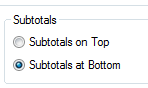
As suggested by Payal, you need to add Total in your bucket expression and then sort accordingly.
- « Previous Replies
-
- 1
- 2
- Next Replies »