Unlock a world of possibilities! Login now and discover the exclusive benefits awaiting you.

- Qlik Community
- :
- All Forums
- :
- QlikView
- :
- More than 3 segments for Traffic light gauge repre...
- Subscribe to RSS Feed
- Mark Topic as New
- Mark Topic as Read
- Float this Topic for Current User
- Bookmark
- Subscribe
- Mute
- Printer Friendly Page

 bhavikumehta
- Mark as New
- Bookmark
- Subscribe
- Mute
- Subscribe to RSS Feed
- Permalink
- Report Inappropriate Content
More than 3 segments for Traffic light gauge representation of Expression
Hello,
Requirement: Show Actual vs Expected results in Traffic light bullets form. There are 4 Segments :
1. if Actual >= Expected then Green (Segment 1)
2. if Actual between Expected and Expected - 9% then Yellow (Segment 2)
3. if Actual < Expected - 9% then Red (Segment 3)
4. if Expected is zero then Grey (Segment 4)
Min and Max values set to -10000 and 10000
Issue: I am getting only 3 colors which i have set for first 3 segments. 4th segment color shows as 3rd segment color.
Am i missing any setting here? Does Traffic light gauge consider only first 3 segment colors? If yes then please suggest alternative to implement above requirement of showing Bullet colors based on different conditions.
Thank you.
Accepted Solutions

 vvira1316
- Mark as New
- Bookmark
- Subscribe
- Mute
- Subscribe to RSS Feed
- Permalink
- Report Inappropriate Content
This one uses traffic light gauge
=If(Expected=0,0,
If(Actual>=Expected, 1,
If(Actual < Expected and (Expected-Actual)/Expected*100 <= 9, 2,3
)))
gauge segment lower bound setting of 0 (grey), 1 (green), 2 (yellow), 3 (red)


 vishsaggi
- Mark as New
- Bookmark
- Subscribe
- Mute
- Subscribe to RSS Feed
- Permalink
- Report Inappropriate Content
May be try like keeping the 4th as 1st like this order?
4. if Expected is zero then Grey (Segment 4)
1. if Actual >= Expected then Green (Segment 1)
2. if Actual between Expected and Expected - 9% then Yellow (Segment 2)
3. if Actual < Expected - 9% then Red (Segment 3)
 effinty2112
- Mark as New
- Bookmark
- Subscribe
- Mute
- Subscribe to RSS Feed
- Permalink
- Report Inappropriate Content
Hi Bravik,
Try:
Pick(
Match(-1,
Expected = 0,
Actual >= Expected,
Actual >= 0.91*Expected,
-1),
LightGray(), Green(),Yellow(),Red())
Regards
Andrew

 Peter_Cammaert
- Mark as New
- Bookmark
- Subscribe
- Mute
- Subscribe to RSS Feed
- Permalink
- Report Inappropriate Content
Are you defining this gauge as a separate object or as a mini-chart?
bhavikumehta
- Mark as New
- Bookmark
- Subscribe
- Mute
- Subscribe to RSS Feed
- Permalink
- Report Inappropriate Content
tried re-ordering.. 4th segment color does not show up instead it shows 3rd segment color for 4th segment.
bhavikumehta
- Mark as New
- Bookmark
- Subscribe
- Mute
- Subscribe to RSS Feed
- Permalink
- Report Inappropriate Content
Are you asking to apply using only 1 segment ?
bhavikumehta
- Mark as New
- Bookmark
- Subscribe
- Mute
- Subscribe to RSS Feed
- Permalink
- Report Inappropriate Content
Using Traffic light gauge representation for an expression in a Pivot chart
vishsaggi
- Mark as New
- Bookmark
- Subscribe
- Mute
- Subscribe to RSS Feed
- Permalink
- Report Inappropriate Content
Can you share your expression if possible?
vvira1316
- Mark as New
- Bookmark
- Subscribe
- Mute
- Subscribe to RSS Feed
- Permalink
- Report Inappropriate Content
How about following
=If(Expected=0,'qmem://ImageID/Grey',
If(Actual>=Expected, 'qmem://ImageID/Green',
If(Actual < Expected and (Expected-Actual)/Expected*100 <= 9, 'qmem://ImageID/Yellow',
'qmem://ImageID/Red'
)))
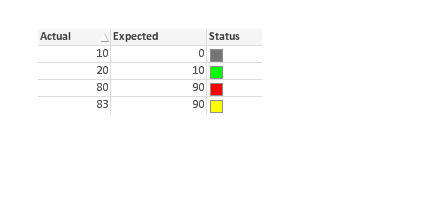
instead of image you can use RGB() of each color you want.
vvira1316
- Mark as New
- Bookmark
- Subscribe
- Mute
- Subscribe to RSS Feed
- Permalink
- Report Inappropriate Content
This one uses traffic light gauge
=If(Expected=0,0,
If(Actual>=Expected, 1,
If(Actual < Expected and (Expected-Actual)/Expected*100 <= 9, 2,3
)))
gauge segment lower bound setting of 0 (grey), 1 (green), 2 (yellow), 3 (red)
