Unlock a world of possibilities! Login now and discover the exclusive benefits awaiting you.

- Qlik Community
- :
- All Forums
- :
- QlikView
- :
- QlikView schema
- Subscribe to RSS Feed
- Mark Topic as New
- Mark Topic as Read
- Float this Topic for Current User
- Bookmark
- Subscribe
- Mute
- Printer Friendly Page

 ali_hijazi
- Mark as New
- Bookmark
- Subscribe
- Mute
- Subscribe to RSS Feed
- Permalink
- Report Inappropriate Content
QlikView schema
Hello
I'm still new to expressor
I'm reading the documentation that comes with the expressor studio
I started reading about QlikView extensions..... I need to create a QlikVeiw schema however I can't find this option in the drop-down-menu of the New Schema button
Please advise
am i missing some installation files, knowing that I've read that QlikView extensions is installed by default with the expressor studio!!
Accepted Solutions

 Michael_Tarallo
- Mark as New
- Bookmark
- Subscribe
- Mute
- Subscribe to RSS Feed
- Permalink
- Report Inappropriate Content
Please note that after you create a Workspace - you MUST enable ALL extensions - to enable the QlikView Read and Write operators - including the QlikView Schema wizard.
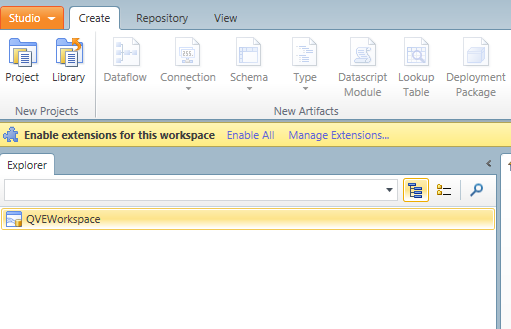
It also can be found in the documentaiotn here: http://documentation.qlik.com/expressor/3.7/expressor_3.htm
To enable AFTER you created a Workspace:
Studio - > Manage Extensions
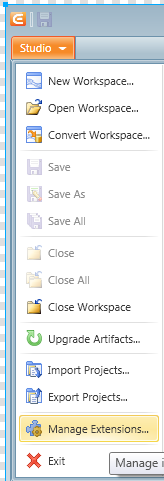
Select the extension and Enable
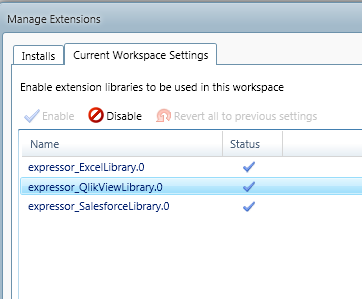
Mike T
Mike Tarallo
Qlik
Michael_Tarallo
- Mark as New
- Bookmark
- Subscribe
- Mute
- Subscribe to RSS Feed
- Permalink
- Report Inappropriate Content
Hello ali_hijazi,
Please check out this document and video - it will help clairify the schemas and semantic type content. Please let me know how you do.
http://community.qlik.com/docs/DOC-3382
Regards,
Mike T
Mike Tarallo
Qlik
Michael_Tarallo
- Mark as New
- Bookmark
- Subscribe
- Mute
- Subscribe to RSS Feed
- Permalink
- Report Inappropriate Content
Please note that after you create a Workspace - you MUST enable ALL extensions - to enable the QlikView Read and Write operators - including the QlikView Schema wizard.
It also can be found in the documentaiotn here: http://documentation.qlik.com/expressor/3.7/expressor_3.htm
To enable AFTER you created a Workspace:
Studio - > Manage Extensions
Select the extension and Enable
Mike T
Mike Tarallo
Qlik
Michael_Tarallo
- Mark as New
- Bookmark
- Subscribe
- Mute
- Subscribe to RSS Feed
- Permalink
- Report Inappropriate Content
This one will also help you:
http://community.qlik.com/thread/52436?tstart=0
Mike Tarallo
Qlik
