Unlock a world of possibilities! Login now and discover the exclusive benefits awaiting you.

- Qlik Community
- :
- Forums
- :
- Forums by Product
- :
- Products (A-Z)
- :
- Qlik Sense
- :
- Documents
- :
- Restoring RootAdmin role on QS July / PostgreSQL 9...
- Move Document
- Delete Document
- Subscribe to RSS Feed
- Mark as New
- Mark as Read
- Bookmark
- Subscribe
- Printer Friendly Page
- Report Inappropriate Content
Restoring RootAdmin role on QS July / PostgreSQL 9.6 after Server Name change

 cmorri1988
- Move Document
- Delete Document and Replies
- Mark as New
- Bookmark
- Subscribe
- Mute
- Subscribe to RSS Feed
- Permalink
- Report Inappropriate Content
Restoring RootAdmin role on QS July / PostgreSQL 9.6 after Server Name change
Recently I was required to change the server/computer name of an AWS instance.
The instance was using simple Windows authentication.
As the directory name is generated from the server name, the RootAdmin role was lost to the old directory name.
NEWSERVERNAME\Administrator and not NEWSERVERNAME\Administrator
To restore this I completed the following steps:
1. Remote connect to the server hosting Qlik Sense
2. Download pgAdmin4 from here:
https://www.postgresql.org/ftp/pgadmin/pgadmin4/v1.0/windows/
3. Install and launch pgadmin4
4. From the home screen, click on 'Add New Server' and populate with the connection details shown.
Please include a database password if this was added during the installation.
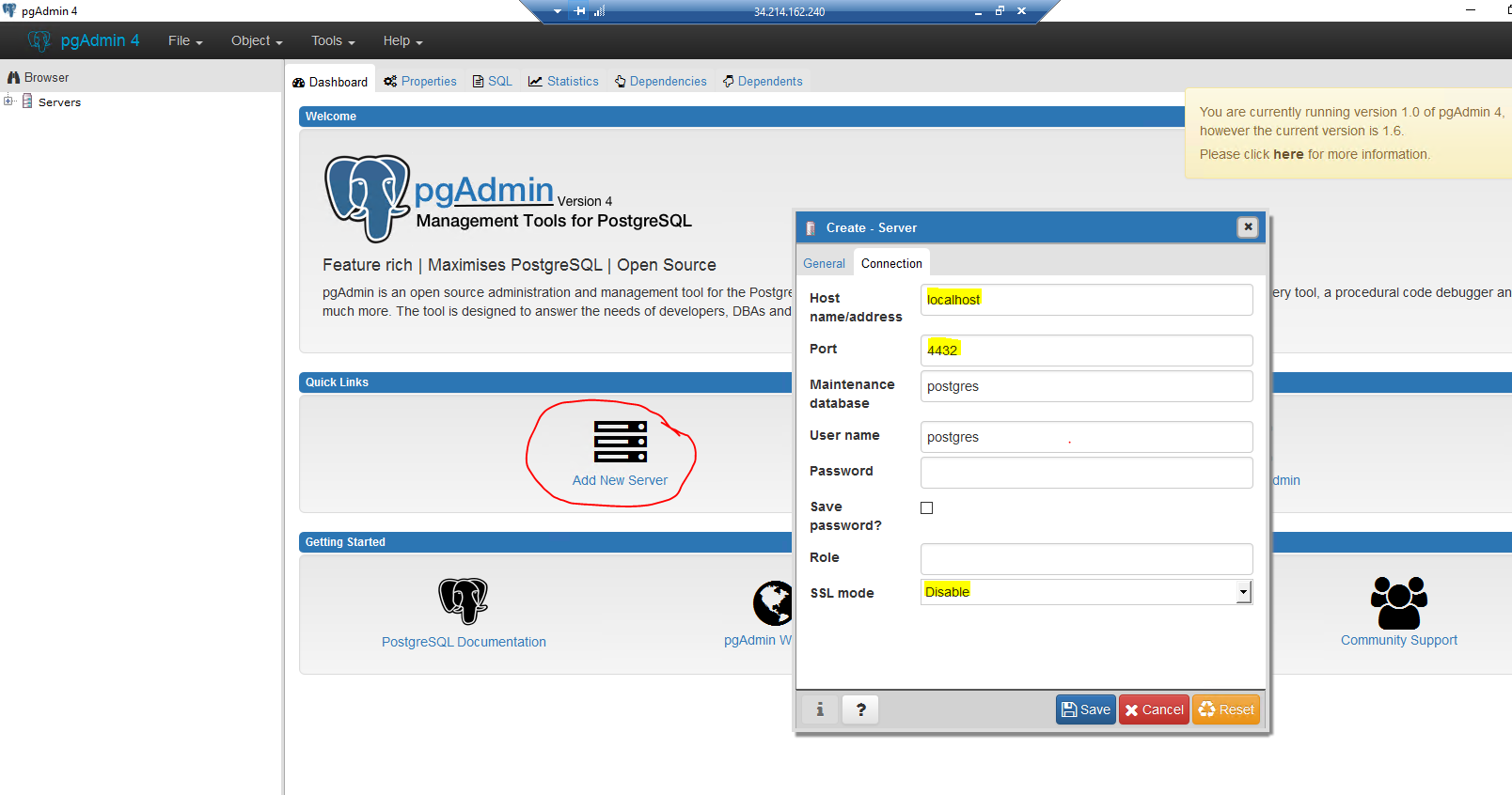
5. Go to:
Servers > Qlik Sense (or whatever you called the connection in step 4) > Databases>QSR>Schemas>public>Tablesand double click on the tableUsers- right click on "View Data" > "View All Rows"
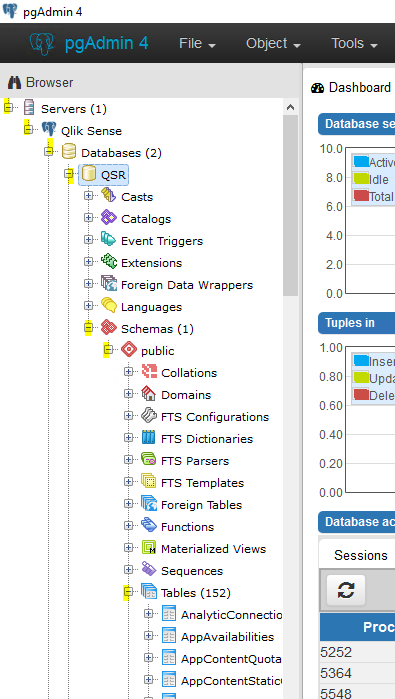
6. Find the user you wish to add RootAdmin rights too.
Click on the RolesStringtext box within that user row.
Type 'RootAdmin' and click save. Also click the floppy disk icon on the menu bar highlighted.

7. Restart the repository service.
---------------------------------------------
N.B. If you are having issues connecting the QMC and Hub prior to this step,
1. Stop the repository services
2. Delete your certificates in MMC
3, Ensure the string within host.cfg file stored at C:\ProgramData\Qlik\Sense (once decrypted using base 64 here: https://www.base64decode.org/) shows the correct and current server name.
4. Perform a repair from the program list and Qlik Sense on your server, and restart all Qlik Sense services.
Hope this helps,
Carmelle

- Move Comment
- Delete Comment
- Mark as Read
- Mark as New
- Bookmark
- Permalink
- Report Inappropriate Content
Super useful, it saved me of having to create another AWS EC2 instance .. just one comment, perhaps when you said "NEWSERVERNAME\Administrator and not NEWSERVERNAME\Administrator" you meant "OLDSERVERNAME\Administrator and not NEWSERVERNAME\Administrator" .. Tx
 Mr_Pearl
- Move Comment
- Delete Comment
- Mark as Read
- Mark as New
- Bookmark
- Permalink
- Report Inappropriate Content
Thank you that was very helpful.