Unlock a world of possibilities! Login now and discover the exclusive benefits awaiting you.

Announcements
Want to see what's currently in public preview? We've pulled it all together in one place. Check it out here
- Qlik Community
- :
- Forums
- :
- Analytics & AI
- :
- Products & Topics
- :
- Visualization and Usability
- :
- How to show last datapoint in Time-aware charts
Options
- Subscribe to RSS Feed
- Mark Topic as New
- Mark Topic as Read
- Float this Topic for Current User
- Bookmark
- Subscribe
- Mute
- Printer Friendly Page
Turn on suggestions
Auto-suggest helps you quickly narrow down your search results by suggesting possible matches as you type.
Showing results for

Anonymous
Not applicable
2017-01-09
07:36 AM
- Mark as New
- Bookmark
- Subscribe
- Mute
- Subscribe to RSS Feed
- Permalink
- Report Inappropriate Content
How to show last datapoint in Time-aware charts
Hello,
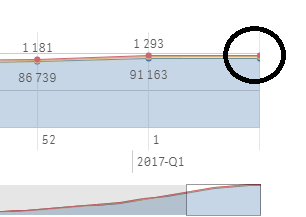
I have made some time-aware charts and I noticed that when choosing to show datapoints, the last point in the series did not show a value. Also, the last datapoint in a line graph or bar in barchart is too narrow to easily point at to get the mousover-hover-field up. This can be critical in a time-aware chart since the last point is often the current date, or atleast the most recent date and, therefore, most interesting.
Is there a way to force this point to show in graphs?
Example:
Regards,
Kristian Kirkeng
929 Views
0 Replies