Unlock a world of possibilities! Login now and discover the exclusive benefits awaiting you.

- Qlik Community
- :
- Forums
- :
- Analytics & AI
- :
- Products & Topics
- :
- Visualization and Usability
- :
- Re: I've just installed Qlik Sense but when I try ...
- Subscribe to RSS Feed
- Mark Topic as New
- Mark Topic as Read
- Float this Topic for Current User
- Bookmark
- Subscribe
- Mute
- Printer Friendly Page

 drjoffily
- Mark as New
- Bookmark
- Subscribe
- Mute
- Subscribe to RSS Feed
- Permalink
- Report Inappropriate Content
I've just installed Qlik Sense but when I try to open it throws an error
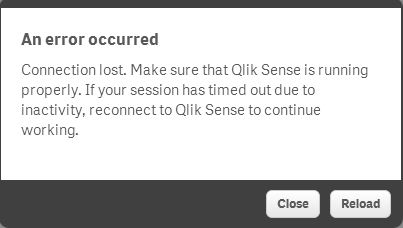
I've just installed Qlik Sense but when I try to open it it throws the error below. I've tried to kill the QV process and start it again but it doesn't work. Any idea?
- « Previous Replies
-
- 1
- 2
- Next Replies »
drjoffily
- Mark as New
- Bookmark
- Subscribe
- Mute
- Subscribe to RSS Feed
- Permalink
- Report Inappropriate Content
Hi Clint, I have "Use automatic configuration script" checked and http://proxy:8083/ as the Address. How do I bypass it?
drjoffily
- Mark as New
- Bookmark
- Subscribe
- Mute
- Subscribe to RSS Feed
- Permalink
- Report Inappropriate Content
Hi Thomas, how do I "use an exclude in it"?

 Thomas_Hopp
- Mark as New
- Bookmark
- Subscribe
- Mute
- Subscribe to RSS Feed
- Permalink
- Report Inappropriate Content
Hi,
I'm guessing it looks like this ?
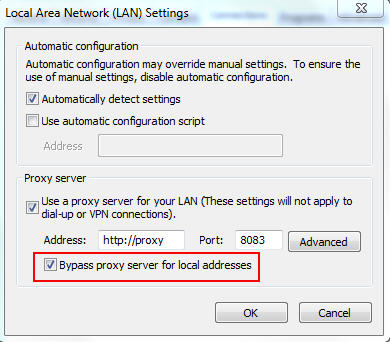
If that's true, please make sure you have the Bypass check box selected as Clint was telling you as well. The exclude would be used if you have a script in use. I thought initially you are using a script.
Thomas
Director - Product Management
Thomas_Hopp
- Mark as New
- Bookmark
- Subscribe
- Mute
- Subscribe to RSS Feed
- Permalink
- Report Inappropriate Content
Sorry,
this is how it looks ?
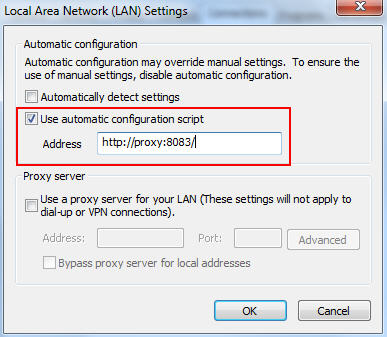
Then you have to do it in the script. Like an example you can find in the internet. It of course must fit your Proxy settings. That's something you have to discuss with the owner of the script.
function FindProxyForURL(url, host)
{ if (isPlainHostName(host))
return "DIRECT";
else
return "PROXY proxy:80";
}
Director - Product Management
drjoffily
- Mark as New
- Bookmark
- Subscribe
- Mute
- Subscribe to RSS Feed
- Permalink
- Report Inappropriate Content
Thanks Thomas but it doesn't work. I don't seem to be able to get my internet working and being able to open QV Sense at the same time.
drjoffily
- Mark as New
- Bookmark
- Subscribe
- Mute
- Subscribe to RSS Feed
- Permalink
- Report Inappropriate Content
I haven't tried the script bit. I'll talk to the network administrators here and let you know.
Thanks for your help.
 ergustafsson
- Mark as New
- Bookmark
- Subscribe
- Mute
- Subscribe to RSS Feed
- Permalink
- Report Inappropriate Content
Hi Marcos,
Perhaps you can post a screenshot (fade out the specific names) of your proxy settings of your default browser and we can see what we can find out of it.
Regards,
Erik
drjoffily
- Mark as New
- Bookmark
- Subscribe
- Mute
- Subscribe to RSS Feed
- Permalink
- Report Inappropriate Content
Hi Erik,
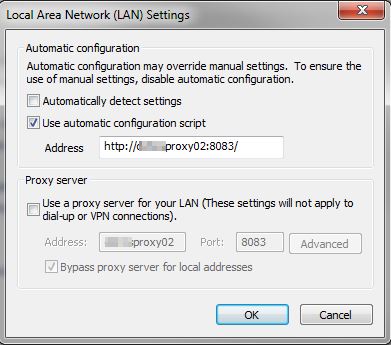
The configuration below is the default setup. The one the internet works but I get the error I posted above.
If I change it to any other combination my QV Sense works but my internet doesn't.
I've contacted the network guys but they'll only be available for me on Monday.
The only solution I haven't tried from the posts above is the one from Thomas where he mentioned some scripts.
ergustafsson
- Mark as New
- Bookmark
- Subscribe
- Mute
- Subscribe to RSS Feed
- Permalink
- Report Inappropriate Content
Hi Marcos,
As Thomas mentioned, then you have to do it in the script. The "network guys" should be able to help you out on Monday. It interferes with our embedded browser, thus you have to change the actual script to exclude local addresses.
Regards,
Erik

- Mark as New
- Bookmark
- Subscribe
- Mute
- Subscribe to RSS Feed
- Permalink
- Report Inappropriate Content
HI Marcos,
This should solve the issue .
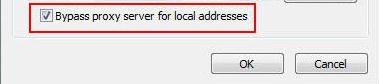
Thanks ,
Raja
- « Previous Replies
-
- 1
- 2
- Next Replies »