Unlock a world of possibilities! Login now and discover the exclusive benefits awaiting you.

- Qlik Community
- :
- All Forums
- :
- QlikView
- :
- Re: Governance Dashboard: Error in hidden script
- Subscribe to RSS Feed
- Mark Topic as New
- Mark Topic as Read
- Float this Topic for Current User
- Bookmark
- Subscribe
- Mute
- Printer Friendly Page

- Mark as New
- Bookmark
- Subscribe
- Mute
- Subscribe to RSS Feed
- Permalink
- Report Inappropriate Content
Governance Dashboard: Error in hidden script
Hi
I installed the governance dashboard on my qv server where the qlikview documents reside and tried to run the reload but keep getting this error message.
“Error in hidden script. For details, open hidden script before reload.
For security reasons, failed hidden script code is not shown.”
I looked into this thread but the thread is from 2012 and didn’t seem to shed any light on the issue. http://community.qlik.com/thread/63476
The details:
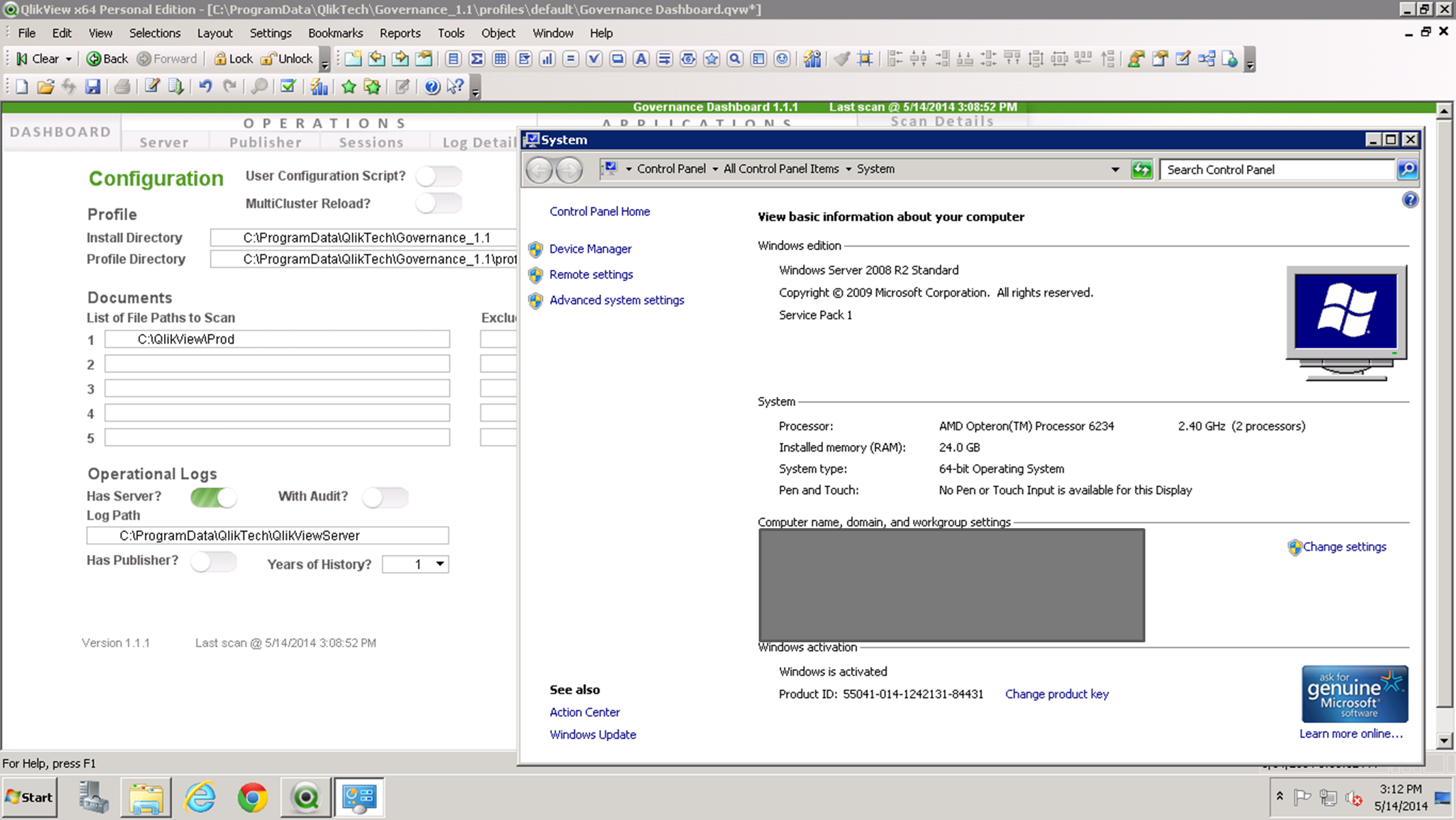
I also have an email out to qvgdfeedback@qliktech.com to see if they can shed some light on it. I'll update this post if I find anything.
- « Previous Replies
-
- 1
- 2
- Next Replies »

 Tyler_Waterfall
- Mark as New
- Bookmark
- Subscribe
- Mute
- Subscribe to RSS Feed
- Permalink
- Report Inappropriate Content
Hello Philip,
Can you send the following information to QlikTech Support so we can troubleshoot it?
- Governance Dashboard.qvw.log
- fullscan.messages.log*
- fullscan.statistics.log*
- Description of how your environment is configured:
- Version of QlikView
- Where is GovernanceDashboard.exe installed?
- Where is the reload occurring?
- User account that is reloading it - does it have read/write access to the profiles and file folders?
You might try reloading without "Has Server" to see if you get the same issue.
Tyler
* in profiles\default\QVX_LastRun folder
- Mark as New
- Bookmark
- Subscribe
- Mute
- Subscribe to RSS Feed
- Permalink
- Report Inappropriate Content
Hmm... I might have been guilty of an ignorant oversight.
I just did a clean reinstall of the Governance Dashboard and noticed a warning that there was a Qv.exe still running and it suggested to shut it down. (Another user had it running on their server session.) I don't remember seeing this before but I might have just continued past the warning.
After closing all Qv.exe processes and doing a clean reinstall it worked fine.
If I have any other issues I'll post them here along with the logs you suggested.

 cheburashka
- Mark as New
- Bookmark
- Subscribe
- Mute
- Subscribe to RSS Feed
- Permalink
- Report Inappropriate Content
Hello,
My Governance Dashboard gives an "Error: Error in hidden script. For details, open hidden script before reload."
It only gives this error when scanning a particular folder. The directory test works though.
I found something strange in the "Fullscan messages log".
What does the "Extract Directory Scan Error mean"?
I attached the log of the dashboard and the "Fullscan messages log".
,KR Koen
Tyler_Waterfall
- Mark as New
- Bookmark
- Subscribe
- Mute
- Subscribe to RSS Feed
- Permalink
- Report Inappropriate Content
Thanks for including the log files!
From the FullScan.messages.log, I see the following errors (noted by the -A and -F):
Multi-Transform QVW - OPERATOR-0016-F: toolId 186.0, name 'Multi-Transform QVW' - Exception 'BufferAllocatorException' occurred in the 'process' function for thread 0. (FullScan.Step_1)
Multi-Transform QVW - OUTPUT_BUFFER-0005-A: An output record is too large. The hard limit on output buffer size of 33,554,432 bytes has been exceeded by a request for 40,173,568 bytes. (FullScan.Step_1)
Multi-Transform QVW - OPERATOR-0005-F: toolId 186.0, name 'Multi-Transform QVW' - the 'process' function failed for thread 0. (FullScan.Step_1)
The fact that it fails on the Multi-Transform QVW operator denotes there is a problem scanning one of the QVWs. The error "An output record is too large" could mean several things about one or more of the QVWs in the folder you are scanning. Here is my guess in order of likelihood:
- a .qvw has extensive data lineage. This can happen when you use a load ... from *.* or a large loop extract (imagine pulling from thousands of log files).
- a .qvw contains hundreds or thousands of data tables and/or fields. This is also written to the qvw XML metadata which could be too large to read.
- a .qvw is corrupt.
- a .qvw has a super long SQL select statement. Never seen this cause a problem, but is possible.
Are you aware of any qvws that might have any of these characteristics?
- Mark as New
- Bookmark
- Subscribe
- Mute
- Subscribe to RSS Feed
- Permalink
- Report Inappropriate Content
I am having this error when executing the script..any help would be greatly appreciated..
Table not found
tempQVWs:
Load FileName as tempFileName,
LoadDateKey
Resident FileList
Where Extension = 'qvw'
AND FileDate >= '2015-03-16'
AND (FileTime >= '1995-08-26 00:00:00'
OR not exists (SOE_FileName,FileName))
AND not exists (NonReadableMetadataQVW,FileName)
Tyler_Waterfall
- Mark as New
- Bookmark
- Subscribe
- Mute
- Subscribe to RSS Feed
- Permalink
- Report Inappropriate Content
Are you pointing to a file folder (on the Configuration page of the app, "List of File Paths to Scan") which has no QVWs?
Or, does this folder only contain one QVW and the QVW can't be read (really old or corrupt)?
- Mark as New
- Bookmark
- Subscribe
- Mute
- Subscribe to RSS Feed
- Permalink
- Report Inappropriate Content
Hi, did you find an answer to this? Thanks
 erjohnso
- Mark as New
- Bookmark
- Subscribe
- Mute
- Subscribe to RSS Feed
- Permalink
- Report Inappropriate Content
I was having same issue with new install of 2.0.2 and found that by adding a qvw to the main file path as Tyler noted above, the hidden script error was resolved.

 marson_esqogito
- Mark as New
- Bookmark
- Subscribe
- Mute
- Subscribe to RSS Feed
- Permalink
- Report Inappropriate Content
hi,
create a empty qvw file in "List of File Paths to Scan".
after governance will works!! 
- « Previous Replies
-
- 1
- 2
- Next Replies »