Unlock a world of possibilities! Login now and discover the exclusive benefits awaiting you.

- Qlik Community
- :
- Forums
- :
- Analytics & AI
- :
- Products & Topics
- :
- App Development
- :
- Bar chart historize values
- Subscribe to RSS Feed
- Mark Topic as New
- Mark Topic as Read
- Float this Topic for Current User
- Bookmark
- Subscribe
- Mute
- Printer Friendly Page

 Rqlik1
- Mark as New
- Bookmark
- Subscribe
- Mute
- Subscribe to RSS Feed
- Permalink
- Report Inappropriate Content
Bar chart historize values
Hello,
I'm trying to plot the evolution of the total number of story points that we planned for our sprints, and historize the values when a sprint has ended.
I have a full record of all stories for each day (ie if we have 300 stories, I'll have 300 rows with a [History Date]=01/01/2021, also 300 rows for [History Date]=02/01/2021, and so on for each day). Each story has a number of points that is susceptible to change each day.
My problem is that I want to stop the values at the end of each sprint :
If a sprint is over (ie [Sprint end date]<today() ) then I want the total sum of points for this date only.
See the attached below : the 2 blue triangles should be at 1882 for the 1st sprint (1st bar) - then 1934 for the 2nd bar. All the following values (=1937) are the total points at the last record available.
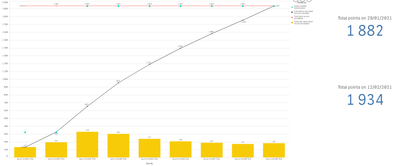
Here is the formula I used in my attempt for the blue triangles in the chart :
=if([Sprint end date]<today(),
sum(total if([History date]=[Sprint end date], aggr(sum(distinct [Points History]), [ID US History]))),
sum(total aggr(sum(distinct [Points]), [ID US])) // This part works
)
And how I'm getting the right values on the right - manually entering the date :
=sum(total if([History date]='29/01/2021', aggr(sum(distinct [Points History]), [ID US History])))
With value '12/02/2021' for the 2nd KPI.
Could anyone help me with this ?
Thanks 🙂
