Unlock a world of possibilities! Login now and discover the exclusive benefits awaiting you.

- Qlik Community
- :
- Forums
- :
- Analytics & AI
- :
- Products & Topics
- :
- App Development
- :
- Re: Color Expressions
- Subscribe to RSS Feed
- Mark Topic as New
- Mark Topic as Read
- Float this Topic for Current User
- Bookmark
- Subscribe
- Mute
- Printer Friendly Page

- Mark as New
- Bookmark
- Subscribe
- Mute
- Subscribe to RSS Feed
- Permalink
- Report Inappropriate Content
Color Expressions
Hi -
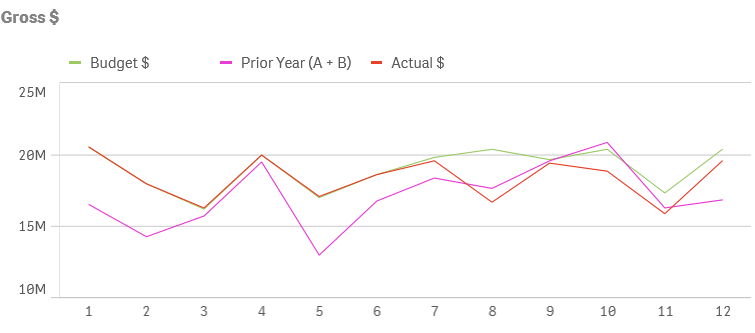
Can someone show me the correct expression for coloring the lines by expression? I want to choose the colors for Budget $, Actual $ an Prior Year A + B. The green barely shows up, and there isn't enough contrast between the magenta and red. If anyone has a brilliant idea for making the lines thicker, that would be awesome.
Thank you!!

 Ivan_Bozov
- Mark as New
- Bookmark
- Subscribe
- Mute
- Subscribe to RSS Feed
- Permalink
- Report Inappropriate Content
Hello! In Qlik Sense 3.2 you can assign colors to measures.
Go to Master items > Measures > Create new and define your measure and color, e.g.:
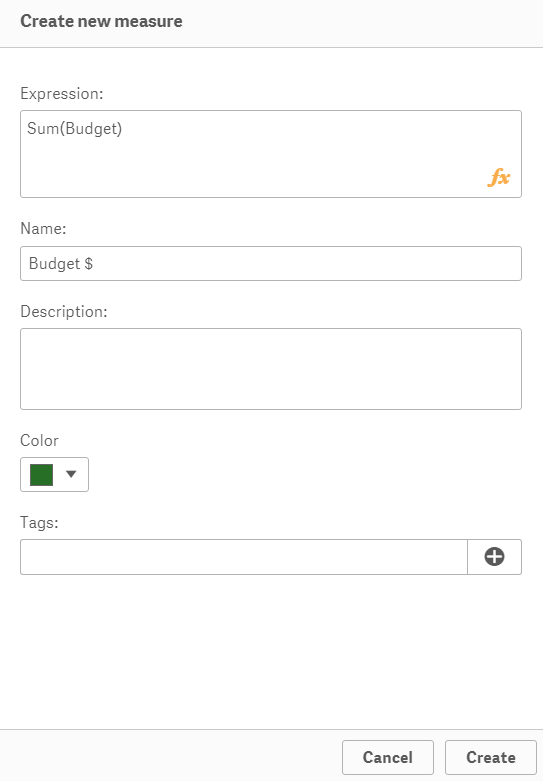
Then use the new master item as a measure in your line chart. The color will be dark green.

 Vasiliy_Beshent
- Mark as New
- Bookmark
- Subscribe
- Mute
- Subscribe to RSS Feed
- Permalink
- Report Inappropriate Content
Hello!
Try to use this solution: How to color the monthly bar for each year diff color , for easy visulisation purpose.
Maybe it helps.