Unlock a world of possibilities! Login now and discover the exclusive benefits awaiting you.

- Qlik Community
- :
- Forums
- :
- Analytics & AI
- :
- Products & Topics
- :
- App Development
- :
- Coloring in Pivot Table with nested columns
- Subscribe to RSS Feed
- Mark Topic as New
- Mark Topic as Read
- Float this Topic for Current User
- Bookmark
- Subscribe
- Mute
- Printer Friendly Page

 heiko_schmidt
- Mark as New
- Bookmark
- Subscribe
- Mute
- Subscribe to RSS Feed
- Permalink
- Report Inappropriate Content
Coloring in Pivot Table with nested columns
Hello, I use a pivot table with 1 dimension and 1 measure in the rows and 2 dimensions for the columns.
The columns are Year and month.
So when i expand the years dimension i get all months for the expanded year. some kind of nesting...
Now i want to have a background color depending on the amount of the measures value for each year total.
So the color should only be visible when the years dimension is collapsed and i don´t see month values for this year.
Lets say the measure in 2021 is 5 for each month. I want to have a background color red when I collapse the years dimension and see that the measure for 2021 is above 50
best regards
Accepted Solutions

 NitinK7
- Mark as New
- Bookmark
- Subscribe
- Mute
- Subscribe to RSS Feed
- Permalink
- Report Inappropriate Content
Try like below
In your measure set background color exp-
if(SecondaryDimensionality()=1,
if(sum(amount)>=10,green()))

NitinK7
- Mark as New
- Bookmark
- Subscribe
- Mute
- Subscribe to RSS Feed
- Permalink
- Report Inappropriate Content
partially understood
can you please explain with screenshots, I think that will be better to understand
heiko_schmidt
- Mark as New
- Bookmark
- Subscribe
- Mute
- Subscribe to RSS Feed
- Permalink
- Report Inappropriate Content
sure, well this is my pivottable
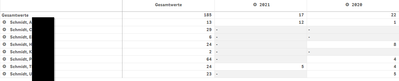
I want a background color for values bigger than 10 for the year 2021 and 2020.
when i expand the years this is what i see and then i don´t want a background color for each month.

when i collapsethe dimension again and only see year the background color should be visible again.
NitinK7
- Mark as New
- Bookmark
- Subscribe
- Mute
- Subscribe to RSS Feed
- Permalink
- Report Inappropriate Content
Try like below
In your measure set background color exp-
if(SecondaryDimensionality()=1,
if(sum(amount)>=10,green()))
heiko_schmidt
- Mark as New
- Bookmark
- Subscribe
- Mute
- Subscribe to RSS Feed
- Permalink
- Report Inappropriate Content
Awesome. It´s working. Thank you so much
