Unlock a world of possibilities! Login now and discover the exclusive benefits awaiting you.

- Qlik Community
- :
- Forums
- :
- Analytics & AI
- :
- Products & Topics
- :
- App Development
- :
- Re: Coloring the Qliksense Stacked chart based on ...
- Subscribe to RSS Feed
- Mark Topic as New
- Mark Topic as Read
- Float this Topic for Current User
- Bookmark
- Subscribe
- Mute
- Printer Friendly Page

 TamilSelvi
- Mark as New
- Bookmark
- Subscribe
- Mute
- Subscribe to RSS Feed
- Permalink
- Report Inappropriate Content
Coloring the Qliksense Stacked chart based on the Legend
I need to use the color for stacked chart based on the legend dimension value.
For example, if I show the sum value for month and Status in the stacked bar chart , the color of the bar should be based on the status value.
I used the below expression in the Appearance >> Color and Legend >> Use custom colors
=pick(Match(ErrorStatus,'Success','Service Unavailable','Bad Gateway'),'#009845','#004080','#F20000')
but its not working properly. If I made the selections in the status then the bar is appearing with the corresponding color but if there is no selection then the bar itself is not showing.
But if I scroll over the chart area the tooltip is appearing as normal.

 NitinK7
- Mark as New
- Bookmark
- Subscribe
- Mute
- Subscribe to RSS Feed
- Permalink
- Report Inappropriate Content
Hi @TamilSelvi ,
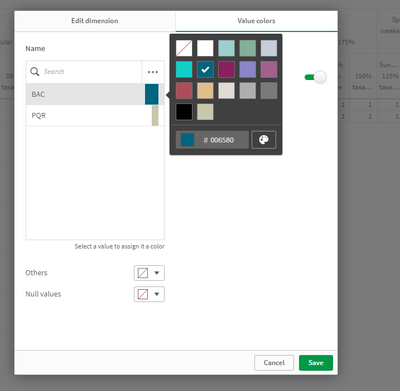
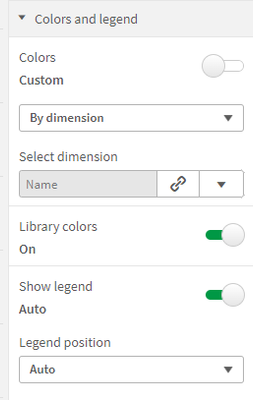
Create master dimension for status and provide color over there and and select colors by dimension
TamilSelvi
- Mark as New
- Bookmark
- Subscribe
- Mute
- Subscribe to RSS Feed
- Permalink
- Report Inappropriate Content
Hi NitinK7
Thanks for the Response.
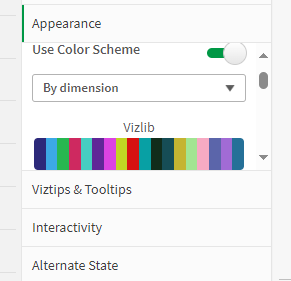
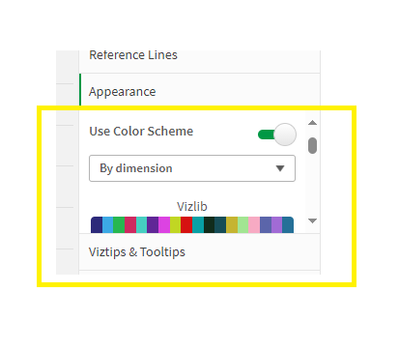
But I am only able to select the by dimension option only. I am not able to get the option to select the dimension.
I am getting the color pallet immediately below the by dimension option.
NitinK7
- Mark as New
- Bookmark
- Subscribe
- Mute
- Subscribe to RSS Feed
- Permalink
- Report Inappropriate Content
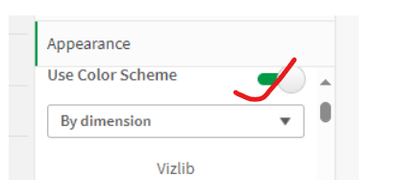
First do off use color scheme option then you can able to see
TamilSelvi
- Mark as New
- Bookmark
- Subscribe
- Mute
- Subscribe to RSS Feed
- Permalink
- Report Inappropriate Content
I selected as you said,
but its not working still
TamilSelvi
- Mark as New
- Bookmark
- Subscribe
- Mute
- Subscribe to RSS Feed
- Permalink
- Report Inappropriate Content
Its not working stll . Is there any solution for this?
TamilSelvi
- Mark as New
- Bookmark
- Subscribe
- Mute
- Subscribe to RSS Feed
- Permalink
- Report Inappropriate Content
Is there any solution for this
