Unlock a world of possibilities! Login now and discover the exclusive benefits awaiting you.

- Qlik Community
- :
- Forums
- :
- Analytics & AI
- :
- Products & Topics
- :
- App Development
- :
- Combining two tables with multiplying
- Subscribe to RSS Feed
- Mark Topic as New
- Mark Topic as Read
- Float this Topic for Current User
- Bookmark
- Subscribe
- Mute
- Printer Friendly Page

 jerryr125
- Mark as New
- Bookmark
- Subscribe
- Mute
- Subscribe to RSS Feed
- Permalink
- Report Inappropriate Content
Combining two tables with multiplying
Hi -
Not sure if this can be done or not. I have two tables which needed to be loaded (table A and table B). Once loaded, table C needs to be created that multiples the value of QTY and QTYMT to create field FQ.
See example below :
Table A
| ID | QTY |
| 1 | 3 |
| 2 | 6 |
| 3 | 8 |
| 4 | 5 |
TABLE B
| ID | LID | QTYMT |
| 1 | 500 | 2 |
| 2 | 500 | 4 |
| 2 | 700 | 3 |
| 2 | 800 | 5 |
| 3 | 500 | 6 |
| 3 | 400 | 8 |
| 4 | 200 | 10 |
TABLE C
| ID | QTY | LID | QTYMT | FQ |
| 1 | 3 | 500 | 2 | 6 |
| 2 | 6 | 500 | 4 | 24 |
| 2 | 6 | 700 | 3 | 18 |
| 2 | 6 | 800 | 5 | 30 |
| 3 | 8 | 500 | 6 | 48 |
| 3 | 8 | 400 | 8 | 64 |
| 4 | 5 | 200 | 10 | 50 |
Any thoughts ? Jerry

- Mark as New
- Bookmark
- Subscribe
- Mute
- Subscribe to RSS Feed
- Permalink
- Report Inappropriate Content
One Solution:
tab1:
LOAD * INLINE [
    ID, QTY
    1, 3
    2, 6
    3, 8
    4, 5
];

tab2:
LOAD * INLINE [
    ID, LID, QTYMT
    1, 500, 2
    2, 500, 4
    2, 700, 3
    2, 800, 5
    3, 500, 6
    3, 400, 8
    4, 200, 10
];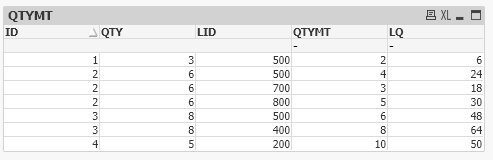
Dimension:
ID, QTY, LID
Expression:
QTYMT
LQ: QTY*QTYMT

 Vegar
Vegar
- Mark as New
- Bookmark
- Subscribe
- Mute
- Subscribe to RSS Feed
- Permalink
- Report Inappropriate Content
If you need to make the 3rd table in script, then join 1 and 2 followed by a resident load on your new table sheet where you add the new fields by multiplication.
Take a look at my script suggestion below.
[_TABLE C] :
Load * From [TABLE A] ;
JOIN ( [_TABLE C]) Load * From [TABLE B] ;
[TABLE C] :
NOCONCATENATE LOAD
*, [QTY] * [QTYMT] as [FQ]
Resident [_TABLE C] ;
Drop table [_TABLE C] ;
Qlik Community MVP
jerryr125
- Mark as New
- Bookmark
- Subscribe
- Mute
- Subscribe to RSS Feed
- Permalink
- Report Inappropriate Content
Hi - Yes I just thought of doing some type of join after posting my questions.
I will give it a try and let you know - jerry
