Unlock a world of possibilities! Login now and discover the exclusive benefits awaiting you.

- Qlik Community
- :
- Forums
- :
- Analytics & AI
- :
- Products & Topics
- :
- App Development
- :
- Re: Count IDs last occurrence by time range
- Subscribe to RSS Feed
- Mark Topic as New
- Mark Topic as Read
- Float this Topic for Current User
- Bookmark
- Subscribe
- Mute
- Printer Friendly Page
 KristofHasko
- Mark as New
- Bookmark
- Subscribe
- Mute
- Subscribe to RSS Feed
- Permalink
- Report Inappropriate Content
Count IDs last occurrence by time range
Hi! I want to show the latest activity of an user in KPIs between different time ranges.
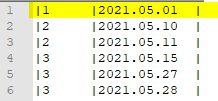
Example dataset:
We have an ID and a Date for each line:
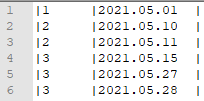
Lets say that the current date is 2021.05.30.
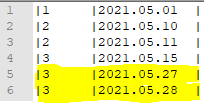
KPI1: Count if the user had activity in the last 3 days:
Result should be 1 because only user 3 had activity in the last 3 days (between 05.30 and 05.27).
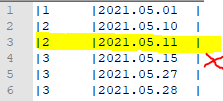
KPI2: Count if the user had no activity in the last 3 days, but had activity between the last 3 days, and last 20 days(between 05.27 and 05.10):
Result should be 1 because user 2 and 3 had activity, but user 3 is already counted in the first KPI:
KPI3: Count if the user had no activity in the last 25 days but had activity before that (before 05.05):
Should be 1, because only user 1 had activity before the given range
I have already tried everything, but nothing worked, I'm out of ideas.
Accepted Solutions

 GaryGiles
- Mark as New
- Bookmark
- Subscribe
- Mute
- Subscribe to RSS Feed
- Permalink
- Report Inappropriate Content
You can incorporate the E() element function in your set analysis for KPIs 2 and 3 to exclude IDs with activity in specific time frame, like this (based on your desciription, I wasn't sure if you are counting today when determining time frames or not, so you may need to adjust the numbers to meet your needs):
KPI 1:
count({$<Date={"<=$(=Today())>=$(=Date(Today()-3))"}>} Distinct [ID])
KPI 2:
count({$<Date={"<$(=Date(Today()-3))>=$(=Date(Today()-21))"},
[ID]=E({<Date={"<=$(=Today())>=$(=Date(Today()-3))"}>} [ID])>} Distinct [ID])
KPI 3:
count({$<Date={"<$(=Date(Today()-26))"},
[ID]=E({<Date={"<=$(=Today())>=$(=Date(Today()-26))"}>} [ID])>} Distinct [ID])
GaryGiles
- Mark as New
- Bookmark
- Subscribe
- Mute
- Subscribe to RSS Feed
- Permalink
- Report Inappropriate Content
You can incorporate the E() element function in your set analysis for KPIs 2 and 3 to exclude IDs with activity in specific time frame, like this (based on your desciription, I wasn't sure if you are counting today when determining time frames or not, so you may need to adjust the numbers to meet your needs):
KPI 1:
count({$<Date={"<=$(=Today())>=$(=Date(Today()-3))"}>} Distinct [ID])
KPI 2:
count({$<Date={"<$(=Date(Today()-3))>=$(=Date(Today()-21))"},
[ID]=E({<Date={"<=$(=Today())>=$(=Date(Today()-3))"}>} [ID])>} Distinct [ID])
KPI 3:
count({$<Date={"<$(=Date(Today()-26))"},
[ID]=E({<Date={"<=$(=Today())>=$(=Date(Today()-26))"}>} [ID])>} Distinct [ID])
KristofHasko
- Mark as New
- Bookmark
- Subscribe
- Mute
- Subscribe to RSS Feed
- Permalink
- Report Inappropriate Content
Element function... It is mind blowing how many different functions Qlik has. I'll try it as soon as possible.
Edit: The solution works! Thank you!
