Unlock a world of possibilities! Login now and discover the exclusive benefits awaiting you.

- Qlik Community
- :
- Forums
- :
- Analytics & AI
- :
- Products & Topics
- :
- App Development
- :
- Count Objects for Max Date in Set Analysis
- Subscribe to RSS Feed
- Mark Topic as New
- Mark Topic as Read
- Float this Topic for Current User
- Bookmark
- Subscribe
- Mute
- Printer Friendly Page

 anellibridge
- Mark as New
- Bookmark
- Subscribe
- Mute
- Subscribe to RSS Feed
- Permalink
- Report Inappropriate Content
Count Objects for Max Date in Set Analysis
Hello,
I have a table showing Category Code, Sales Date, and Objects:
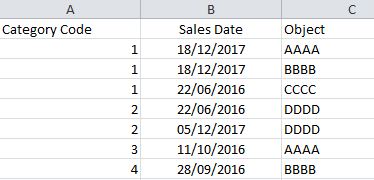
I want to calculate for each Category Code the quantity of distinct Objects that have the max Sales Date for each Category Code: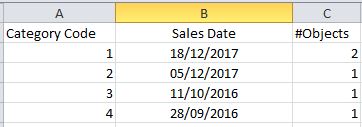
In this example for the Category Code=1, I want that #Objects=2 because there are 2 distinct Objects that have the Sales Date 18/12/2017.
I'm using the Version November 2017 of Qlik Sense.
Any suggestion?
thx a lot,
Arianna
- Tags:
- advanced analytics integration
- aggr
- count
- max by dimension
- qlik functions
- qliksensedevelopers
- set anaalysis
- « Previous Replies
-
- 1
- 2
- Next Replies »
Accepted Solutions
anellibridge
- Mark as New
- Bookmark
- Subscribe
- Mute
- Subscribe to RSS Feed
- Permalink
- Report Inappropriate Content
Hi Hector,
thank u a lot for your reply, but it doesn't function that formula.
After a lot of test I found the solution! 
Count( Distinct If(Aggr(NODISTINCT Max( TOTAL <[Category Code]> [Sales Date]),[Category Code],[Object]) = [Sales Date], [Object]))
Thanks a lot to everyone,

- Mark as New
- Bookmark
- Subscribe
- Mute
- Subscribe to RSS Feed
- Permalink
- Report Inappropriate Content
Count(Aggr(Only(Objects), [Sales Date]))

 sunny_talwar
- Mark as New
- Bookmark
- Subscribe
- Mute
- Subscribe to RSS Feed
- Permalink
- Report Inappropriate Content
May be try this
Dimension
Category Code
Measure
Max([Sale Date])
Sum(Aggr(If([Sale Date] = Max(TOTAL <[Category Code]> [Sales Date]), 1, 0), [Category Code], [Sale Date]))
 hjimenez25
- Mark as New
- Bookmark
- Subscribe
- Mute
- Subscribe to RSS Feed
- Permalink
- Report Inappropriate Content
You should try this:
In your Data Load Editor:
Sales:
LOAD
"Category Code",
"Sales Date",
Object
FROM [lib://ExcelFilesForTest/Example1.xlsx]
(ooxml, embedded labels, table is Hoja1);
left Join (Sales)
LOAD
"Category Code",
date(Max("Sales Date")) as MaxDatePerCategory
FROM [lib://ExcelFilesForTest/Example1.xlsx]
(ooxml, embedded labels, table is Hoja1) group by "Category Code";
SalesFinal:
LOAD *,
if("Sales Date" = MaxDatePerCategory,1,0) as _flagLastDate
Resident Sales;
drop Table Sales;
Then use this in your Table:
Use Category Code as Dimension, and count({$<_flagLastDate={1}>} distinct Object) as mease.
I hope this helps.
anellibridge
- Mark as New
- Bookmark
- Subscribe
- Mute
- Subscribe to RSS Feed
- Permalink
- Report Inappropriate Content
Hi Hector,
thank u for your reply, but I can't change the Data Model (it's more complex than this).
I need a formula that allows the dynamic selection of the Dates or something else that change the quantity of Objects
thank u so much,
anellibridge
- Mark as New
- Bookmark
- Subscribe
- Mute
- Subscribe to RSS Feed
- Permalink
- Report Inappropriate Content
Hi Allu,
Thank u for your reply, but unfortunately it doesn't resolve my problem.
I need a formula that calculates for each Category Code how many distinct Objects have the Max Sales Date exists.
thank u so much
anellibridge
- Mark as New
- Bookmark
- Subscribe
- Mute
- Subscribe to RSS Feed
- Permalink
- Report Inappropriate Content
Hi Sunny,
thank u so much for your reply!
I tested your formula and it works as I expected. In particular that it's ok if I use it in the first Table, because I obtain 1 in the rows where I have the Max Date.
My problem is calculate the count of this 1 in the second Table.
Could you give me another suggestion for this?
thank u a lot
sunny_talwar
- Mark as New
- Bookmark
- Subscribe
- Mute
- Subscribe to RSS Feed
- Permalink
- Report Inappropriate Content
Not entirely sure what you mean? Isn't the 2nd table the expected output of what you are looking to get?
anellibridge
- Mark as New
- Bookmark
- Subscribe
- Mute
- Subscribe to RSS Feed
- Permalink
- Report Inappropriate Content
Yes!
I modified your formula and It seems to work . Now I'm doing some test with this:
Sum(TOTAL <[Category Code]> if([Sales Date] = Aggr(max(TOTAL <[Category Code]> [Sales Date]), [Category Code], [Object]), 1, 0))
hjimenez25
- Mark as New
- Bookmark
- Subscribe
- Mute
- Subscribe to RSS Feed
- Permalink
- Report Inappropriate Content
Hi Arianna,
I know you can not modify your data model, it could be better. This is a modified version of Sunny´s solution and yours:
Try this:
sum(TOTAL <[Category Code]> aggr(if([Sales Date] = max(TOTAL <[Category Code]> [Sales Date]), 1, 0),[Category Code], [Sales Date],[Object]))
I hope this help you.
- « Previous Replies
-
- 1
- 2
- Next Replies »