Unlock a world of possibilities! Login now and discover the exclusive benefits awaiting you.

- Qlik Community
- :
- Forums
- :
- Analytics & AI
- :
- Products & Topics
- :
- App Development
- :
- Date format issue
- Subscribe to RSS Feed
- Mark Topic as New
- Mark Topic as Read
- Float this Topic for Current User
- Bookmark
- Subscribe
- Mute
- Printer Friendly Page

 Aspiring_Develo
- Mark as New
- Bookmark
- Subscribe
- Mute
- Subscribe to RSS Feed
- Permalink
- Report Inappropriate Content
Date format issue
Hello All,
I have below date in my table :-
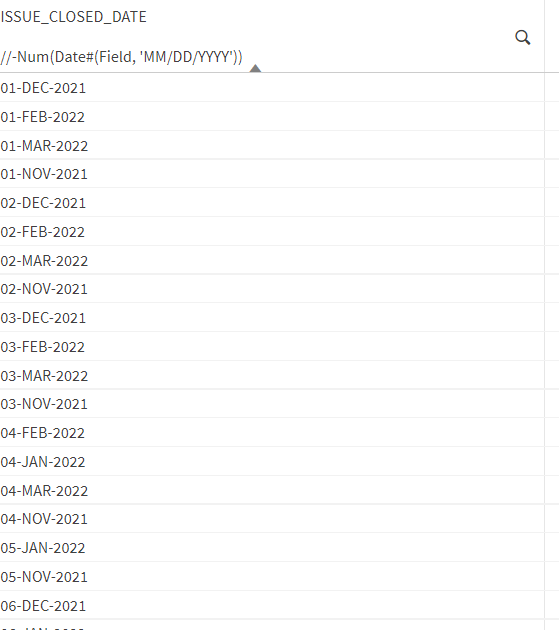
I wish to convert them into this format:-
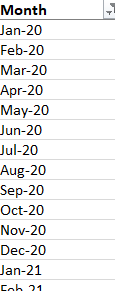
I tried to give format like Date (Date field, 'MMM-YY') but it is giving me blank result.
Can anyone please help ?
Thanks in advance
Accepted Solutions
 aveeeeeee7en
- Mark as New
- Bookmark
- Subscribe
- Mute
- Subscribe to RSS Feed
- Permalink
- Report Inappropriate Content
Your ISSUE_CLOSED_DATE is in Text format.
You need to first convert your original date to a number format which is actually the internal representation of Date.
Try this:
DATE(DATE#(Issue_Closed_Date,'DD-MMM-YYYY'),'MMM-YY') AS Issue_Closed_Date_Month
Expected Output:
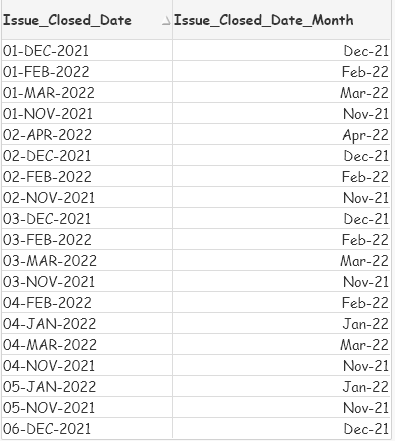
Hope that helps.
Regards,
AV7eN
aveeeeeee7en
- Mark as New
- Bookmark
- Subscribe
- Mute
- Subscribe to RSS Feed
- Permalink
- Report Inappropriate Content
Your ISSUE_CLOSED_DATE is in Text format.
You need to first convert your original date to a number format which is actually the internal representation of Date.
Try this:
DATE(DATE#(Issue_Closed_Date,'DD-MMM-YYYY'),'MMM-YY') AS Issue_Closed_Date_Month
Expected Output:
Hope that helps.
Regards,
AV7eN
