Unlock a world of possibilities! Login now and discover the exclusive benefits awaiting you.

- Qlik Community
- :
- Forums
- :
- Analytics & AI
- :
- Products & Topics
- :
- App Development
- :
- Dates; changing months into quarters
- Subscribe to RSS Feed
- Mark Topic as New
- Mark Topic as Read
- Float this Topic for Current User
- Bookmark
- Subscribe
- Mute
- Printer Friendly Page

 SouthsideFinanc
- Mark as New
- Bookmark
- Subscribe
- Mute
- Subscribe to RSS Feed
- Permalink
- Report Inappropriate Content
Dates; changing months into quarters
how can I create quarters using a field called Booking Month or Booking Year

 PhanThanhSon
- Mark as New
- Bookmark
- Subscribe
- Mute
- Subscribe to RSS Feed
- Permalink
- Report Inappropriate Content
Hi,
try this:
'Q' & ceil(month(bookingmonth)/3) as quarter
best regards Son
SouthsideFinanc- Mark as New
- Bookmark
- Subscribe
- Mute
- Subscribe to RSS Feed
- Permalink
- Report Inappropriate Content
thanks ... i had trouble with that method but i was able to do it with the following: thanks for the help!
LOAD * INLINE [
Booking Month, Booking Quarter
Jan, Q1
Feb, Q1
Mar, Q1
Apr, Q2
May, Q2
Jun, Q2
Jul, Q3
Aug, Q3
Sep, Q3
Oct, Q4
Nov, Q4
Dec, Q4
];
PhanThanhSon
- Mark as New
- Bookmark
- Subscribe
- Mute
- Subscribe to RSS Feed
- Permalink
- Report Inappropriate Content
Good!
this maybe Happen because you Month Field isnt cast as date Field.

 stevedark
- Mark as New
- Bookmark
- Subscribe
- Mute
- Subscribe to RSS Feed
- Permalink
- Report Inappropriate Content
The problem you will have with this approach is that Month is a string, and therefore will not sort correctly.
If the only date you have in your data is a string based month then you can convert that to a date, and then use that date in a preceding load.
MonthQuarter:
LOAD
*,
'Q' & ceil(Month/3) as Quarter,
ceil(Month/3) as QuarterNo
;
LOAD
Month as MonthTxt,
Month(Date#('01 ' & Month & ' 1999', 'DD MMM YYYY')) as Month
INLINE [
Month
Jan
Feb
Mar
Apr
May
Jun
Jul
Aug
Sep
Oct
Nov
Dec
];
What the code is doing here is building a full date, including the month, and then converting that to a numeric date. Once you have a numeric date you can get the month that this comes from as a dual data type (i.e. Jan=1, Feb=2 etc.). Without doing that the month is just a piece of text and you can't sort or do other functions over it. The code above gives both a Month and a MonthTxt field and you will see how they behave here:
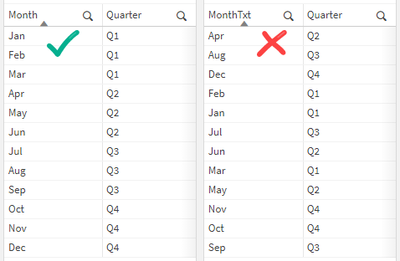
Hope that makes sense?
Steve

 rwunderlich
- Mark as New
- Bookmark
- Subscribe
- Mute
- Subscribe to RSS Feed
- Permalink
- Report Inappropriate Content
@stevedark I don't think you have to do the full fake date any more. You can just do
Month(Date#(Month 'MMM')) as Month
-Rob
stevedark
- Mark as New
- Bookmark
- Subscribe
- Mute
- Subscribe to RSS Feed
- Permalink
- Report Inappropriate Content
Hi @rwunderlich
Hope you are keeping well!
I did wonder that, I thought I would go with what I knew would definitely work.
Having a quick test now, it gives you the first of that month in 1899 - obviously:

Thanks for pointing this out Rob, every day's a school day!
Steve
