Unlock a world of possibilities! Login now and discover the exclusive benefits awaiting you.

- Qlik Community
- :
- Forums
- :
- Analytics & AI
- :
- Products & Topics
- :
- App Development
- :
- Re: Default Selection of Max Date
- Subscribe to RSS Feed
- Mark Topic as New
- Mark Topic as Read
- Float this Topic for Current User
- Bookmark
- Subscribe
- Mute
- Printer Friendly Page

 jpersinger
- Mark as New
- Bookmark
- Subscribe
- Mute
- Subscribe to RSS Feed
- Permalink
- Report Inappropriate Content
Default Selection of Max Date
I am trying to use a search string to create a dynamic bookmark which selects the most recent date as seen in this video:
Dynamic Default Bookmarks in Qlik Sense
I have created a search string which correctly selects the most recent date, i tested this by pasting into filter pane search (date field is named [Date]): =Date=Max({1} total Date)
The problem is when i save the bookmark after applying the filter it does not save the expression, just the resulting value.
So today the bookmark would return 1/3/2020 and tomorrow it would still return that instead of 1/4/2020. The video above clearly shows this is possible, so i'm not sure what i'm missing.
Accepted Solutions

 jwjackso
- Mark as New
- Bookmark
- Subscribe
- Mute
- Subscribe to RSS Feed
- Permalink
- Report Inappropriate Content
I'm on June 2019. If I don't press the enter key to accept the search formula before I create the bookmark, the formula is not included in the bookmark.
jwjackso
- Mark as New
- Bookmark
- Subscribe
- Mute
- Subscribe to RSS Feed
- Permalink
- Report Inappropriate Content
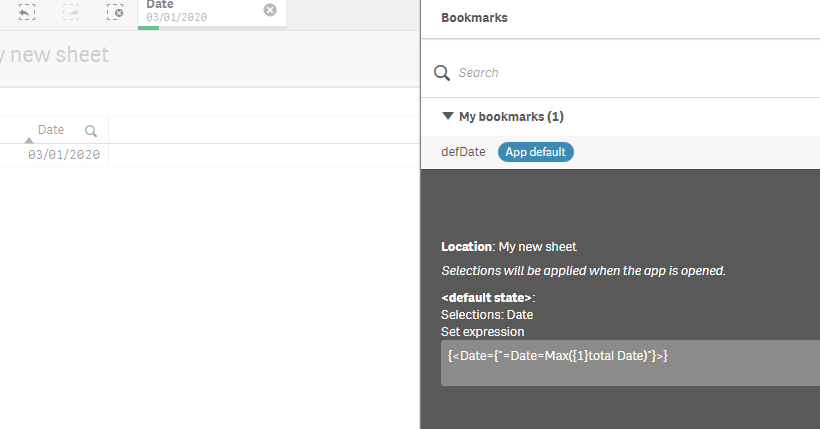
I followed the video and it appears to work. I created a table with a few dates, added the formula in the search query, accepted the search results, and created the bookmark. When I opened the app, the default date was the max date in the table. I added another date, re-opened the app and the bookmark selected the new max date. See the image below:
 jpersinger
- Mark as New
- Bookmark
- Subscribe
- Mute
- Subscribe to RSS Feed
- Permalink
- Report Inappropriate Content
Thanks for replying.
That's exactly what i'm looking for, not sure why I am seeing a different behavior.
I'm assuming you took the formula exactly as I posted above? =Date=Max({1} total Date)
I took the Set Expression from the screenshot you attached and tried that as well and still got the same result {<Date={"=Date=Max({1}total Date)"}>}
This is how the bookmark looks for me: {<Date={'2020-01-02'}>}
Which version of Qlik Sense did you do this in? (I am on April 2019 patch 3)
jwjackso
- Mark as New
- Bookmark
- Subscribe
- Mute
- Subscribe to RSS Feed
- Permalink
- Report Inappropriate Content
I'm on June 2019. If I don't press the enter key to accept the search formula before I create the bookmark, the formula is not included in the bookmark.
jpersinger
- Mark as New
- Bookmark
- Subscribe
- Mute
- Subscribe to RSS Feed
- Permalink
- Report Inappropriate Content
Wow!!
That is what we are doing different, I was clicking the green checkmark to confirm the selection. I hit enter instead this time and it saved the formula.
I highly doubt that clicking the green checkmark to confirm a selection is supposed behave differently than hitting the enter key...
Either way, thank you!
To make this even more strange i just noticed that in the video he does click the green checkmark to confrim the selection.

 ioannagr
- Mark as New
- Bookmark
- Subscribe
- Mute
- Subscribe to RSS Feed
- Permalink
- Report Inappropriate Content
Hi guys @jwjackso @jpersinger my version is Feb'19, is this why I can't do this?
it's all ok until i try to assign the expression...
It's ok up until the =Date , if i try =Date=max(Date) it says there are no results
jwjackso
- Mark as New
- Bookmark
- Subscribe
- Mute
- Subscribe to RSS Feed
- Permalink
- Report Inappropriate Content
The formula should be
=Date=max({1} Total Date)
ioannagr
- Mark as New
- Bookmark
- Subscribe
- Mute
- Subscribe to RSS Feed
- Permalink
- Report Inappropriate Content
@jwjackso hello, when I published the app, the bookmark =Date=max({1} Total Date) remained still to the certain max date before new data were loaded ( Now you know, new data get loaded every day ). Why is it that and how can i fix it?
