Unlock a world of possibilities! Login now and discover the exclusive benefits awaiting you.

- Qlik Community
- :
- Forums
- :
- Analytics & AI
- :
- Products & Topics
- :
- App Development
- :
- Excluding values in AVG not working
- Subscribe to RSS Feed
- Mark Topic as New
- Mark Topic as Read
- Float this Topic for Current User
- Bookmark
- Subscribe
- Mute
- Printer Friendly Page

 valpassos
- Mark as New
- Bookmark
- Subscribe
- Mute
- Subscribe to RSS Feed
- Permalink
- Report Inappropriate Content
Excluding values in AVG not working
Hi community,
I have a duration measure in days that tells me how much time a task took to be completed, in average, as follows:
AVG(Interval([Task Completed Date] - [Task Started Date])
But there are certain tasks that take less than half a day (<0.5 of duration) to be completed, and I want to exclude these tasks from my AVG duration. How can I accomplish that?
I have tried the following:
AVG({<%Task_Duration-={"<0.5"}>} %Task_Duration)This is supposed to exclude tasks whose duration are less that 0.5 days, but it isn't working as expected - the AVG is still counting them.
What am I doing wrong?
Thank you for your help!,
Lisa
- « Previous Replies
-
- 1
- 2
- Next Replies »

 dplr-rn
- Mark as New
- Bookmark
- Subscribe
- Mute
- Subscribe to RSS Feed
- Permalink
- Report Inappropriate Content
The set analysis Syntax looks correct.
How are you creating the column %Task_Duration
I would check the value,type of that and double check
valpassos
- Mark as New
- Bookmark
- Subscribe
- Mute
- Subscribe to RSS Feed
- Permalink
- Report Inappropriate Content
Hi,
The %Task_Duration field is calculated in the model in this way:
Interval([Task Completed Date] - [Task Started Date])
I'm trying to show the AVG on a KPI, not a table.
Thanks,
Lisa
dplr-rn
- Mark as New
- Bookmark
- Subscribe
- Mute
- Subscribe to RSS Feed
- Permalink
- Report Inappropriate Content
thats fine.
check the data in column and column type.
i ran a test on the set analysis to make sure with some dummy data and it works
mine Avg({<Duration-={"<0.5"}>}Duration)
your AVG({<%Task_Duration-={"<0.5"}>} %Task_Duration)
so it must be something in data level
valpassos
- Mark as New
- Bookmark
- Subscribe
- Mute
- Subscribe to RSS Feed
- Permalink
- Report Inappropriate Content
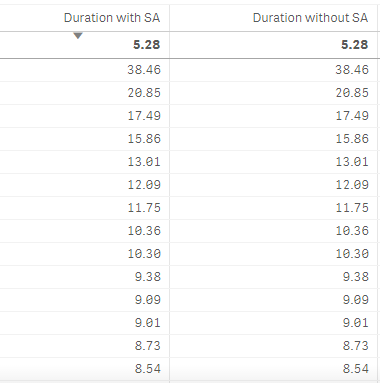
If a put the expression in a table, with or without SA, the value is the same
Duration with SA:
AVG({<%Task_Duration-={"<0.5"}>} %Task_Duration)
Duration without SA:
AVG(%Task_Duration)
valpassos
- Mark as New
- Bookmark
- Subscribe
- Mute
- Subscribe to RSS Feed
- Permalink
- Report Inappropriate Content
Forgot the printscreen:

 dwforest
- Mark as New
- Bookmark
- Subscribe
- Mute
- Subscribe to RSS Feed
- Permalink
- Report Inappropriate Content
AVG(IF(%TaskDuration >0.5,%TaskDuration))
dplr-rn
- Mark as New
- Bookmark
- Subscribe
- Mute
- Subscribe to RSS Feed
- Permalink
- Report Inappropriate Content
your previous comment said "I'm trying to show the AVG on a KPI, not a table."
valpassos
- Mark as New
- Bookmark
- Subscribe
- Mute
- Subscribe to RSS Feed
- Permalink
- Report Inappropriate Content
I've put the expressions in the table just for testing purposes
dplr-rn
- Mark as New
- Bookmark
- Subscribe
- Mute
- Subscribe to RSS Feed
- Permalink
- Report Inappropriate Content
share your output in KPI. table a lot depends on the dimensions used etc.
And also include an extract of the duration column if possible

- « Previous Replies
-
- 1
- 2
- Next Replies »