Unlock a world of possibilities! Login now and discover the exclusive benefits awaiting you.

- Qlik Community
- :
- Forums
- :
- Analytics & AI
- :
- Products & Topics
- :
- App Development
- :
- Help with trial balance expression
- Subscribe to RSS Feed
- Mark Topic as New
- Mark Topic as Read
- Float this Topic for Current User
- Bookmark
- Subscribe
- Mute
- Printer Friendly Page

 ali_hijazi
- Mark as New
- Bookmark
- Subscribe
- Mute
- Subscribe to RSS Feed
- Permalink
- Report Inappropriate Content
Help with trial balance expression
Hello got a QVF file in which I'm creating a pivot table for trial balance
the result is 100% correct (open attached qvf and select the company code 010 and select A/P-A/R accounting)
You see the opening balance, the activity, and closing balance and how the opening balance of a month is the closing balance of the previous month...
Now if you select Nov 2010 the numbers are still correct however I can still the remaining months to the right
and that's because of the variable I'm using which is $(vL.TrialBalance.OpeningBalance) which I'm using in the expressions for opening balance, and closing balance
is there a way to hide the months and show only selected ones?
Kindly advise ( @sunny_talwar , @rwunderlich )
- « Previous Replies
-
- 1
- 2
- Next Replies »
Accepted Solutions

 sunny_talwar
- Mark as New
- Bookmark
- Subscribe
- Mute
- Subscribe to RSS Feed
- Permalink
- Report Inappropriate Content
Check attached
sunny_talwar
- Mark as New
- Bookmark
- Subscribe
- Mute
- Subscribe to RSS Feed
- Permalink
- Report Inappropriate Content
Check attached
ali_hijazi
- Mark as New
- Bookmark
- Subscribe
- Mute
- Subscribe to RSS Feed
- Permalink
- Report Inappropriate Content
so you only added avg(1)?
ok this works so good with carry-forward-accounts
what if I want something similar but for non-carry forward accounts that reset on period 1 always
the variable that you fixed calculates the cumulative amount per account prior to the minimum month selected
then I add to it the activity per month to get the closing balance
however some accounts like the ones that start with 6 and 7 I want if I select a month in the middle of the fiscal year to work as the one fixed but gives zero for the starting period
hope you can help here
sunny_talwar
- Mark as New
- Bookmark
- Subscribe
- Mute
- Subscribe to RSS Feed
- Permalink
- Report Inappropriate Content
Would you be able to share a sample where we can see this?
ali_hijazi
- Mark as New
- Bookmark
- Subscribe
- Mute
- Subscribe to RSS Feed
- Permalink
- Report Inappropriate Content
Hi @sunny_talwar
check attached sample
select 010 as company code
now in october 2010 the opening balances are zero
what I want to achieve is to have the revenues and expenses be zero in Octo 2011 and then continue on summing the cumulative
sunny_talwar
- Mark as New
- Bookmark
- Subscribe
- Mute
- Subscribe to RSS Feed
- Permalink
- Report Inappropriate Content
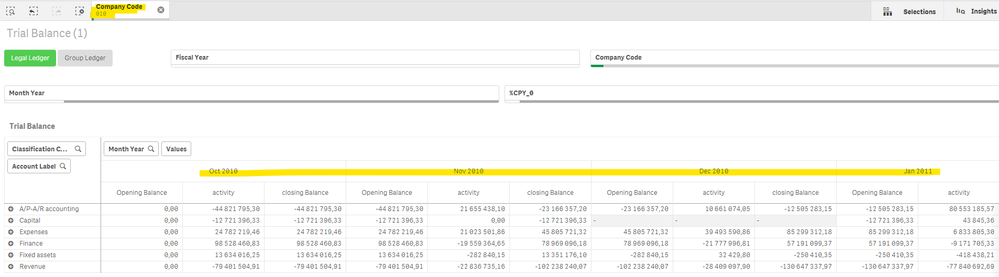
You want Oct 2011 to be 0? but right now I only see Oct 2010, Nov 2010, Dec 2010, Jan 2011 in the chart once I select Company Code 010
ali_hijazi
- Mark as New
- Bookmark
- Subscribe
- Mute
- Subscribe to RSS Feed
- Permalink
- Report Inappropriate Content
Hello @sunny_talwar
check attached
sunny_talwar
- Mark as New
- Bookmark
- Subscribe
- Mute
- Subscribe to RSS Feed
- Permalink
- Report Inappropriate Content
I still don't see Oct 2011?
 ali_hijazi
- Mark as New
- Bookmark
- Subscribe
- Mute
- Subscribe to RSS Feed
- Permalink
- Report Inappropriate Content
scroll the chart to the right
ali_hijazi
- Mark as New
- Bookmark
- Subscribe
- Mute
- Subscribe to RSS Feed
- Permalink
- Report Inappropriate Content
Hello @sunny_talwar
if you check the month year filter you have all months for 2 fiscal years
you need to scroll the chart from the bottom to the right to see the remaining months on the chart

- « Previous Replies
-
- 1
- 2
- Next Replies »