Unlock a world of possibilities! Login now and discover the exclusive benefits awaiting you.

- Qlik Community
- :
- Forums
- :
- Analytics & AI
- :
- Products & Topics
- :
- App Development
- :
- Hide bar chart labels, except on one bar
- Subscribe to RSS Feed
- Mark Topic as New
- Mark Topic as Read
- Float this Topic for Current User
- Bookmark
- Subscribe
- Mute
- Printer Friendly Page

 Lauri
Lauri
- Mark as New
- Bookmark
- Subscribe
- Mute
- Subscribe to RSS Feed
- Permalink
- Report Inappropriate Content
Hide bar chart labels, except on one bar
On a bar chart, is it possible to show the label of just one bar? I'm close to achieving it, using the Dimension reference line, but it doesn't look great with the vertical line:

The goal is to give each user the chart revealing their own rate without identifying the other users.
I'm using NPrinting to deliver the charts by email to the users.
Thanks for any suggestions.

 Frank_S
- Mark as New
- Bookmark
- Subscribe
- Mute
- Subscribe to RSS Feed
- Permalink
- Report Inappropriate Content
You can show show 1 bar chart with the following steps:
Edit sheet
Click on your chart
Open 'Appearance' menu and expand x-axis: your dimension
Change number of axis values property to 'custom' and choose '1' as the max number
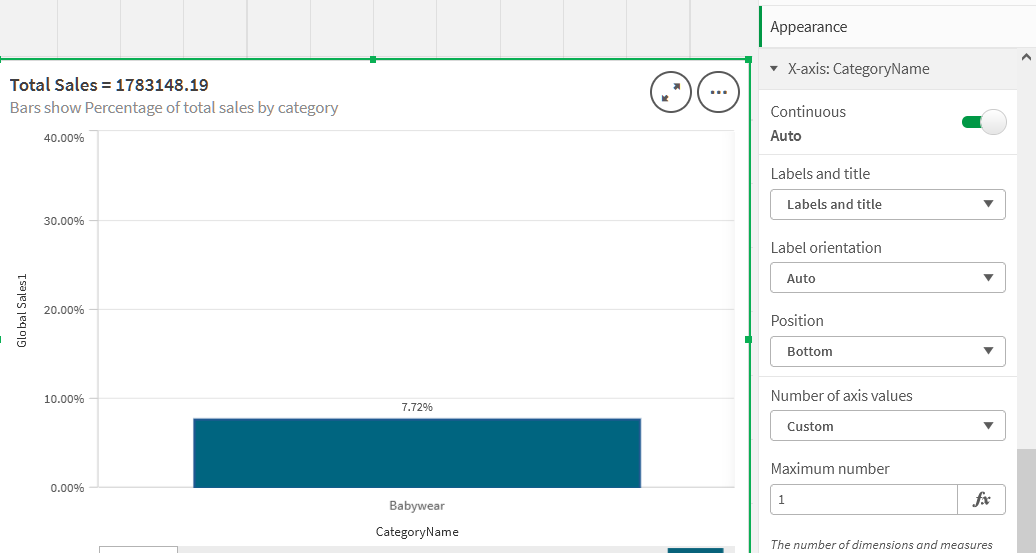
Reload your NPrinting connection to update the chart properties in the NP connection cache
This information is also here:
Hope this helps...
Lauri
- Mark as New
- Bookmark
- Subscribe
- Mute
- Subscribe to RSS Feed
- Permalink
- Report Inappropriate Content
Thanks, Frank. I want to show all of the bars, and hide all bar labels except for the selected dimension.
Frank_S
- Mark as New
- Bookmark
- Subscribe
- Mute
- Subscribe to RSS Feed
- Permalink
- Report Inappropriate Content
Hi @Lauri
Please sign up for this upcoming visualization seminar and bring your question with you!
Its being held next Tuesday Aug. 23rd, 2022.
I'm sure someone on that panel will have an answer...one way or the other.
Cheers!...
