Unlock a world of possibilities! Login now and discover the exclusive benefits awaiting you.

- Qlik Community
- :
- Forums
- :
- Analytics & AI
- :
- Products & Topics
- :
- App Development
- :
- How to filter by either 1 date field while each re...
- Subscribe to RSS Feed
- Mark Topic as New
- Mark Topic as Read
- Float this Topic for Current User
- Bookmark
- Subscribe
- Mute
- Printer Friendly Page

 seidydelacruz
- Mark as New
- Bookmark
- Subscribe
- Mute
- Subscribe to RSS Feed
- Permalink
- Report Inappropriate Content
How to filter by either 1 date field while each record is associated with 2 separate date fields?
Hello,
My experience with Qlik is very limited and have this situation that my data source has two Date Fields; ‘policy_eff’ and ‘entry_date’ with every record. A Policy can be sold on one date, however the effective date (policy_eff) can be another, even on a future date. Furthermore, users want to have a radio button option that I’ve found to filter all the visualizations filtered by either Effective date or Entry date. While this radio button will take a field value, I need to create a field to add to the radio button's dimension which will have for example values; Effective date OR Entry date.
policy | policy_type | broker_state | rep | premium | livecount | product | product_name | policy_eff | entry_date |
XYZ526490 | D | NJ | 027 | 125 | 2 | INS | D | 1/30/2018 | 2/1/2018 |
XYZ526491 | B | NY | 028 | 125 | 1 | INS | B | 1/16/2018 | 2/1/2018 |
XYZ526493 | M | PA | 030 | 247.2 | 4 | INS | M | 1/31/2018 | 2/1/2018 |
How can I populate Effective date OR Entry date in a field which will take the corresponding date from 'policy_eff’ or ‘entry_date’? How and what can I script in the table to achieve this?
Your suggestion is highly appreciated.
Thank you very much.
Accepted Solutions

 Vegar
Vegar
- Mark as New
- Bookmark
- Subscribe
- Mute
- Subscribe to RSS Feed
- Permalink
- Report Inappropriate Content
Try this script (written in QlikView):
Policies:
LOAD policy,
 policy_type,
 broker_state,
 rep,
 premium,
 livecount,
 product,
 product_name,
 (date#(policy_eff, 'M/D/YYYY')) as policy_eff,
 (date#(entry_date, 'M/DD/YYYY')) as entry_date,
 policy_eff&'|'& entry_date as %datekey
FROM
[https://community.qlik.com/t5/Qlik-Sense-App-Development/How-to-filter-by-either-1-date-field-while-each-record-is/m-p/1528609#M37983]
(html, codepage is 1252, embedded labels, table is @1);

CalendarLink:
LOAD
 %datekey,
 'Entry date' as Calendar,
 entry_date as %date
Resident
 Policies
;
LOAD
 %datekey,
 'Policy eff' as Calendar,
 policy_eff as %date
Resident
 Policies;

/*A calender table where %date is the link to CalendarLink*/
Calendar:
LOAD
 date(%date) as Date,
 Year(%date) as Year,
 month(%date) as Month,
 %date;
LOAD
 43116 + IterNo() as %date
autogenerate 1
While
 43116 + IterNo() <= 43132
;
You will get this datamodel:
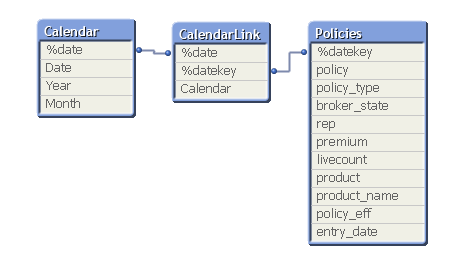
Then by putting the Calendar field into a radio-button you will get your desired result.
Qlik Community MVP
Vegar
- Mark as New
- Bookmark
- Subscribe
- Mute
- Subscribe to RSS Feed
- Permalink
- Report Inappropriate Content
Try this script (written in QlikView):
Policies:
LOAD policy,
 policy_type,
 broker_state,
 rep,
 premium,
 livecount,
 product,
 product_name,
 (date#(policy_eff, 'M/D/YYYY')) as policy_eff,
 (date#(entry_date, 'M/DD/YYYY')) as entry_date,
 policy_eff&'|'& entry_date as %datekey
FROM
[https://community.qlik.com/t5/Qlik-Sense-App-Development/How-to-filter-by-either-1-date-field-while-each-record-is/m-p/1528609#M37983]
(html, codepage is 1252, embedded labels, table is @1);

CalendarLink:
LOAD
 %datekey,
 'Entry date' as Calendar,
 entry_date as %date
Resident
 Policies
;
LOAD
 %datekey,
 'Policy eff' as Calendar,
 policy_eff as %date
Resident
 Policies;

/*A calender table where %date is the link to CalendarLink*/
Calendar:
LOAD
 date(%date) as Date,
 Year(%date) as Year,
 month(%date) as Month,
 %date;
LOAD
 43116 + IterNo() as %date
autogenerate 1
While
 43116 + IterNo() <= 43132
;
You will get this datamodel:
Then by putting the Calendar field into a radio-button you will get your desired result.
Qlik Community MVP
seidydelacruz
- Mark as New
- Bookmark
- Subscribe
- Mute
- Subscribe to RSS Feed
- Permalink
- Report Inappropriate Content
LOAD
43116 + IterNo() as %date
While
43116 + IterNo() <= 43132
;
