Unlock a world of possibilities! Login now and discover the exclusive benefits awaiting you.

- Qlik Community
- :
- Forums
- :
- Analytics & AI
- :
- Products & Topics
- :
- App Development
- :
- How to find previous year same days sales?
- Subscribe to RSS Feed
- Mark Topic as New
- Mark Topic as Read
- Float this Topic for Current User
- Bookmark
- Subscribe
- Mute
- Printer Friendly Page

 kwl1234
- Mark as New
- Bookmark
- Subscribe
- Mute
- Subscribe to RSS Feed
- Permalink
- Report Inappropriate Content
How to find previous year same days sales?
Existing expression for getting last year sales.
Sum({$<[SALES.fYear2]=, [SALES.Month]=,SALES.SALES_DATE, [SALES.FiscalDateNum]={">=$(=Num(YearStart(Max(addyears([SALES.FiscalDateNum],-1)))))<=$(=num(addyears(Max([SALES.FiscalDateNum]),-1)))"}>} [SALES.NET_AMOUNT])
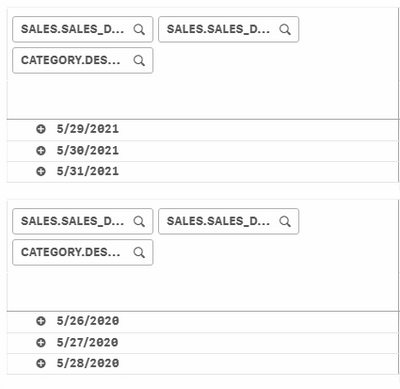
However, when I select SALES.fYear2 = 2021 and SALES.Month = May. On the previous year table shows the SALES.SALES_DATE up to 05/28/2020. There are 05/31/2021. So, 31,29,30 on May are missing. I don't know what happen on my expression. It only having a issues on 05-2020
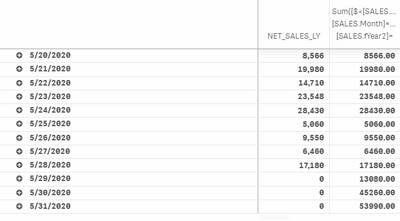
I tried to using below expression for obtain previous year date, the results look fine.
Sum({$<[SALES.fYear2]=, [SALES.Month]=,SALES.SALES_DATE,[SALES.fYear2]={$(=only([SALES.fYear2])-1)}>} [SALES.NET_AMOUNT])
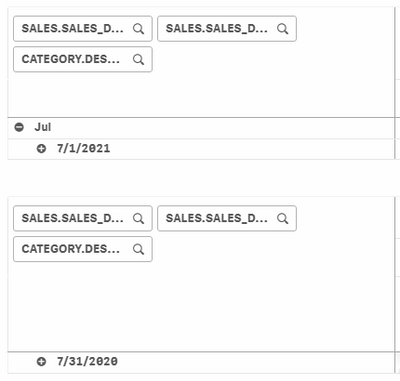
But when I select SALES.fYear2 = 2021 and SALES.Month = Jul, it always showing the whole month of last year sales.
I only want to show the last year date same as selected year, not the whole month of last year.