Unlock a world of possibilities! Login now and discover the exclusive benefits awaiting you.

- Qlik Community
- :
- Forums
- :
- Analytics & AI
- :
- Products & Topics
- :
- App Development
- :
- How to show hyper link for a field in Qlik Sense T...
- Subscribe to RSS Feed
- Mark Topic as New
- Mark Topic as Read
- Float this Topic for Current User
- Bookmark
- Subscribe
- Mute
- Printer Friendly Page

- Mark as New
- Bookmark
- Subscribe
- Mute
- Subscribe to RSS Feed
- Permalink
- Report Inappropriate Content
How to show hyper link for a field in Qlik Sense Table
Hi Folks,
I have a Table, i need to apply hyper link for one of the field (integer).
Sub2u444
- Mark as New
- Bookmark
- Subscribe
- Mute
- Subscribe to RSS Feed
- Permalink
- Report Inappropriate Content
Hi,
i am new to qlik sense. I have no idea how to create extension.
can i use the above code in expr?
Thanks for your reply.
SUb2u444

 reddy-s
- Mark as New
- Bookmark
- Subscribe
- Mute
- Subscribe to RSS Feed
- Permalink
- Report Inappropriate Content
Hi Subba Reddy,
I am sorry if I was not clear. You cannot use this in an expression. This cab be used in an extension object in the Javascript file.
Thanks,
Sangram.
- Mark as New
- Bookmark
- Subscribe
- Mute
- Subscribe to RSS Feed
- Permalink
- Report Inappropriate Content
reddy-s
- Mark as New
- Bookmark
- Subscribe
- Mute
- Subscribe to RSS Feed
- Permalink
- Report Inappropriate Content
No Problem at all! 
- Mark as New
- Bookmark
- Subscribe
- Mute
- Subscribe to RSS Feed
- Permalink
- Report Inappropriate Content
Hi Sangram,
can you the expr, i am not getting he correct color....

 Chanty4u
- Mark as New
- Bookmark
- Subscribe
- Mute
- Subscribe to RSS Feed
- Permalink
- Report Inappropriate Content
r u getting expression error? if yes i think u missed one closing brace at the end.
if not
try with original RGB() values for Green() and Red()
- Mark as New
- Bookmark
- Subscribe
- Mute
- Subscribe to RSS Feed
- Permalink
- Report Inappropriate Content
so can you share the values for Green and Red..?
i have not getting for above expr, but it was showing expected the color ..
Chanty4u
- Mark as New
- Bookmark
- Subscribe
- Mute
- Subscribe to RSS Feed
- Permalink
- Report Inappropriate Content
based on ur metrics...u can chk RGB values like below try this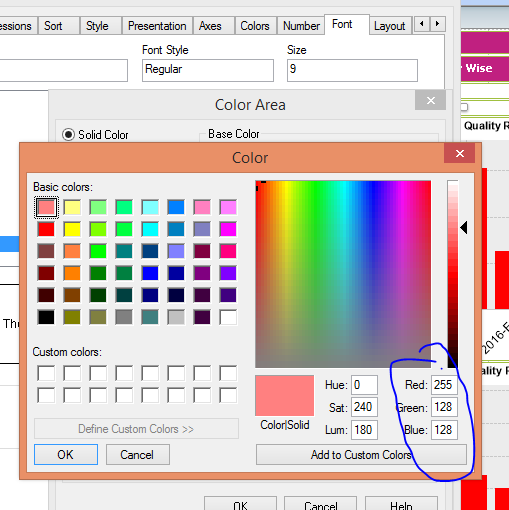
- Mark as New
- Bookmark
- Subscribe
- Mute
- Subscribe to RSS Feed
- Permalink
- Report Inappropriate Content
I am sorry, i am using QliSense. Here there is no option to select.
reddy-s
- Mark as New
- Bookmark
- Subscribe
- Mute
- Subscribe to RSS Feed
- Permalink
- Report Inappropriate Content
Hi Subba Reddy,
What Chunty suggested will work even in qliksense. Just make use of the rgb() function like this:
Taking the rgb values from the above screen shot:
use this as the colour code: rgb(255,128,128) this should give you a solid red colour