Unlock a world of possibilities! Login now and discover the exclusive benefits awaiting you.

- Qlik Community
- :
- Forums
- :
- Analytics & AI
- :
- Products & Topics
- :
- App Development
- :
- How to use aggr() function with max date
- Subscribe to RSS Feed
- Mark Topic as New
- Mark Topic as Read
- Float this Topic for Current User
- Bookmark
- Subscribe
- Mute
- Printer Friendly Page

 Stevendf
- Mark as New
- Bookmark
- Subscribe
- Mute
- Subscribe to RSS Feed
- Permalink
- Report Inappropriate Content
How to use aggr() function with max date
I am new to Qlik Sense and have a simple problem that I couldn´t find any answers that fit my case:
I have a table like this:
| Date_Sales | Value |
| 31/01/2019 | 10 |
| 31/01/2019 | 20 |
| 31/01/2019 | 30 |
| 28/02/2019 | 20 |
| 28/02/2019 | 30 |
| 28/02/2019 | 40 |
| 31/03/2019 | 15 |
| 31/03/2019 | 25 |
| 31/03/2019 | 35 |
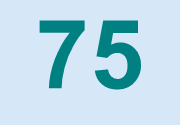
I want to show in a KPI the sum of sales of the last date. In this case, last date is 31/03/2019 and the sum is 75.
The function that I came up was "=Max(aggr(sum([Value]),[Date_Sales.autoCalendar.YearMonth]))", but it´s, obviously incorrect, and only shows me the sum of the date 28/02/2019, which is 90 (max of the 3).
Any help for this? Sorry if it´s too simple. I started working on Qlik Sense this week and couldn´t find anything that helped me.
Thanks
Accepted Solutions

 dplr-rn
- Mark as New
- Bookmark
- Subscribe
- Mute
- Subscribe to RSS Feed
- Permalink
- Report Inappropriate Content
Sum({<Date_Sales={'$(=Max(Date_Sales))'}>}Value)

 Vegar
Vegar
- Mark as New
- Bookmark
- Subscribe
- Mute
- Subscribe to RSS Feed
- Permalink
- Report Inappropriate Content
 RawData:
load date#(Date_Sales, 'DD/MM/YYYY') as Date_Sales,
Value as Value
inline [
Date_Sales, Value
31/01/2019,10
31/01/2019,20
31/01/2019,30
28/02/2019,20
28/02/2019,30
28/02/2019,40
31/03/2019,15
31/03/2019,25
31/03/2019,35
];
RawData:
load  date#(Date_Sales, 'DD/MM/YYYY') as Date_Sales,
Value as Value
inline [
Date_Sales,	Value
31/01/2019,10
31/01/2019,20
31/01/2019,30
28/02/2019,20
28/02/2019,30
28/02/2019,40
31/03/2019,15
31/03/2019,25
31/03/2019,35
];
With the script above you could use the following expression to get your 75.
=Sum({<Date_Sales = {"$(=Maxstring(Date_Sales))"}>}Value)
Qlik Community MVP
dplr-rn
- Mark as New
- Bookmark
- Subscribe
- Mute
- Subscribe to RSS Feed
- Permalink
- Report Inappropriate Content
Sum({<Date_Sales={'$(=Max(Date_Sales))'}>}Value)
Stevendf
- Mark as New
- Bookmark
- Subscribe
- Mute
- Subscribe to RSS Feed
- Permalink
- Report Inappropriate Content
It worked perfectly. Thank you so much.
