Unlock a world of possibilities! Login now and discover the exclusive benefits awaiting you.

- Qlik Community
- :
- Forums
- :
- Analytics & AI
- :
- Products & Topics
- :
- App Development
- :
- JSON POST Request - 415 Error
- Subscribe to RSS Feed
- Mark Topic as New
- Mark Topic as Read
- Float this Topic for Current User
- Bookmark
- Subscribe
- Mute
- Printer Friendly Page

 pumpkin_power
- Mark as New
- Bookmark
- Subscribe
- Mute
- Subscribe to RSS Feed
- Permalink
- Report Inappropriate Content
JSON POST Request - 415 Error
Hi,
I use Qlik Sense Sep 17 and want to set up a Connection to a REST API.
I managed GET requests to it but I allways get the same error with the POST request.
The Parameters I set in the query are right, this I tested in the playground of the API. But the same query doesnt work from Qlik.
It is this URL: https://api.e-control.at/rc/1.0/products/power/rate
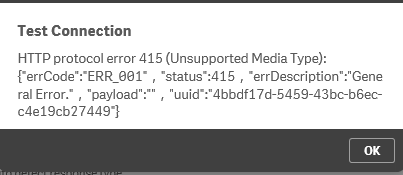
I tried this query in the Request Body field in Qlik and via the Query Parameters, but both gave the error 415 unsupported media type:
{
"comparisonOptions": {
"additionalProductAssociationId": 0,
"additionalProductId": 0,
"brandId": 0,
"feedInProductAssociationId": 0,
"feedInProductId": 0,
"mainProductAssociationId": 0,
"mainProductId": 0,
"productName": ""
},
"customerGroup": "HOME",
"energyType": "POWER",
"feedInRequestOptions": {
"energyOutput": 0,
"feedIn": 0,
"nominalPower": 0,
"smartMeterRequestOptions": {}
},
"firstMeterOptions": {
"consumptionType": "NORM_POWER_STANDARD",
"energyOutput": 0,
"highConsumption": 0,
"loadprofile": "H0",
"lowConsumption": 0,
"productType": "MAIN",
"rateZoningType": "STANDARD",
"smartMeterRequestOptions": {},
"standardConsumption": "3050.00",
"summerConsumption": 0,
"summerHighConsumption": 0,
"summerLowConsumption": 0,
"winterConsumption": 0,
"winterHighConsumption": 0,
"winterLowConsumption": 0
},
"gridAreaId": "51",
"gridOperatorId": "14651",
"includeFeedInOptions": false,
"includeSwitchingDiscounts": true,
"membership": 0,
"moveHome": true,
"priceView": "EUR_PER_YEAR",
"rcSearchMode": "STANDARD",
"referencePeriod": "ONE_YEAR",
"requirements": [],
"supplierId": 0,
"zipCode": "8010"}
Does anyone know how to fix this?
Accepted Solutions

 thkarner
- Mark as New
- Bookmark
- Subscribe
- Mute
- Subscribe to RSS Feed
- Permalink
- Report Inappropriate Content
The message "unsupported media type" could be avoided (in this case) by providing query header parameters
Content-Type
application/json; charset=UTF-8
Furthermore you should use the latest REST Connector 1.20.
BR Thomas 🙂
PS: Please mark this post as helpful / solved if applicable
thkarner
- Mark as New
- Bookmark
- Subscribe
- Mute
- Subscribe to RSS Feed
- Permalink
- Report Inappropriate Content
The message "unsupported media type" could be avoided (in this case) by providing query header parameters
Content-Type
application/json; charset=UTF-8
Furthermore you should use the latest REST Connector 1.20.
BR Thomas 🙂
PS: Please mark this post as helpful / solved if applicable
