Unlock a world of possibilities! Login now and discover the exclusive benefits awaiting you.

- Qlik Community
- :
- Forums
- :
- Analytics & AI
- :
- Products & Topics
- :
- App Development
- :
- Re: Line break in text box?
- Subscribe to RSS Feed
- Mark Topic as New
- Mark Topic as Read
- Float this Topic for Current User
- Bookmark
- Subscribe
- Mute
- Printer Friendly Page

 sjb34300
- Mark as New
- Bookmark
- Subscribe
- Mute
- Subscribe to RSS Feed
- Permalink
- Report Inappropriate Content
Line break in text box?
I want to add a line break in a text box in Qlik Sense. Any ideas how to do that? The text box doesn't seem to respect html or ascii. It just shows that code as text.
- « Previous Replies
-
- 1
- 2
- Next Replies »
 mhoudas78
- Mark as New
- Bookmark
- Subscribe
- Mute
- Subscribe to RSS Feed
- Permalink
- Report Inappropriate Content
Chr(10) or chr(13) don't work.
there is a limitation and the answear is not the reponsible design
 smgt90
- Mark as New
- Bookmark
- Subscribe
- Mute
- Subscribe to RSS Feed
- Permalink
- Report Inappropriate Content
char(10) was what worked for me
 krzohi
- Mark as New
- Bookmark
- Subscribe
- Mute
- Subscribe to RSS Feed
- Permalink
- Report Inappropriate Content
For me also none of those proposals work..
This issue is from 2015 and now is almost 2022 for gods sake!!!
Qlik WAKE UP!!!!

 SrikarSiddarth
- Mark as New
- Bookmark
- Subscribe
- Mute
- Subscribe to RSS Feed
- Permalink
- Report Inappropriate Content
Hi,
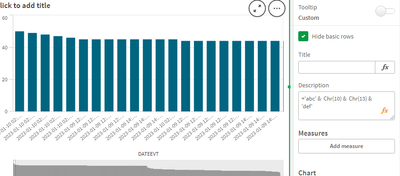
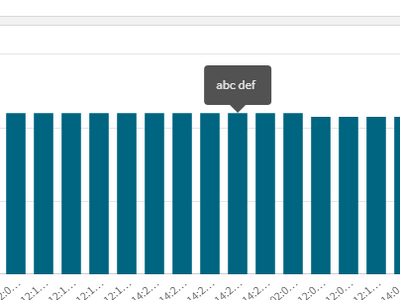
For all users using Qlik on Windows, we need to add both \r\n (carriage return and newline characters) to obtain a new line.
Thus we need to add both chr(10) & chr(13) in the same order. For example:
='abc' & Chr(10) & Chr(13) & 'def'
source: https://community.qlik.com/t5/New-to-Qlik-Sense/Line-Break-in-Label/td-p/107737
krzohi
- Mark as New
- Bookmark
- Subscribe
- Mute
- Subscribe to RSS Feed
- Permalink
- Report Inappropriate Content
Hi,
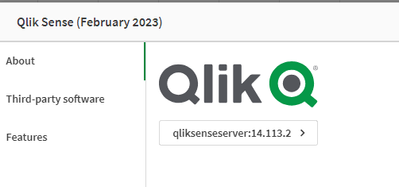
this solution doesn't wotk

 Ken_T
Ken_T
- Mark as New
- Bookmark
- Subscribe
- Mute
- Subscribe to RSS Feed
- Permalink
- Report Inappropriate Content
in the SAAS products I do not see any way to get to the expression fx button for the TEXT in the text chart. can only edit it in the GRID using the built in editor. so, I cant see a way to do what this post recommends. if anyone knows how to do it in SAAS or QCG using the newest TEXT chart, please share a screenshot

 N30fyte
- Mark as New
- Bookmark
- Subscribe
- Mute
- Subscribe to RSS Feed
- Permalink
- Report Inappropriate Content

Click fx to the right of the input box.


- « Previous Replies
-
- 1
- 2
- Next Replies »