Unlock a world of possibilities! Login now and discover the exclusive benefits awaiting you.

- Qlik Community
- :
- Forums
- :
- Analytics & AI
- :
- Products & Topics
- :
- App Development
- :
- Loan Amortization Schedule
- Subscribe to RSS Feed
- Mark Topic as New
- Mark Topic as Read
- Float this Topic for Current User
- Bookmark
- Subscribe
- Mute
- Printer Friendly Page

 GhazanfarAli
- Mark as New
- Bookmark
- Subscribe
- Mute
- Subscribe to RSS Feed
- Permalink
- Report Inappropriate Content
Loan Amortization Schedule
Hi all!
I have recently started working on Qlikview so have less knowledge about it. The task I am trying to achieve is calculate the Loan Amortization Schedule using the while loop but could able to do that.
I have following input table(qvd)

I want Loan Amortization Schedule to be calculate in qvs using the Qvd I have up pasted meaning I want separate table for the Payment plan based on this inputs.
the desired result show be like that, this picture is random loan calculation
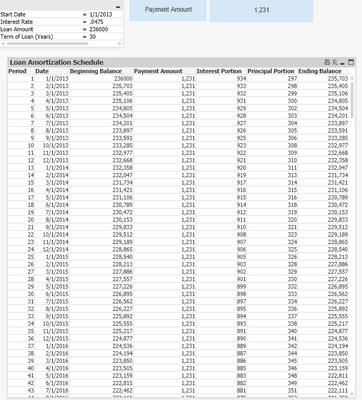
will greatfull if somebody can help.

 chrismarlow
- Mark as New
- Bookmark
- Subscribe
- Mute
- Subscribe to RSS Feed
- Permalink
- Report Inappropriate Content
GhazanfarAli
- Mark as New
- Bookmark
- Subscribe
- Mute
- Subscribe to RSS Feed
- Permalink
- Report Inappropriate Content
Hi Chris!
Thanks Buddy for the quick replay!
what I am after is to create the payment plan in qvs instead creating Set Expression formulas. By the way I have see the link already but it does not help much unless giving idea how calculations working.
as I said I have been struggling with while loop to create line by line future payment plan.
I would be grateful if you can help me with creating payment plan using scripts in Load statement.
/Ghazanfar
chrismarlow
- Mark as New
- Bookmark
- Subscribe
- Mute
- Subscribe to RSS Feed
- Permalink
- Report Inappropriate Content
Hi,
This might be a start, for each loan you could use something similar to below, which is a script equivalent of your second screenshot, it would need some work to loop through your loans though & attach dates ... your input table looks like it has loans with mid-month end dates, so not sure if you need something more sophisticated though.
Cheers,
Chris.
let rate=0.049/12;
let nper=20;
let pv=5000;

payments:
Load
	[Payment Amount]-[Interest Portion] As [Principal Portion],
	*;
Load
	If(ID=1,
		$(pv),
		peek('Ending Balance')
		) as [Beginning Balance],
	If(ID=1,
		($(pv)*(1+$(rate)))-[Payment Amount],
		peek('Ending Balance')*(1+$(rate))-[Payment Amount]
		) as [Ending Balance],
	If(ID=1,
		$(pv)*$(rate),
		peek('Ending Balance')*$(rate)
		) as [Interest Portion],
	*;
Load
	RecNo() as ID,
	fabs(num(Pmt($(rate), $(nper), $(pv)))) as [Payment Amount]
AutoGenerate ($(nper));
 AlexJoe
- Mark as New
- Bookmark
- Subscribe
- Mute
- Subscribe to RSS Feed
- Permalink
- Report Inappropriate Content
Yes, I'm familiar with that kind of graph. To make things easier, you can use programs that automatically calculate everything for you. All you have to do is enter the necessary numbers and watch the result. You will also be able to convert the graphs as needed. I think it's pretty handy, so you should try it. But it is worth consulting an expert for those who are still new to the subject. Personally, it was vital for me to address a few critical documentary issues, and Mortgage Broker Coventry helped me with that. Maybe you will find it helpful too. You can also ask any questions you may have.
 RandallChristop
- Mark as New
- Bookmark
- Subscribe
- Mute
- Subscribe to RSS Feed
- Permalink
- Report Inappropriate Content
The best you can do is to find an automatized program that will do the math for you. It will make things much easier. But even though online tools are helpful, when it comes to loans I prefer to seek professional advice. So just to make sure you won't make it wrong, I suggest consulting an expert. Find a company with good reviews, such as Mortgage Advisor Derby, and address your critical documentary issues. I hope my advice will be helpful, and you'll manage to fulfill the task and convert your graph.
 Radagask
- Mark as New
- Bookmark
- Subscribe
- Mute
- Subscribe to RSS Feed
- Permalink
- Report Inappropriate Content
You can look on the Internet for ready-made codes that will automatically display the amount of payments. Many banks offer a calculation function, you enter the amount and term of repayment and the site automatically calculates the monthly payment. The code is in the public domain. But sometimes the data on the site can be inaccurate. When I took out a mortgage to buy a house, the site said my monthly payment would be $1,500. These Mortgage Advisor Leicester guys helped me get the same amount for the same term and my monthly payment was only $1,350.
 ChadGregory
- Mark as New
- Bookmark
- Subscribe
- Mute
- Subscribe to RSS Feed
- Permalink
- Report Inappropriate Content
Start with the principal amount, interest rate, and loan term. Then, use the loop to calculate each installment, reducing the principal each time. As for your input table (qvd), make sure it contains all the necessary data like principal, interest rate, and loan term. If you're still having trouble, don't hesitate to ask for help on Qlikview forums or communities. Folks there can often provide code snippets and guidance to get you on the right track. And if you ever need financial advice, I usually consult with Mortgage Broker Chelmsford. They're pros when it comes to money matters.
 prosperusfundin
- Mark as New
- Bookmark
- Subscribe
- Mute
- Subscribe to RSS Feed
- Permalink
- Report Inappropriate Content
Welcome to the world of QlikView — great to see you experimenting with something practical like a Loan Amortization Schedule. It’s definitely doable using a WHILE loop or the IterNo() and RecNo() functions within a resident load.
If you’re also exploring how real-world loan repayment structures work (like short-term or bridging loans), you can check out some examples at Prosperus Funding, where they explain how structured loan schedules are used for projects and property finance.
🧩 Step 1: Load Your Input Table
Assume your QVD contains fields like:
LoanID, Principal, Rate, Term, StartDate
Load it first:
Loans:
LOAD
    LoanID,
    Principal,
    Rate,
    Term,
    StartDate
FROM [YourLoanFile.qvd] (qvd);
⚙️ Step 2: Generate the Amortization Schedule
You can now use a While loop in a resident load to generate a new table for the payment plan.
LoanSchedule:
LOAD
    LoanID,
    StartDate + (IterNo()-1) * 30 AS PaymentDate, // assuming monthly payments
    IterNo() AS PaymentNumber,
    Rate/12 AS MonthlyRate,
    Principal AS OpeningBalance,
    (Principal * (Rate/12) * (Pow(1 + Rate/12, Term))) / (Pow(1 + Rate/12, Term) - 1) AS EMI,
    (Principal * (Rate/12) * (Pow(1 + Rate/12, Term))) / (Pow(1 + Rate/12, Term) - 1)
        - (Principal * (Rate/12)) AS PrincipalComponent,
    (Principal * (Rate/12)) AS InterestComponent
Resident Loans
While IterNo() <= Term;
📊 Step 3: Calculate Remaining Balance (Optional)
If you want to compute Remaining Balance, you can do it using Peek() or in a subsequent load:
FinalSchedule:
LOAD
    LoanID,
    PaymentNumber,
    PaymentDate,
    EMI,
    InterestComponent,
    PrincipalComponent,
    (Peek('OpeningBalance') - PrincipalComponent) AS RemainingBalance
Resident LoanSchedule
Order By LoanID, PaymentNumber;
✅ Tips:
-
Always check if your Term is in months or years — adjust accordingly.
-
You can replace
30with actual calendar logic if your payments aren’t strictly monthly. -
To debug your While loop, try a smaller
Term(like 3 or 6 months) first.
If you’re comparing how financial schedules apply to property funding, here’s a real-world case reference: Certified Residential Bridging Loans — it shows how similar amortization logic is used in professional short-term finance planning.
📘 Bonus:
There’s a great discussion on Qlik Community about iterative loads with amortization schedules:
https://community.qlik.com/ — just search for Loan Amortization using While Loop.
