Unlock a world of possibilities! Login now and discover the exclusive benefits awaiting you.

- Qlik Community
- :
- Forums
- :
- Analytics & AI
- :
- Products & Topics
- :
- App Development
- :
- Re: Median QlikSense
- Subscribe to RSS Feed
- Mark Topic as New
- Mark Topic as Read
- Float this Topic for Current User
- Bookmark
- Subscribe
- Mute
- Printer Friendly Page

 arvindjha2050
- Mark as New
- Bookmark
- Subscribe
- Mute
- Subscribe to RSS Feed
- Permalink
- Report Inappropriate Content
Median QlikSense
Hello all,
Below is sample code :
Test :
Load * Inline
[
Year,Region,Values
2018,India,10
2018,SriLanka,20
2018,Australia,32
2019,India,12
2019,SriLanka,15
];
I create a line chart :
Dimension :Year
Measure : Median(Values)
Output is : Year 2018 - 20 ;Year 2019 - 13.5
But i want output like this :
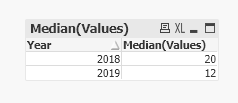
Output is : Year 2018 - 20 ;Year 2019 - 12
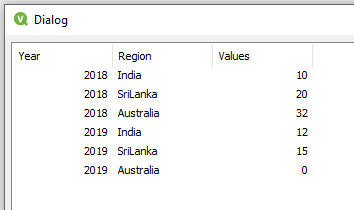
The logic should be even though for 2019 we don't have value for Australia we want to consider that in median calculation with zero assigned to it , so after sorting it should be Median of values : 0,12,15 which should be equal to 12.
- Tags:
- chart
Accepted Solutions

 tresB
tresB
- Mark as New
- Bookmark
- Subscribe
- Mute
- Subscribe to RSS Feed
- Permalink
- Report Inappropriate Content
You have to populate your sparsely populated data correctly for that to work.
A sample code to wards that would be like:
t1:
Load * Inline
[
Year,Region,Values
2018,India,10
2018,SriLanka,20
2018,Australia,32
2019,India,12
2019,SriLanka,15
];

t2:
Load Distinct Region Resident t1;
Join (t2)
Load Distinct Year Resident t1;

Left Join (t2)
load * Resident t1;

Drop Table t1;

NULLASVALUE Values;
Set NullValue='0';
NoConcatenate
t3:
Load * Resident t2;
Drop	Table t2;
 tresB
tresB
- Mark as New
- Bookmark
- Subscribe
- Mute
- Subscribe to RSS Feed
- Permalink
- Report Inappropriate Content
You have to populate your sparsely populated data correctly for that to work.
A sample code to wards that would be like:
t1:
Load * Inline
[
Year,Region,Values
2018,India,10
2018,SriLanka,20
2018,Australia,32
2019,India,12
2019,SriLanka,15
];

t2:
Load Distinct Region Resident t1;
Join (t2)
Load Distinct Year Resident t1;

Left Join (t2)
load * Resident t1;

Drop Table t1;

NULLASVALUE Values;
Set NullValue='0';
NoConcatenate
t3:
Load * Resident t2;
Drop	Table t2;
arvindjha2050
- Mark as New
- Bookmark
- Subscribe
- Mute
- Subscribe to RSS Feed
- Permalink
- Report Inappropriate Content
Thanks a lot.
Can we do the same based on count of distinct values of Country?
For example
t1:
Load * Inline
[
Year,Region,Values
2018,India,10
2018,SriLanka,20
2018,Australia,32
2019,India,10
2019,SriLanka,15
2019,SriLanka,20
];
Here for 2019 , count for India is 1 , SriLanka is 2 and Australia is zero, hence median of 0, 1 and 2 which will be 1.
tresB
- Mark as New
- Bookmark
- Subscribe
- Mute
- Subscribe to RSS Feed
- Permalink
- Report Inappropriate Content
Try:
Median(Aggr(Count(Region), Year, Region))
arvindjha2050
- Mark as New
- Bookmark
- Subscribe
- Mute
- Subscribe to RSS Feed
- Permalink
- Report Inappropriate Content
Hello ,
Thanks a lot.
I have another scenario :
t1:
Load * Inline
[
Year,Region,Impact
2018,India,Low
2018,SriLanka,Low
2018,Australia,Significant
2018,Japan,Low
2019,India,Low
2019,SriLanka,Low
2019,SriLanka,Significant
2019,India,Medium
2019,Australia,Low
2019,India,Significant
2019,UK,Significant
2019,UK,Low
];
Here we need to consider the same year and also Impact equal to Significant
For example in 2018 it will be,
India = 0
Sri Lanka = 0
Australia - 1
Japan - 0
Median will be zero
In 2019,
India - 1 (Impact is equal to Significant in one case)
SriLanka - 1 (Impact is equal to Significant in one case)
Australia - 0 (Impact is equal to Significant in zero case)
UK - 1 (Impact is equal to Significant in one case)
Median for 0,1,1,1 which is 1
