Unlock a world of possibilities! Login now and discover the exclusive benefits awaiting you.

- Qlik Community
- :
- Forums
- :
- Analytics & AI
- :
- Products & Topics
- :
- App Development
- :
- Min, Max(Datum) in expression, without variables
- Subscribe to RSS Feed
- Mark Topic as New
- Mark Topic as Read
- Float this Topic for Current User
- Bookmark
- Subscribe
- Mute
- Printer Friendly Page

 adlisval
- Mark as New
- Bookmark
- Subscribe
- Mute
- Subscribe to RSS Feed
- Permalink
- Report Inappropriate Content
Min, Max(Datum) in expression, without variables
I have in my scripts an expression with variables, which gives wrong results and I want to rewrite it without variables, but I don't know how to write the MIN and Max of Datum, to obtain the results I need.
In the following example I'll explain what I need from MIN and MAX of Datum. As can be seen in the image bellow, the "min Datum" and "max Datum" are calculated for each row, which is NOT what I need. What I need is to have on each row the MIN and MAX of the selected Datum range. So in this case, the dates highlighted in yellow.
Question 1: How do I write that?
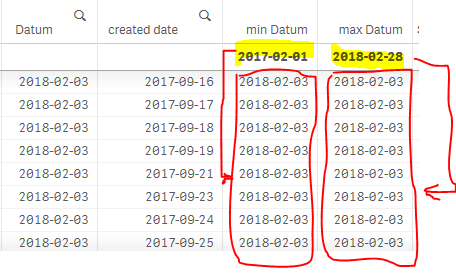
Question 2: How do I write the new expression, based on the answer to question 1?
Here are the variables and the expression (to be replaced):
Variables to replace:
| LET vDateStart | = '=Num(Min({'& chr(36)& '<%flagDisplay={1}>}Datum))'; |
| LET vDateEnd | = '=Num(Max({'& chr(36)& '<%flagDisplay={1}>}Datum))'; |
Variable to keep:
| SET setActuals | = '{$<%flagDisplay={1}>}'; |
Expression to rewrite without the variables vDateStart and vDateEnd:
| LET mNewCCount | = 'SUM(' & Chr(36) & '(setActuals) IF([created_date] >= ' & Chr(36) & '(vDateStart) AND [created_date] <= ' & Chr(36) & '(vDateEnd), c_distinct_count))'; |
And here is the NEW expression, without variables (but I don't know how to write the MIN and Max of Datum, to obtain the results I need):
=SUM($(setActuals) IF(num([created_date]) >= num(Min(Datum)) AND num([created_date]) <= num(Max(Datum)), c_distinct_count))
