Unlock a world of possibilities! Login now and discover the exclusive benefits awaiting you.

- Qlik Community
- :
- Forums
- :
- Analytics & AI
- :
- Products & Topics
- :
- App Development
- :
- Multiple colors in Pivot cell turning white
- Subscribe to RSS Feed
- Mark Topic as New
- Mark Topic as Read
- Float this Topic for Current User
- Bookmark
- Subscribe
- Mute
- Printer Friendly Page

 Keitaru
- Mark as New
- Bookmark
- Subscribe
- Mute
- Subscribe to RSS Feed
- Permalink
- Report Inappropriate Content
Multiple colors in Pivot cell turning white
Hi Qliksense Experts and developers,
I have an issue with Pivot table color where cells turn white with an occurrence of multiple colors instances taking place in example a particular month. I'm trying to assign another color value to cell if there happens to be more than 1 color occurrence in that particular cell where Horizontal axis is by Months as show in the screenshot.
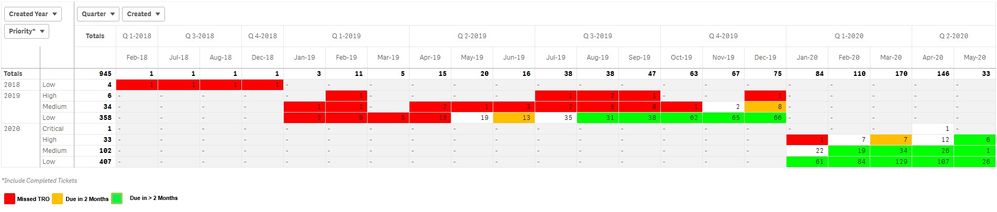
Color expression i used below for the above is:
if(Dimensionality()<>0 and secondaryDimensionality()<>0,
pick(match([TRO Due],'Missed TRO','TRO Due in 2 Mnths','TRO Due > 2 Mnths'),lightred(),rgb(255,190,0),lightgreen()))
The white background cells occur when the cell has more than 2 values. I'm looking to assign other colors to the cell if they are 2 or more values in the mix.
Accepted Solutions

- Mark as New
- Bookmark
- Subscribe
- Mute
- Subscribe to RSS Feed
- Permalink
- Report Inappropriate Content
Hi Keitaru,
Try this
if(Dimensionality()<>0 and secondaryDimensionality()<>0,
pick(wildmatch( CONCAT(DISTINCT [TRO Due],' ') ,'Missed TRO','TRO Due in 2 Mnths','TRO Due > 2 Mnths','*'),lightred(),rgb(255,190,0),lightgreen()),lightblue())
Hope it helps,
Sergey
- Mark as New
- Bookmark
- Subscribe
- Mute
- Subscribe to RSS Feed
- Permalink
- Report Inappropriate Content
Hi Keitaru,
Try this
if(Dimensionality()<>0 and secondaryDimensionality()<>0,
pick(wildmatch( CONCAT(DISTINCT [TRO Due],' ') ,'Missed TRO','TRO Due in 2 Mnths','TRO Due > 2 Mnths','*'),lightred(),rgb(255,190,0),lightgreen()),lightblue())
Hope it helps,
Sergey